Showing posts with label Facebook. Show all posts

Saturday

Facebook plans to add MSQRD Selfie Filters functionality in News Feed

If you are familiar with the MSQRD video filter app for smartphones, then what I'm about to say won't be too strange to you. If you aren't, let me tell you a bit about the MSQRD app.

MSQRD, whose actual nae is Masquerade but was styled to that probably due to its scary nature, is a filter app for selfies and videos, which allows (or allowed) users to add filters and lenses to selfies and videos they took. The app was still in its start-up stages when it was acquired by Facebook for about $117 Million in March.

Until recently, nothing was heard of the app, and none of its features were seen integrated into Facebook platforms. Now, Facebook is testing a new feature that puts a camera at the top of News Feed and allows Facebook users to add filters to their selfies. The feature is similar to the selfie filter in Snapchat, and from reports of testers, the feature will have to be enabled by tapping on the camera button, after which it will be enabled automatically each time the Facebook app is started.


Though the feature is available for the Facebook app for iOS and Android, it is currently open for testing by iOS users in Brazil and users of both platforms in Canada only. The feature offers filters and face-altering lenses that can be applied as overlay on top of pictures and selfies, just like that in Snapchat. Users in Brazil and Canada already have the ability to apply Olympics-themed filters to their pictures and post them directly to their Facebook profiles.

When the feature rolls out officially, it would only be available for the Facebook application for Android and iOS, though, and is likely not to be accessible on the web-based platform.

Friday

Facebook Messenger Tricks #1: How To Play Soccer Game

For most of us, Facebook Messenger is simply an app used to chat with friends on Facebook and the web generally. However, like almost everything concerning Android, Facebook Messenger has so many hidden features, among which is the ability to play mini games, which I'm going to talk about. Currently, there are three (3) different types of games you can play on Facebook Messenger: Soccer, Basketball, and Chess.
Today, I'm going to show you how to play the hidden soccer game on Facebook Messenger.

How To Play Soccer Game on Facebook Messenger 2016

New games are often added and removed to the Fb Messenger app with every version update that coincides with a special event in the world in general. The current soccer game in Facebook Messenger was added in honor of the ongoing UEFA European Championships. Follow the following easy steps to play the new hidden soccer game on Facebook Messenger today.

1. Firstly, you have to update your Facebook Messenger app to the latest version on the Google Play store.

Ensure you update the app if you haven't. This is important because the soccer game was added to the app in the last update, which was made on the 5th of this month.


3. After updating the app, tap on the app icon in the app drawer to launch it.


4. On the 'conversations' screen, tap on any chat, as if you want to send a message to a contact.

5. Tap on the emoji button.


6. Navigate to the emoji group with the soccer icon above it.


7. Click on the first emoji, the soccer emoji and send it as a message.


8. Once the message is sent, click on the sent soccer emoji and you'll be taken to the Facebook Messenger Soccer Game Screen!

9. Tap on the soccer ball to start playing.


10. Keep tapping the soccer ball to keep it in the air and gain more points.


The game is hard to play and could be quite challenging for first-time players. My highest score as you can see in the screenshots above is 7 :-) till date. There are other hidden games in Facebook Messenger, at least two others that I know about. I'm going to be bringing them to you in the next parts of this article. Watch out!

Tuesday

Facebook Makes Username changes Unlimited

Social Media giant, Facebook had recently made some updates to Profile usernames. It was initially limited, you were allowed to change your username just twice after creating your Facebook Profile, but now you can change your Facebook username many times as possible.
This is similarly done and had  always been an available feature at Twitter and Instagram where users can freely change their usernames as many times as they like.


Facebook had also integrated the @username on Facebook pages. If you had always desired to change your username, you now have an unlimited opportunity to do so on Facebook.

Integrate and Show Facebook Audience Network Ads on WordPress & Blogger blogs [ Web/Mobile version ]

In this post, we will show you how to apply, integrate or use Facebook FAN Ads (Facebook audience network) on your Blogger and WordPress blogs or web apps. With this feature, you'll be able to display and earn with Facebook ads on your WordPress and Blogger blogs. This stuff works on WordPress sites too, using a bit of a different method.

Facebook Audience Network (FAN) has been around for a couple of months now and there seems to be positive progress for publishers using it, especially those who receive tons of traffic to their Apps or Mobile sites.

The aim of the network is to help publishers earn money from their App and Mobile sites (blogs) they run just like we have other Publisher networks (e.g: Google AdSense, Media.NET etc), the only difference with Facebook Audience Network "at the moment" is, the Program is ONLY for Mobile Apps and mobile sites.


If you're wondering if you can use FAN ads on a Blogger blog, the answer is, sure, YES YOU CAN. I had given it a try and I'll show you how to Integrate it into your Blogger blogs using the steps below.

We all are aware that all Blogger's sites mobile version is found at this URL ==> www. example . com.html?m=1 
 Or for example : www.editweaks.com.html?m=1

This URL, along with your device and browser details are what tells Facebook that a User is viewing your site on Mobile, hence make them display F.A.N ads.

There are only 4 simple phases you have to pass to Set it up.
1. Register for a Facebook Developer account
2. Apply with your mobile site or App for Monetisation
3. Integrate the script into your mobile site (Blog)
4. Get Approved, Go Live and start earning from it.

Details:

1. Register on FB Developers if you haven't already
Use your Facebook profile to Register a Facebook developer account here and Add your website URL in "ADD New App." Read more about setting up your App on this page

2. Get Started with an App 
Once you've created and Added App from Step 1, take note of your APP ID, we'll be making use of that later.
Now, head go to Facebook Audience network page, click START NOW.
Select the App you created for your Website, next, we will use the app and website to Apply for FAN ads. That page will also take you through all the steps to Create Advert Placement which you'll apply on your blog (mobile site) later.

3. Getting Approved, 
You have to integrate the codes you're given into your website. The codes come in 2 pairs which you'll integrate into your Blogger template.
Go to your Blogger Settings >> Template >> Edit Template HTML.
look for <head>
Just below it, Paste these lines of code (where you see APP ID, replace it with your App ID number you copied in step 2.)

<script id='facebook-jssdk' src='//connect.facebook.net/en_US/sdk/xfbml.ad.js#xfbml=1&amp;version=v2.5&amp;appId=APP ID NUMBER HERE'/>

Now hit Save.

4. Go Live 
Again, Go back to your Blogger settings >> Layout >> Add gadget >> JavaScript/HTML >> Paste the code given to you after you created ad placement in 2nd Step above.
In the ad code you'll find something like this ===>  testmode="false"
You can turn that to "true" so that Facebook is aware you're trying or testing it out to Get Approved for FAN ads.

Now, Hit Save and exercise some patience, it may take days or a Week but you should Get an Alert and Mail from Facebook once you're Approved.

Facebook Audience Network Ads for Blogger blogs


After then you can set back your FAN Ad code to testmode="false"

Facebook F8 Meetup in Lagos (Hosted by CCHub)

Facebook Developers Conference known as F8 has finally been brought into Lagos, Nigeria by Co-Creation Hub (CCHub). The F8 Meet up comprises mainly of Developers and people who are building or would want to build tools & solutions with or around the biggest Social Media platform, Facebook.


In the previous Years, Facebook's F8 conference were held in other continents, North America, Asia, Europe, Latin America and now added to the list is Lagos being among the first cities to Host it for the very first time in Africa.

The Meet up is in an effort to bring developers from all over the world key content and announcements being shared at F8. Facebook is holding 27 meetups all over the world to coincide with the event happening live in San Francisco on April 12.

ALSO READ: How Social Media Can Impact Your Businesses For More Profit

Each meetup will feature a live stream of the opening day keynote and time to connect with the local developer community.

Date: 12th of April, 2016

Time: 5.30 PM to 8.00 PM (WAT)

Venue: Co-Creation Hub (CcHUB), 294, Herbert Macaulay Way, Yaba, Lagos, Nigeria

If you can't attend for some reason, GO HERE and sign up, so you can watch all for free, the keynotes and selected sessions that will be live streamed online. There will also be bonus content available online, such as exclusive interviews and behind the scenes footage of F8.

Wednesday

Adding Friends to Groups without their Consent, the Worst Facebook feature Ever!

Having been on the Social Network for over 4 years, I mean I love Facebook but this is probably the first time I am venting about one of their Features, an ugly one for that matter.

Facebook Groups is one of the nicest thing to happen on the Facebook Social Network, we know how it had helped many more people to be Connected in a very targeted way.
There are Groups for our various Alumni Schools, Work places, Religious centers, Interests and Hobbies... to mention but few but it's quite annoying how it's been used or abused by some people on Facebook nowadays, and they are selfishly happy they doing it because Facebook allowed them to.

Image credits: madamenoire.com -Things that must end
Friends add their friends to Groups without their Consent, and as far as I know, the guys who engage in this act have even simplified it that they now use scripts to add people very much faster, hence you will always get notified that your friend Posted on a Group you are member of but that's not the Point, the point is most of these Groups are Not really Sharing any useful content or values to the members, the Aim is the Groups are built basically for Spamming.

To tell you how serious it is, one of my most respected friends Mr. Gossy Ukanwoke (Founder of BAU) had even reacted.

Please don't add me to any silly Facebook Groups. Not interested. A concerned citizen
Posted by Gossy Ukanwoke on Tuesday, 20 October 2015

His post was what triggered mine minutes later...


Adding Friends to Groups without their Consent, the Worst Facebook feature ever :/
Posted by Ifediri on Wednesday, 21 October 2015

We all can testify that we have friends that have also bitterly complained about the issue.

A small tweak... A Little Way Out... 

If you are in the same situation as me where so many friends have added you to too many groups, right now here's the Fastest Way to leave those unwanted Facebook Groups:

1.Visit : https://www.facebook.com/groups/?category=membership

2.Move down to "Groups You're In" 

3. On the Right side, beside the "Add to favorites," you see the settings Gear
4. Click the settings Gear,
5. There Click Leave Group.

In my opinion, I still believe Adding Friends to Groups without their Consent doesn't make any sense, it's actually the Worst Facebook feature I ever seen and The Facebook Team should do something about changing or terminating it as quickly as possible.

Sunday

Fix & Prevent Your Facebook Account From HootSuite & Sociota Spam on your Wall

At the moment some people's Facebook accounts are getting hacked and Spammed via Hootsuite and Sociota, all without their Consent, I don't know How, but you too may have noticed how suddenly your Wall or a Facebook friend's Timeline becomes messed up due to too much spam, this happens fast overnight, posting Spammy Links of blog posts which the account owners are not even aware of.

We recall posting about controlling Facebook tags and How to Keep your Facebook wall clean But this case is a bit different.

It was hacked accounts with 2 of my Friends, Hootsuite was on the First, then HootSuite and Sociota was on that of my other Friend, spamming their Walls with over 20 malicious Links everyday.

How did Hootsuite and/or Sociota get access to post links on their Facebook Timeline?

Trying to find the source of How their Facebook accounts were hacked and those Spammy links came in, I asked several Questions but they still couldn't be able to say where the issue may have sprung from.

I could only tell that the unwanted Links on their Facebook wall/Timeline were coming from HOOTSUITE and SOCIOTA.

I have fixed all of these Facebook Hack/Spam issues with Hootsuite, so just incase you experience a similar case, here's how to Go about removing those spammy links and Keep your Facebook Accounts safe.


** LOGIN TO YOUR FACEBOOK ACCOUNT, Facebook Web on PC precisely.

** Hover to the Right where your see your SETTINGS.

** Hover to the left Menu, click Apps.


** When your click Apps, you'll see a List of all Apps you've used, granted permissions and Linked your Facebook Account with.

** There you'll see HOOTSUITE OR SOCIOTA (depending on the one that's been Spamming your Wall).

** Click the X button near the App to Remove it.
A pop up will ask to confirm deletion

** Make sure you tick >> DELETE ALL YOUR ACTIVITIES, including posts, photos and videos on Facebook. This may take few minutes.

With that, you Don't have to worry about going through stress of Deleting all those Links on your Wall


Keeping your Facebook Account Safe:

To avoid these from happening again, you're expected to change your Password and be careful about the Links you Follow especially links posted by friends you barely know.

Be also more careful with the 3rd party Apps that requests your Permission on Facebook, you'll find some of these Apps while using your Facebook account to Sign up or Login at another website, please be sure you read and understand the Terms of using the App before granting it Permission to access your Facebook account.


ON THE CONTRARY

HOOTSUITE AND SOCIOTA are not Harmful.
Hootsuite and Sociota are merely Social Media tools for publishers, which helps people publish and manage their posts, photos and blog Feeds to different social media websites simultaneously.

Even if your Accounts may have been Hacked and used to publish Feeds from those strange blogs, then it might be the blog's owner doing something fishy to get Traffic when those Links are posted on your FB profile or it might be you clicking a malicious link without knowing it.

Thursday

How Influential or Powerful Are You On Social Media - Get To Know

I believe you must have gone through your Facebook, Twitter or Instagram today, it is exciting how Billions of people use Social Media everyday, every minute, every Second, for various reasons, the major reason being to Connect and Share with Old and New friends.

In fact, re-connection with old friends was the first definition of Social Networking, as days had gone by, Social Networking (now Social Media) has transcended into more purpose and grown into something Much more Huge than just Connecting with Familiar friends. People now use it for Entertainment, Sharing Fun, knowledge, Business, Marketing and so on.

These New Reasons and Essence of using Social Media seem to yield the Best results by How much influence A Social media Profile has on their Friends or fans.

So we throw up the Question:
How Influential & Powerful Are You on Social Media?

Public Speaker
Photo Credits: HuffingtonPost
In Social Media, I noticed there're always two kinds of people you can be, either you're the Giver, or you're the receiver of contents, you choose who you want to be there and get the best results out of your Facebook, Twitter, Instagram accounts etc, if you know just How Influential & Powerful YOU ARE or CAN BE on Social Media.

After reading this Post, we will be able to understand:
1. What is Social Media Influence

2. Tools with Metrics/Stats for measuring Your Influence on Social Media

3. Amazing things You Can Do With the Social Media Measuring Tool.

4. Few methods, tweaks or Life Hacks that Improves your Influence on Social Media

WHAT IS INFLUENCE, in Social Media

I'll give us a Practical Example...
When a Successful Artiste, Enterpreneur or other Personalities post on Facebook, Do you notice How many Hundreds or Thousand RESHARES, LIKES and COMMENTS Only that Post receives? That is what counts as influence, the Ability to impact and make people do things through your Social Media Posts.

HOW TO MEASURE YOUR INFLUENCE ON SOCIAL MEDIA

Now this is the most exciting part of this Post, where I'll show us a Great tool you'll use to know your Virality or influence On Social Media. This Tool is known as KLOUT .
Klout measures your Influence and also improves your  performance by helping you find, Create and share great content.

I had been on KLOUT since early January this Year 2015,
After Signing up and Connecting some of my Accounts, I personally had to share it with you as I found it really useful, it picks the most relevant Viral Posts I had made on Social Media and puts them up for me to see.
Klout will also use your Performance to Measure your Klout Score, the Higher the Score - the Better.

Below is my performance over the last 90 days according to Klout.

Klout Score


Amazing Things Klout Can Do For You.

1. IT CAN EASILY QUALIFY YOU FOR A SPONSORED POST:
Looking for a way to make some cash using your blog or Profile? Now, some Web Industries or Companies looking for Influential Writer Profiles, before they Hire you, they won't ask you How many Thousand Followers you Have on Twitter or Facebook, they just ask for your KLOUT SCORE. It's as easy as that.
Or if you're submitting a Proposal to write or be an Influencer you can Simply Add your Klout score to your Report, it will be recognised and appreciated.


2. IT TELLS YOU WHERE YOU'RE DOING GREAT OR POORLY:
When you scroll up and have a look at my Connected Accounts on Klout, My Facebook scored 82%, Twitter 15% and LinkedIn 4%, this tells me that while I am doing good on Facebook, I am not doing well on Twitter & LinkedIn so I'll have to be more regular there to make the Ratio better.
I am yet to even connect my Instagram and FourSquare Accounts.
It's based on Interests, you may Enjoy FB and Twitter and stick with them, but it's a Big Plus to be Every where possible.

Few LifeHacks & Tweaks that Improves your Social Media Influence

This headline should be an Entirely Fresh post on its own, I'll keep it real Quick anyway, If you're interested in motivating people/friends, try these few Traits of an Influencer:
  • Smile for everyone and be fun
  • Conversations cannot always be about YOU, Most or sometimes you talk useful things about others
  • Influential People do on Social media what they want to be doing in life, No faking
  • They are Direct and honest, while always being conscious of the feelings of others
All the above should reflect in your Posts, both Texts and photos. After implementing these within a couple of weeks, your Klout score should go up meaning your Influence is going up.

Have you checked with Klout already? You may be More Influential than I am on Social Media, How many Points did you Score, please Share with us in the comment form :)

Sunday

Facebook's Founder & CEO Brings Free Internet To Ghana with New Project Called Internet.Org

The Founder and CEO of Facebook, Mark Zuckerberg, has finally launched a project he created called INTERNET.ORG
The INTERNET.ORG project focuses on Connecting the world, especially countries that are yet to get easy access to the internet.
He recently added Ghana to the list of countries that will benefit from this project.
The Internet.org App is now available to Airtel Ghana subscribers, making Ghana the fifth country they've connected with Internet.org.
People in Ghana can now use the internet for free to access local services, search for jobs, buy and sell products, and stay connected.


He had been to other countries where he also launched the project. Like Columbia 2 weeks ago, around 14th January 2014.
Before today, only about 50% of Colombians had access to the internet. By launching the Internet.org app on the Tigo network today, Mark said, "We're giving people free access to basic internet services for jobs, health, finance and communication. By partnering with the Colombian government, we're also able to include e-government services for the first time, for education and Agriculture.
Colombia is the first country in Latin America where we've launched Internet.org , and it's the
fourth in the world after Zambia, Tanzania and Kenya.

We hope to spread Internet.org to more countries soon and we're excited to continue on the path of connecting the whole world."

Wednesday

How To Fix - Warning: YOURSITE.html cannot be crawled by Facebook's Servers

Facebook Rescrape url tips and tricks with Guide to Facebook comment moderation, recrawl url and share post debugger Guide 2018 - This post will show you how to quickly fix Facebook Fetch New scrape information or data for your blog or URL objects, debugger that fixes facebook og:image and more. It works on both Blogger, WordPress or any of other kind of websites.

This is a common error experienced by those who use the Facebook Comment/Social Plugin, especially on Blogger platform, after publishing a New post and the URL of that post cannot be Understood by the API of your Facebook comment plugin. This leads to the Error Response you see:
Warning: http://www.yoursitedotcom.html cannot be crawled by Facebook's servers.

Normally, Facebook servers are meant to:

1. Crawl your post(s)
2. Fetch the URL
3. be able to understand the URL of that post.
4. and give you raw tags they constructed from its Open Graph properties. These properties contains things like the post-link image & Snippet we see when you share the post on Facebook.

RECOMMENDED: How To Use/Display Only ONE Name on Your Facebook Profile

Facebook servers crawl your new links, each time a new post is made, just Once, if they can't understand it, you'll get that server error, this Error is followed by RESPONSE CODE 404 which you'll see right below.

Facebook's Servers errors


Sometimes after few hours this error repairs by itself (only if Facebook servers crawl again) but if the error is staying for too long, below is a Quick Fix I have used many times to solve it.

1. Click the Error Link


2. You'll be taken to Facebook Developer's page, this is where you'll debug the error in your link.

You may have seen this page before right? Now here's what you're to do - Just scroll down to where you find the FETCH NEW SCRAPE INFORMATION. Click it


facebook developers


Alternative is to USE THIS FACEBOOK DEBUG TOOL

Insert your URL there and click on Debug.

This will make Facebook to crawl and Scrape your website URL for objects and return a response for you to check.

3. Wait few seconds let the page Reload...


The Response code - 404 is now fixed, You should now see - Response Code 200, which means Facebook servers had crawled your link again and fetched the right properties.
Now, reload or visit the your blog post/page, the server error is now fixed & will no longer be there.

Friday

Add & Display Author (Your) Name On Facebook Shared-Post Snippets

There had been a few popular stuffs I had written here about the Social Media Giant, Facebook, posts like
and
There're More on Social Media which you can read here, but I recently started noticing something on Facebook, when people share posts from websites and blogs, this New Feature displays the author (Website Owner's) Name below the snippet of the shared post on Facebook.

For Those who may not Know what Snippets are:

SNIPPETS are a small piece or small bit, scrap, or fragment having summary or description of a website or post that was shared on Facebook or Results after you search for keywords on Search Engines like Google.

The Advantage with this snippet feature, it will help Readers know who owns and Authors your various blogs, so they can easily find and keep in touch with you more closely.
To assure you of how valuable this feature could be, I checked around and found few popular bloggers that have already taken advantage of the tool.

This is what it actually looks like.


That's a snippet from +Jide Ogunsanya , a smart blogger who's using the tool. Once he shares or his visitors shares his stuff on facebook, it displays his name underneath the post, as the owner of the blog from which the post/link was shared.
As you can see, the snippet is showing his name and web address,
So we can easily know who owns which website/blog.


Here're More!

The next below is a snippet shared on Facebook from my 2nd blog


Facebook Share Snippets


.... and this one from A friend's blog


Facebook Share Snippets

Now, Let's Learn How to Add & Display Author Name On Facebook Share Snippets

There's No sweat in adding this feature to your own blog, it's just a line of META-TAGS, that's all
1. Login to your Blogger/Wordpress dashboard.
2. Go to Template >> Edit HTML
Click inside where you have all your template codes, then search or Press CTRL  + F
search for this code
 <data:blog.title/></title>
Right under the code above , you'll find this  </b:if>

Now,  under that little code, copy and Paste this
<meta content='YOUR NAME' name='Author'/>

3. Replace YOUR NAME with your own name.

4. Click Save, then give it time for it to take effect.
Effect will not be instant because this tool is not like other codes which you used for designing your blogs, this is actually a META-TAG, it would take about 15 - 30 minutes for Google to crawl your template and Save that change.
This meta tag doesn't only apply on helping you display Author name on Facebook shared posts snippets, it also helps your site look more detailed and descriptive on Search engines and especially Social Media. There're more meta-tags out there but this particular one is found relevant.

Hope you found it useful, Please take a second to Hit our SHARE or LIKE buttons to let your friend's know about it.


Sunday

How To Use/Display only ONE Name on your Facebook Profile

During the period this post was published, I discovered and started using ONLY ONE Name on my Facebook, I didn't see much reason why I should put all of it for the whole world to see, as my name was a bit complex, by the way, I really enjoyed being referred to as a simple guy, with a simple name.
Immediately I began using just One name displaying on my Profile, many friends found it cool, and was like

 "Wow Bro! How did you do that?"
 " I want only one of my Names displayed like yours"

Well, I really don't do much explaining via Conversations on Facebook, so I compiled a Brief Post On How You all can Display Only one name on your Facebook Profile or how to change Facebook name to one word. ... which ever way you want to do it in 2015/2016.

Hence, this post should be useful to you
  • If maybe you have complex name like me,
  • You don't wanna tell the whole world your Full names.
  • You like to keep things simple with your Facebook profile.


one name facebook profile

Fact is, Facebook don't Allow English Users option to choose and use One name, the tweak is we're gonna get this done via Proxy.

1. Be sure to log out from your Facebook account (you'll login later)
Now, Go to HideMyAss
On the website you'll find IP:Port Proxies, click it or  => GO HERE


2. Now hover you mouse to Proxy Country >  Untick All countries
In the box below All Countries, scroll down and Tick Bangladesh, if you can't find Bangladesh, use INDONESIA.


HideMyAss Facebook

3. Click UPDATE RESULTS
You should see a List of Bangladesh Proxies, Pick a strong one.
Copy its Proxy and Port, now go to your Browser settings, Firefox Precisely

4. Menu >> Advanced, Network >> Settings >> Pick Manual Proxy Configuration
Paste the Bangladesh Proxy and Port you earlier Copied, and Save.

Next, go to WHATS MY IP ADDRESS to confirm your IP/Location has changed to the country Proxy you chose which is - Indonesia or Bangladesh.

5. Login to your Facebook Account,
General Settings >> Language >> Select Bangledesh or Use Indonesia
After changing the Language, this will now make it possible for you to use One name on your Profile.

6. Again, Open Account Settings >> General >> Type Only A Name In "First Name"
OR Edit existing Name, Clear Midde and Last Name , scroll down >> Input your Current Password and Hit Save.
That's All

Possible Side Effects

New People searching for you using your Real full names might not easily find you, since you're using one name but hey, I don't have a problem with that, I already had old friends on my list, and new ones can still find me using my real name coz Facebook have a record of my full names which I was previously using before I switched to use ONLY One name

By the way, after taking the steps to use Only One name on your Facebook profile, did you Find it Nice? Do you have any friends already using this? What do you think about it, Let us know
.

Monday

Facebook Tags: How to Take Total Control of What Appears on Your Facebook Wall

I had shared quite a few helpful tips concerning Social Media, with us here On EdiTweaks, this is just another one, depending on the matters arising and Frequent questions been asked by our fans or other people across the web, especially Facebook.

As a Facebook Power user, as much as I grew over a thousand friends within my 2 years of joining the Social Network, I had to learn to keep my Facebook wall clean, nobody like seeing irrelevant stuffs all over a friend's profile or Facebook Wall these days, this is because
1. I am personally, a neat guy ;)
2. I am a Blogger/Webmaster who had linked most of his works to his Facebook profile, it won't seem professional if the new friends/clients who would probably check me or You out, start finding our walls messed up with unnecessary Tags, especially those Photo Tags, and unwanted/malicious Links, coming along with its notifications.
You find some of that really annoying right? Well, I do too.

That's the aim of this post, here, I will be sharing with us, how to take Complete and Total control of what  appears on your Facebook Wall, you can't control your friends from tagging you, but you definitely can control what they tag you in, and choose if such can be allowed to appear on you wall.

Let's Follow the steps Below:

1. Click on the Settings Engine -You should find the Engine Sign at the top right, if you are not using Facebook Graph Search, as we have in the Screenshot below


In other words, simply use this Link to go to your >> Profile Account Settings

2. Click on Timeline and Tagging-

3. Hover your mouse to - "How can I manage tags people add and tagging suggestions?"
 click Edit and Enable it.


Wait few seconds for the settings to save, then go back to Facebook Home and we are done.

Now you are rest assured that Photo, status, links  or whatever you're tagged in won't show on your Wall, Facebook will Notify you that you have been tagged as usual, but you'll have to review the post first (photo, Link or status) that you were tagged in, and Accept or Decline whether it should appear on your Facebook wall.

Hope this was useful and helped you improve your Facebook Experience.

Do take a Second to Click the SHARE and LIKE button, or drop a comment if you have any questions or additions.

Happy Facebooking :)


Friday

Create Facebook Pages for Blogger Or Website

Facebook is not just a social network, it also comes with Pages that lets you build a closer relationship with your audience and customers, besides this, it is also becoming a good source of traffic especially for your website, after visitors browse your site, you would want them to come back and stay connected since these people spend time on the social network, this is the essence of creating a facebook page.
On this post, I will be sharing my own fast and method of how you can go about making facebook fanpage for a website, probably, you are a blogger, or or you own some other website, go through this steps I have below to set up a fan page and get it up in your site as soon as possible:

Facebook Pages

First, Go HERE , there are other page types like:
  • Local business, place, Company, organisation, institution, Entertainment and so on, but since we are creating a Page for a website, you are to go for Brand or Product. Something like the Screenshot we have at the top-left.
  1. A List of categories will show up when you click it,  just scroll down to where you have Websites, select it
  2. Type in your Page Title, make sure you Agree to the Terms of Service, once you've done this, then you are through, but it doesn't stop here does it?
  3. You can Import contacts in your E-mail or Invite friends to like your new page.
  4. Also include a brief description of the page in Edit Page Info section.
  5. Click Save and you're set.
  6. Make sure you invite and tell friends to Like your Page afterwards, also keep posting useful quality content in the page to keep it active and interactive for the Fans.

Great Tips to Improve Your SEO Rankings through Social Media

SEO or Search Engine Optimization has undergone a sea of change from its initial years. A whole new range of algorithm has changed the ground for even playing field. They are trying to rule out malpractices in SEO as well as find unique and user loved sites to rank in the searches more. Along with this the huge surge in popularity of Social Media has changed the dynamics completely. Modern success in page ranking is much more dependent on a successful integration of SEO and Social media. Enhancing SEO with effective and impressive Social Media presence holds the key to success.


seo and social media

Must Read Read: Ways On How Web Hosting Affects SEO

Here are some tips to do it.

TIP 1: Brand Building.

Establishing a strong brand presence is one of the first things to do on the top social networking sites. This makes your site or brand visible on any social search. As the current trend is to stay logged in to their social networking pages almost 24/7, they also try to look for information in those sites.


Using your business name, while signing up in any social media sites, will be a better way to start. This also helps better brand recalling. While signing up try to use the most popular social networking sites as well as the professional networking sites too. Audio visual networking site like YouTube will also do a lot of good.

TIP 2: Share and let them Share.

Insert Share buttons for these networking sites in your page will allow readers or visitors to share contents that they like. This will increase your visibility in your social network and increase your social presence also. The more people share your content or ‘Like’ them, more of their friends will get to learn about you, your content and what you have to offer.

TIP 3: Social Bookmarking.

Social bookmarking sites like StumbleUpon, Reddit, and Pinterest can do wonders to your social presence and SEO. They also provide a great opportunity to go viral. The attribute to “dofollow” has a huge impact.

TIP 4: Beat your own Drum.

Use your brand name at every opportunity. This creates brand visibility as well as brand consciousness among users. Most importantly they will improve search ranking and SEO. Use the brand’s name in all updates, comments and every way possible but always try to make the brand name a part of the content. But do not speak badly about any other brand, as this creates mistrust among the loyal fans also.

TIP 5: Communicate

Good ranking in social media means an active presence in the media. The secret of successful social media presence and thereby successful SEO is not only building a page.


Use the social media page to interact with your consumers. Post relevant contents, interact with other brands and followers. Use the page to launch, advertise, and float discount and contests. Using the page for direct interaction can also be a good idea.

More likes, shares, follows, tweets are likely to rank your page higher in search results.

Conclusion.

With the population in social media increasing at a phenomenal rate every second, it is one of the best places for SEO. Keeping the basics right and ethically correct SEO can be done to increase your business and brand promotion hugely in these sites. People are getting more and more dependent on social media to find information on about everything possible, particularly consumer goods. So using them properly and effectively will definitely help promote business and SEO.

Saturday

The 10 Best Facebook Features of All Time Which You Should Not Ignore

Facebook is an amazing tool that all business owners need to utilise. Find out a few of the many reasons why and what this can mean for your business. Reach the millions that pass through the social network every day.

SMO (Social Media Optimisation) is the thing to be in the know about these days and without it, your business could be missing out on reaching missions of people worldwide. Depending on what your business, service, or product is depends on exactly what tools you will be able to make the most use of, but even the smallest business needs online visibility if you are serious about being a success in ways that only the 21st century knows how. Technology has advanced massively and with it has come the Social Networking sites that attract missions of users each and every day. These people could be your next customers and it's time to find out how you can utilise Facebook to help you.

The great thing about Facebook is that it likes relevance and this goes for target audiences as well.
Facebook Ads are there to advertise your 'page' or business to users. Facebook will only show the ads to those users who fall into the categories you select and, based on your business type, will specifically target the audiences who are going to find your service relevant and have the potential to become your customers. The progress made here can be followed via your Facebook Ads Campaigns.

The main focus should be on your page itself so it's time to explore what that means in detail. There are a number of reasons why a business should be on Facebook; these are just a few of them.

facebook_featuresFirstly,
  • Engage your fans (or customers) with relevant content and even special offers. Keeping your fans in the loop and giving them something worth reading about, which is related to your business or product, will ensure they don't forget you're in a hurry.

  • Relevant content is really important because otherwise you can guarantee you will lose fans as quickly as you gain them.

  • Approaching this in the right way will remind your customers that you are there


The Activity Log on your page is like the standard users timeline and records every interaction you have had on Facebook. This is great for monitoring purposes to see how you are engaging with fans and if they are interested in what you have to say or offer. Get this right and you might have people sharing your content which means you will reach even more people that you thought!

You can even link your Facebook page to Twitter which means you can cross-promote and kill two birds with one stone. This is great for any social media marketing strategy and allows you to reach a much wider audience without having to do anything more than you would have. When you post an update on to Facebook, having this feature enabled means that the post will also be published on Twitter.
Although it is not a common thing for business owners and Facebook users to do, you can even specify terms for comments on your posts and page. You can block certain conversation although users don't really like this, but it can be a handy tool!

The new timeline is great for businesses because it encourages fresh content. The changes mean that business pages are now similar to user profile pages and encourage fresh, unique content. This may seem a bit of a pain initially, but this fresh content will ensure a steady stream of traffic to your page and can potentially increase custom. Try to post daily, it doesn't have to be much, maybe a question or start a discussion to provoke users into commenting on your posts. The attention you get, the more visibility you will have.

Facebook Insights now allows you to get real-time data as well, pretty much. You can now view how your post is getting on within 10 minutes of posting it. This means that you can always change your mind if the desired effect is not immediate.

Using Facebook is the way to reach millions who may be interested in your service that you wouldn’t have met before.

Tuesday

How To Mention/ Tag People On Facebook Mobile Status or Comments

Mention/ Tag Friends or people On Facebook Mobile Status in 2018 (an easy manual method Updated) -
Just like Twitter, Facebook introduced mentioning or tagging people in posts around 2010, you could actually Mention people, Groups, Pages and Events, simply by Typing the @ sign and adding name of who or what you're tagging next to it.

Benefits Or Purpose of Facebook Mentioning

  • To attract the Person's attention
  • When there's need to describe several cases/location where the person was present
  • To Praise that person, (good examples are during birthdays)
  • To praise and expose Pages/groups etc, imagine how cool it would feel when some great persons on facebook mention your Business Page to their friends on Facebook.
The slight glitch about this great "Facebook Mentions" tool was that it only worked for Computer users who use the Web version of the Social network,  leaving Mobile users behind.
With the rapid growth of mobile users who have over populated  PC users, the need to do more on Facebook from our cell phones can no longer be ignored. Mentioning On Facebook is now made Possible, and easy too.
Few related sites have shared How you can go about it, but believe me, this should be the Easiest and Comprehensive you can learn to do by yourself.
I did my test run using the most used Mobile browser, Opera Mini 4  and it worked just fine.

How To Mention, Tag Friends on Facebook Mobile Using Browsers like Opera mini (The Best Manual method)

1. Get the Profile ID of who you want to mention, this could be a person, page, group etc. 
(i) If the person doesn't have a Username: Simply go to the person's profile, open the URL bar and copy the ID number
 e.g   www.facebook.com/profile.php?id=0000987654321

(ii) If the person has a Username: go to graph.facebook.com/*the Username* 
This would provide you with the User ID and other unique details, whether it's a Page, group or whatever.
Like my ID can be found here graph.facebook.com/ifediri
So all you need do is copy the ID in the first line, and proceed to the second step.

2.  Get the Person's Full Name, copy out the name of the person you want to mention exactly the way it is written in their profile (include space where necessary). 
Now use the format below, type without space
@[Profile ID:Name of the Person]

  
For example:  @[0000987654321:Edi The Tweakster]

N.B: careful when doing this, omitting something when spelling can cause error, hence mentioning may not work.
Below are few screenshots of how I mentioned myself in my own status

 Before Updating the status


Result After updating


You can have some fun trying it out yourself, if it worked for you, don't forget to say thanks by Sharing with friends.

Thursday

Hide Your Recent Activities From Facebook Timeline

If you're a Facebook Power User, the active type who's always Liking and Commenting on Statuses, photos, Walls, Notes, and Links and so many other stuffs. Every of these activities you perform are being Recorded on your Profile.
Seriously, you and I wouldn't be having problems with that, if not for the fact that there are facebook stalkers, they get to track your every single move on facebook, this is very easy for them to know immediately they open your Profile, sounds quite annoying especially if they begin to know too much about you from your activities.
Maybe you've already noticed, then start Deleting the recent stuffs one by one, that can get boring, or even discourage you from engaging in anymore activities.

Facebook lets us have Control over these things, so you can have full control of your Profile, get some Privacy, and handle what people see about you,

here's How you can Hide your Recent Activities on Facebook.

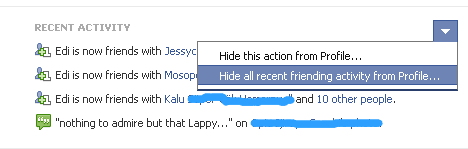
1. Open your Facebook Profile

2. You see a bunch of Recent activities you performed, depends on the Activity performed, i.e Comment or Like activity.
 
3. Move your mouse to the right side where you find a pointer as in the screenshot below, Click it.


You get options to Hide that particular action, click Hide all recent activity from Profile


We are DONE!
Now you are free to perform countless activities on facebook without it being recorded on your facebook profile for anyone else to see.


Wednesday

How to Edit and Correct Your Facebook Photos 2018

Few years back, even when facebook have become the biggest social network in the world,  though we could all Edit our Facebook photos and rename them, still our Dear Facebook website lacked the online tool that would help us correct our photos we had already uploaded . People would upload photos but realize it was not uploaded in the upright position, this could piss them off, next make them Delete this photo.

All these have recently changed. Facebook is now having the tool, you can correct your photos online, so you don't need to edit them before uploading, be it portrait or landscape, all you gotta do is Rotate the photo till you get the desired position you want . And believe me, it's a dead easy stuff  you'll do in seconds.

1. Login to your facebook account
2. Open the uploaded facebook Photo

3. Click Edit, you should find it at right hand of the page as we have in the Screenshot below, see it?


editing your facebook photos

4. Click Options, found right underneath facebook photo you are editing.
The Edit Tool menu will come up with Add location, change Date, and of cause the Rotate Right or Rotate Left which you should click to correct the photo.

5. In case you've also been looking for how you could change your profile picture, you can also choose the Make this profile my picture from there.

editing your facebook photos

6. Once you have rotated the photo to your desired position, click on Finished editing to save it.

editing your facebook photos

Hope you find this post very simple and explanatory especially if you are still a new Facebook user, why not say Thanks by sharing it with friends using our Social sharing buttons below? :)

How to Convert Your Personal Facebook Account to a Facebook Page


When I finished writing this post, I reviewed it and realised I had pointed out two great ways it would help us,
  1. Which is the main post,  How to Convert Your Personal Facebook Account to a Facebook Page
  2. A Trick behind the Post that will Help you fetch more Fans to like your Page, Fast, free, and without stress.
Now, some Facebook users who Signed Up for a Personal profile may later have a need to reach out to more than they could keep as friends since Facebook allows one profile to have a maximum of 5,000 friends as at the time of my making this post.

So, if you fall into the category of those who want to Share and connect to/with more people, the best option for you is to convert your personal facebook profile into a Facebook  page, facebook pages permits an almost unlimited amount of people to stay connected to, unlike Personal or Individual profiles.

      Pages offer more robust features for organizations, businesses, brands and public figures, maybe, you have been friends with one or more Public figures like Artistes or Speakers only to realize after sometime that this personal profiles whom you once sent Friend Requests or otherwise have suddenly changed into a Facebook page with thousands of Fans, well, this is exactly what this post will be discussing.


How Do I Convert My Personal Account To a Facebook Page?
If you would like to Convert your personal account to a Page, Click Here
This action is called the "Profile to Business Page Migration"
After this conversion, your facebook website address (vanity URL) will be the same, then, all your profile pictures are exported and all your facebook friends automatically become people who have LIKED your new page, these are the only things that are carried along, NO other contents will be moved.
So, be sure to have saved all your important contents such as Notes and Messages before carrying out the Migration.
  
According to the Facebook Help Center:
To avoid losing important content, Facebook recommends taking these steps before you convert your personal account:
  1. Download your profile (timeline) information. You can download a file that contains all of your sent and received messages and all of the photos and videos you’ve uploaded to Facebook.
  2. Appoint a new group admin to any groups you manage. The account you’re converting will lose these admin rights during the conversion process
When all the above notices have been put in mind and under taken, then you can go on converting your Personal Account to a Facebook Page.
Incase you accidentally converted your profile to a page, You can also reverse your newly created page back to  your Personal Account again by submitting a request for a reversal here.

NOTE: You must bear in mind that using Pages as if it were personal profiles for Individuals is against Facebook's Statement of Rights and Responsibilities, which means, after converting it into a Page, you must use and maintain it as a Page, not as a profile.

But hey, the second part of this article like I mention in the first paragraph, there's a little tip or do I say, Trick about this Post, People frequently ask,

 "What's The Little Trick Behind Facebook Pages with many Fans?"


If you wonder how some New pages you just discovered seemed to have grown with a sudden huge amount of fans without waiting for a long time to get them, Or If your aim is to create a facebook page with plenty of fans who have Liked it without going through the stress of buying these fans through third party sites, well, here's the Tip.
  • Create a Facebook profile with a Name it mustn't necessarily be your real name, but ensure the name you choose to Sign up with is Proper, because people would prefer connecting with Profiles with names that sound Human, than they would if you created a profile with the name of your Business or Brand.  You can even choose Female as the Gender of the Profile, generally, people would accept Requests from females, especially guys, Hence, increase your chances of having more friends, that's another good tip eh? LOL
  • When you are done creating and Verifying the Profile, then you can start Sending Friend Requests like crazy, but Hey, you will need to be careful with how much requests you send, Or else, you get a Ban from Facebook since it's against their Laws, so Send but don't send too much or too frequently, perhaps 7-10 Requests on every 4 or 5 days interval is okay.
Keep up with the tips, then your number of friends will grow efficiently, then you can later go on Changing the Profile into a Facebook page with plenty of Fans that had already Liked it.