Showing posts with label Tweaks. Show all posts

Sunday

2018 MTN Double Data Trick - How to Easily Get 100% Bonus on your Data Subscriptions

The MTN 100% data bonus is back in 2018 and we'll show you how to activate or subscribe to it. It's really some simple step or trick that will easily get you MTN double data for the normal price. No much technical effort is required, no tweaking of Android IMEI like the method we used in this post some months ago, it worked back then but somehow MTN network found out a lot of people embezzled it which led to a block.

Today, we had come up with this latest brand new method which worked as at December 2017 into the new year 2018.

Below was how I doubled my MTN subscription Data for 2018

2018 MTN Double data


Go to SMS on your phone, Send the following words to 131:
  • Double
  • Promo
  • Free

These should be sent separately. What this means is, send Double first, thereafter send Promo, then send Free.

Upon sending DOUBLE, you should receive a response stating your request has been received and is being processed. You may also receive a message stating the SMS instruction you entered is incorrect.

That shouldn’t bother you. Go ahead and send the other words to same 131.

After sending FREE to 131, you should receive a message stating ‘Dear Customer, Enjoy data offers on MTN Deal zone, dial *131*1#

Tuesday

MTN Double Data Bonus - The Simple Steps to Activate | Buy any Data & Enjoy Double

Hello there! Today I am going to show you a simple sweet method to get Double of any data plan you buy on any MTN line, it's usually called Phone Bonus. This means when you purchase a 1.5GB plan for 1,000 NGN, you get 1.5GB Bonus, totaling 3GB (for 1k Naira). Cheap and cool right?
MTN had been dashing out this offer to few customers who recently purchased any newest trending smartphones by Infinix, Tecno, Samsung and few others, that's all it takes to be eligible for the Phone Bonus offer, but hey, what if you don't own any of these new smartphones? Can you still enjoy this bonus?
It's a YES, you can get and enjoy the MTN Phone Bonus/double data Offer too.

MTN Phone Bonus

Follow the steps here:

REQUIREMENTS:
  • An MTK Android phone (any Tecno, Infinix would do)
  • MTN sim on MTN Pulse plan
  • The IMEI

STEPS -
1. I assume you are already familiar with Tweaking your device's IMEI. For a complete guide to do that, read up this post.

2. Make sure you're on MTN Pulse plan ( *406# ) , that's the plan I used when I got the Eligibility for the Phone Bonus.
NOTE: I used one phone to get this working on 2 different MTN SIMs.

3. Tweak your IMEI: Use any of the IMEI below inside your device,
Simply replace the *** with any last 3 digits and make sure it makes a valid IMEI for use.

359839072565***
359839072565***
356602075753155
356602075753197
356602075753015
356602075753114
356602075753106
356602075753189
356602075753023
356602075753031
356602075753049

See this post for more about validating an IMEI or better still Go HERE to check if your last 3 guessed numbers were correct.

After you change the IMEI, switch the phone Off and Insert the SIM and switch on the MTK Android phone. Now wait a few minutes, you will get an SMS telling you CONGRATULATIONS! Your smartphone had been activated to enjoy double on any data.

Thursday

Updated Settings for MTN Musicplus + SimpleServer (If your BIS Refuses to Work On your PC, Android or iPhones)

We don't see any of these Telecoms doing their subscribers any good by blocking out the Simple server with BBLite tweaks people had been using... or managing rather, for a long while.

Truth remains that Data bundles in NG are still not as cheap as it's meant to be, instead of 1MB for less than 1 Naira, they prefer to reap people off which not everyone can afford or won't happily keep paying for, any ways, I didn't come here to vent.
If your Simple server had stopped working with your BBLited or BIS subscriptions which we shared in latest browsing tweaks 2016 sometime time ago, then we have an update that you can use to keep moving on, the updated Settings for MTN Musicplus with SimpleServer for both PC and Android.


TO ACTIVATE THE LATEST METHOD FOR YOUR SIMPLE SERVER + MTN MUSICPLUS FOR PC and ANDROID

With this, you'll get 150mb for 15Naira, and you can always do it as many times as you want.

Use the set up below:
1. Text C to 5900
2. Reply YES when you see a msg

3. Open your Simpleserver config file replace this "web.blackberry.com"
Replace that with >>>  musicplus. mtnonline.com /touch/index. html#index-page (WITHOUT SPACE)

Now save it and launch the simple server program, connect to internet and browse with your Mozilla or Chrome using Local Host (127.0.0.1) Port :8080 As usual.

If you exhaust it, text  CANCEL7C TO 5900 And reactivate using Step 1.


How to Use the MTN Musicplus tweak on iPhone/iPad


How to Use the MTN Musicplus tweak on your Android

You can simply Install and Use this With Simple Android Server Or Psiphon you can get here
Use your normal music plus settings on Netify or ProNet, Sypon Shield, OR follow the below settings -
  • Tick Remove Port
  • Proxy type: Real Host
  • Proxy Server: musicplus.mtnonline.com/touch/index.html#index-page
  • Real Proxy Type: Inject
> Select save and click on “tunnel whole device”.
> Click on the options tab

Region: All servers are working with it, but we advice you pick United states to avoid strange languages when browsing.

Select more option, And check “Connect through an HTTP” then select “Use the following settings:” then configure as.
Host address: 10.199.212.2
Port: 8080
Hit Back and hit Connect. (Thumbs up to Shelaf for sharing this)

As we earlier said, If you exhaust the allocated data, just text  CANCEL7C TO 5900 And reactivate using Step 1.

We understand that the process is a bit of stress but we have to keep it going till we find a stable tweak or till the former BBlited plans start working again.

Friday

All-In-One | Latest Browsing Tweaks 2016: MTN, Etisalat, Glo and Airtel

We are back at this and glad to announce working tweaks in 2016 despite it took some later time due to few other projects. Let's share some Free browsing and unlimited downloads with the most affordable browsing rates for all Telecom networks: MTN, Airtel, Etisalat and Glo.
If you've been looking for browsing cheats this period, this post is for you, just as we did with some awesome browsing tweaks last year.

All tweaks below works but note that some of these tweaks may get speed issues, new working ones will be updated here in this post thread from time to time.

We will break this down from MTN, Etisalat, Glo and Airtel Tweaks into categories depending on the device you use, namely:
For PC and Mobile - Android and iOS. Let's begin!

all nigerian networks


MTN Browsing Tweaks 2016

Many MTN tweaks are working at the time we published this post, we picked them out for you to use:

MTN Browsing Tweak For Android (Mobile):

First, Activate BB LITE Plan.
Send BBMIDID to 21600 - for Daily plan
Or Text BBLITED to 21600 - Daily Plan > costs 70Naira - Dial *216*7#
Text BBLITEW to 21600 for Weekly Plan costs 350Naira only

i.) ANDROID USERS DOWNLOAD SIMPLE SERVER FOR ANDROID HERE and check this post for full settings.

ii.) Use Psiphon Or Syphon settings for MTN BIS:
Download Psiphon  Or  Download Syphon here  and Use the Below Settings to Configure It.

Create New APN settings on your phone as follows:
» Open your phone settings >> Go to more >> Go to mobile network >> Go to access point names > Select MTN, Then create new APN and configure as shown below:
» APN: web.gprs.mtnnigeria.net
» Proxy: 127.0.0.1
» Port: 8080
» Save And Activate it as your default settings

Then Launch Syphon Shield or Psiphon Handler, in the handler menu:
» Remove Port: make sure you tick/mark it
» Proxy type: Real Host

» Proxy server: http://musicplus.mtnonline.com/data-reset or http://172.16.5.226@mtnonline.com/data-reset (THAT PROXY SERVER WORKS FOR FREE AT 0.0kobo in your acct but FOR BIS REPLACE THE PROXY SERVER WITH - web.blackberry.com)

» Real Proxy Type:Default
» Real Proxy Server: 172.16.5.226
» Real Proxy Port: 8080

» Select save and click on “tunnel whole device”.
Click on the option tab
» Region: select, USA or any other server

» Check “Connect through an HTTP Pro” then select “Use the following settings:” then configure as.
» Host address: 10.199.212.2
» Port:8080

MTN Browsing Tweaks For PC this 2016 

You can make use of MTN Simple server tweak for your PC. It's same settings and still blazing in 2016. For reminders use the settings below:
PC USERS DOWNLOAD SIMPLER SERVER FOR PC
and see the full settings to configure the Simple server for PC here

MTN MAGIC SIM 2016


We can't ignore sharing words about this tweak that returned after disappearing since 2013, it's back and works till date.
To activate it, ensure to Migrate your MTN Sim to MTN Pulse, dial *406# to do that.
  • Dial *123# and select as folows >> 3. Data services >> 1. my data plans >> 4. Simple surf >> choose 2 hours 1 day @250NGN
Once you get debited, Connect and Browse with it for only 3 or 4 mins. Disconnect and Switch off the SIM. Remove the SIM, Do not turn it On till 24hrs (next day), switch it on and Enjoy unlimited surfing. Works on all devices (PC and Mobile, hotspot: Android & iOS).


Airtel Browsing Tweaks For PC and Android 2016

Get 2gb with 100 naira on airtel without wasting time, dial *440*18#
N.B: it work for all the device both java android and pc, and it expires one day so this is for those of you who like downloading with your pc and android.

Subscribe Airtel 800mb with Just #100,
Simple Steps On How To Subscribe For Airtel 800MB
With Just N100 Valid For 1 Month.
Here is the Simplest code to
use,
Send "BYC3 to 440"

Airtel 1500 for 3gb
This isn't really a tweak but a cheaper data plan that works on all device.
Recharge 1500 and activate with this, simply dial >> *440*16#

Glo Browsing Tweaks For PC and Android 2016

Glo Tweaks for PC and Android:
The below Glo subscriptions work on both Mobile (Android) and PC
1. GLO 3GB FOR 500
This is a cheap plan, the Weekend plan costs N500 and gives you 3GB for 7days (weekend Sat 12am-Sun 11:59pm & Nights 12am-5am),
TO ACTIVATE: Send via sms, 61 to 127 or dial *127*61# (Plan not shareable) Data Booster will not work with this plan, no auto renewal).

2. You can use the Glo BIS Subscription for MTK Android phones after tweaking/changing your IMEI (supports Tecno, Infinix, Innjoo and other MTK devices). Follow the steps to activate it in this post.

Etisalat Browsing Tweaks For PC and Android 2016

Last but not least is Etisalat browsing (free) tweaks:

Activate Etisalat Social ME Plan. Dial *200*3*3*1#
choose monthly plan, #500 per month
Download PSIPHON Handler and use the settings below:

Tick Reverse Proxy box
Proxy type: Reverse Proxy
Proxy Server: mobile.facebook.com
Real Proxy Type: Inject
Real Proxy Server: ns393958.ovh.net
Real Proxy Port: 3128
Hit Save
Tick Tunnel Whole device and accept
Scroll to options and select United States as region
Now, Go to “more options”
When you see connect through an HTTP Proxy... TICK IT
Also Tick Use following settings…
Host Address: 94.23.200.49
Port: 3128
Now turn on your Data connection and Hit Connect on the Psiphon app.

Browsing Tweaks are quite valuable that people especially geeks can't do without, we will update more as the year goes, Enjoy these one while it lasts, any Questions or Contributions? Leave us your comments below.

Tuesday

Download Latest Psiphon/ Syphonshield Handler APK Here

At last Psiphon 103 (Syphonshield v313) is here! This works for tweaking MTN, etisalat, Airtel and other networks.
For Those of us who had been using the previous Psiphon 102 handler, we know how it's been saving lots of data cost for us but sometimes we face issues with loopholes being patched by our network providers, this led us to get the updated version known as Psiphon 103 handler or Syphon Shield v3.1.3 Handler UI.

More About Psiphon 103 handler apk (Syphon shield v3.1.3):
It was Modded by Dzebb, this is quite better than the previous version Psiphon 102.
Psiphon 103 handler apk has new Brazilian design, connects easier and faster, consumes less RAM, consumes less battery, the meters can be hidden and few other goodies.
  • Psiphon 103 handler or Syphon Shield v3.1.3 Handler UI => DOWNLOAD HERE

Installing Psiphon/ Syphonshield Handler:

How to Install
1. Download the apk file from the link above
2. Install it and it will override your current Psiphon settings

For MTN psiphon, when you launch the Psiphon,
From the handler menu.

Proxy type – Real Host

Proxy server – web.blackberry.com (If you're to use MTN BIS, see the Blackberry plan codes here)

Real Proxy server –
Real Proxy type – inject/HTTP/Direct/socks

Host address 10.199.212.2
Port 8080

Region : choose any country of your choice

Tick : Tunnel whole device

Click on more options
Tick sound ? and vibrate

Tick –connect through HTTP proxy
Tick –use the following settings
Host address-10.199.212.2
Port-8080

Save and connect

3. Launch it and enjoy the latest Psiphon Handler

ALL-IN-ONE! Latest Browsing Tweaks For MTN, GLO, ETISALAT and AIRTEL Users This 2016 / 2015

Have you been looking for Free/Cheap Browsing Tweaks to use this 2016? That's great, you have come to the right place, there are browsing tweaks for you now, for a while now many geeks had been using these browsing tweaks to do heavy downloads and Browsing at a very affordable rate, after many demands from friends and fans here, I finally took my time to make this post for all of us. It's an ALL-IN-ONE PACKAGE, tweaks for almost All Nigerian Networks, MTN, GLO, ETISALAT and AIRTEL.

UPDATE: Check out Latest Browsing Tweaks and Cheats in 2016 - For MTN, Airtel, Etisalat and Glo

Note: These Tweaks below still work in 2016 for MTN and Glo, we will update you on Etisalat and Airtel 2016 tweaks later on.

Here's a Break Down of all the Tweaks I am about to Share with you:
1. MTN BIS with Simple Server
2. GLO BIS FOR ANDROID, 3GB for 1k
3. ETISALAT, PayG - Unlimited browsing and Downloads
4. AIRTEL - A Fresh Tweak that Gives you 2GB after Tweaking your IMEI

So if you have the Sim listed above, smile as you Grab a Cup of Tea as you'll surely benefit from any or All these Browsing Tweaks below.

1. MTN BIS with Simple Server

  • WORKS ON PC AND ANDROID

SETTINGS FOR SIMPLE SERVER FOR PC

After downloading, Subscribe to any MTN BIS Plan of your choice by dialing *123*4*1#

The Daily BBC plan has been blocked for this tweak.


For using Blackberry plan with the Simple server:
BB10 Plan works great ( Send BBMIDID to 21600 - for Daily plan or the Daily plan for 70Naira - Dial *216*7# ).
Make sure you get the BIS Activation SMS and 100 or 70 Naira is deducted, once it's active.
Follow the Settings Below to Enjoy the sweet browsing on your Android or PC with MTN BIS plan :)

subscribe to any of your choice by dialing *123*4*1# to choose a plan, you're suggested ouse the Daily BBC plan ( Send BBCDAY to 21600 ), once it's active.
Follow the Settings Below to Join the Enjoyment on your Android with MTN BIS plan :) -

subscribe to any of your choice by dialing *123*4*1# to choose a plan, you're suggested ouse the Daily BBC plan ( Send BBCDAY to 21600 ), once it's active.
Follow the Settings Below to Join the Enjoyment on your Android with MTN BIS plan :) - See more at: http://www.editweaks.com/2014/06/mtn-bis-finally-working-again-with.html#sthash.tRrAmqIs.dpu
1.  Extract the SimpleServer.Zip >>> Open the extracted file folder,
You'll find Simpleserver.exe and
SimpleServer.ini
Edit the .INI file and input the following
In your Simple server INI input >> web.blackberry.com,
that is in your VALHDR0 = 'web.blackberry.com'
and
IQUERY = 'web.blackberry.com'
Save It (Ctrl + S )

Double Click on the ‘SimplerServer.exe to run the application.

2. Connect the modem, with normal APN settings.
To make sure your APN is correct, go to settings on your Modem and configure your
APN: web.gprs.mtnnigeria.­net ,
Password & username: web

Also configure your browser and IDM to 127.0.0.1 (LocalHost)
Port 8080.

3. On Firefox Menu, Click >> OPTIONS >> NETWORK >> SETTINGS >> TICK MANUAL CONFIGURATION, Input the Proxy I.P (127.0.0.1 and Port:8080) and Save.
See this Post on How to Configure your Browser to LocalHost.

RECOMMENDED: Best Ways To Change and Use Proxy Servers/Local Host on Google Chrome

After you're set, be sure the Simple Server is running, Connect your Modem.
Open your browser and start Browsing and downloading.

ANDROID USERS FOLLOW THE STEPS BELOW

==> Install SimpleServer.apk on your Android (Rooted Android Only) Root Your Android Here
==> Create New APN settings On Your Phone
As Follows...
Proxy: 127.0.0.1
Port: 8080
APN: web.gprs.mtnnigeria.­net
Save And Activate it SS your default settings.
 On your Android, go to simple server App and configure the settings:
==>Proxy host: 10.199.212.2
==>Proxy Port: 8080
==>Injection Method: get
==>Injection query/url: http: //­ web.blackberry.com/ [without any space]
==>Injection Host: web. blackberry.com [don't leave space]
==>Injection line: press your enter key 4 times
==>Log level: debug

Now the Last part;
Leave any other thing , Press Bck to Exit it, Pressing Back will automatically Save your Settings as you Exit.
Put on your Internet, Go back to Simple Server App and click START.

Simple Server Android

You can Browse and Download all you want. It powers all Apps.


N.B: This particular Tweak dies and resurrects, now look at this pretty Old Post I wrote about MTN BIS Working with DROIDVPN, that was early last year,  it had existed even before I updated that post in July 2014... We just invent new methods to keep it alive.
I use it when I published this post. It still works.

2. GLO BIS For Android Browsing Tweak

WORKS ON ANDROID ONLY:
All you need do is Tweak/Repair your Android's IMEI to that of Blackberry. After that, you can Share Connection from your Android to your PC via HOTSPOT.
GLO users are adviced to see this post On >> How to use Glo Blackberry Subscription on your Android.

3. ETISALAT Browsing Tweak:

WORKS ON PC AND ANDROID

Etisalat PayG

This one is Superfast browsing tweak for Etisalat users, but you'll need to be Super Smart to Enjoy it.
Follow the Steps Below:
 1.Get your sim on easycliq so that you receive free mb when you recharge. Subscribe to the payg plan.*229*5*7#
2.Recharge N100, they give you 5mb or 10mb depending.
3.Start your browsing, preferably downloading.
4.They usually reset the connection at 55mins, so your download will most likely stop at that time.
5.Just disconnect or switch of your data and then reconnect. No need for codes.
6.After another 55mins, do the same again.
This can be used for days with the initial N100 still intact. Your free 10mb will be reduced to 0.48mb and that will reduce by 10kb after each cycle. (CREDITS TO aiikae of GL for this working One)
N.B - Avoid Video Streaming Sites like Youtube etc when browsing as in Step 3.

4. AIRTEL Browsing Tweak

This is A Fresh Tweak that Gives you 2GB after Tweaking your IMEI
See the IMEI >> 869878000162957
It's 15 Digits, so you'll need to generate your Unique Numbers and use it to Get your own 2GB from Airtel.
You can copy the first 12 and generate others to make it unique.
Use IMEI.info to Check Valid IMEI or generate for yourself.
See this Post To Learn How to Tweak your IMEI
After tweaking this IMEI on your Android, Text  3G TO 141 and Enjoy.
See Screenshot Of 2GB received Below.

Airtel new 2Gb


CONCLUSION:
You will need to keep checking this post for updated working ones, just incase the one you use gets slow or blocked.
Young people love tweaks... never mind anyone telling you it's old stuff, I understand that you and other people who are reading this may be students trying to save some Cash and avoid Expenses, besides if you also check well, you're Enjoying More Data Freedom than people who pay for Data/Internet subscriptions,  that's one of the Major reasons I created this Tech blog. To Share Tweaks, unique and Useful Knowledge that works and make Life easy for all our Readers all over the World.
Network Agents can walk in here anytime to find this post and Decide to work on blocking it, but it really is none of our Business either.

We worked hard to dig out and Write this Long Post, If you Must Copy it, Pls be Kind enough to Give (Credit) Link Back to us where you Got it From.
We don't ask for money or Anything from you, Linking back and Sharing this post is the Best way to Support and Appreciate our effort, so everyone can progress.
SHARING IS CARING TOO, Don't Forget To Hit Our SHARE and LIKE Buttons Below. Have Fun!

Saturday

How To Back Up IMEI Number of Android MTK Smartphone

Incase what you wanna do doesn't workout even after successfully making Repair or Changes of your IMEI Number, it's important that you Back up your IMEI even before carrying out any action on the device from the beginning.

You can Back up your Phone's IMEI by writing down the IMEI of the Phone1 & 2 (if it's dual sim
Or better Use the Backup option in MobileUncle tools.

REQUIREMENTS:
1. A rooted Android
2. Mobile uncle tools App >> Download here


To Use Mobile Uncle tools to Backup your MTK Android Phone's IMEI

i.) Open the App, go down and touch IMEI BACKUP RESTORE (MTK)
ii.) Choose BACK UP TO SDCARD (MTK) and SDCARD2(MTK)


RE-boot when done,
After everything, you still can put back your previous IMEI you backed up on your SD card.
To re-insert the IMEI,
>> select - Restore IMEI from SDCARD(MTK) or SDCARD2(MTK), depending on which one you used to back up your IMEI.
Your Previous IMEI will be restored, now re-boot the device to make it active. That's all

Found this Useful?, click the Share button below.


Tuesday

*Updated* MTN BIS Now Working on Android Again with DroidVPN (for July 2014!)

Android users who know about DroidVPN should quickly check this one out, it's working real fast as at the moment of this Post,  

MUST SEE THIS  UPDATE! - ALL-IN-ONE! Latest Browsing Tweaks For MTN, GLO, ETISALAT and AIRTEL Users This 2015

ALL-IN-ONE! Latest Browsing Tweaks For MTN, GLO, ETISALAT and AIRTEL Users This 2015 - See more at: http://www.editweaks.com/2015/02/all-in-one-latest-browsing-tweaks-for.html#sthash.Nj5DyLk5.dpuf
Make sure you have an active MTN BIS, or subscribe to any of your choice by dialing *123*4*1# to choose a plan, you're suggested ouse the Daily BBC plan ( Send BBCDAY to 21600 ), once it's active.
Follow the Settings Below to Join the Enjoyment on your Android with MTN BIS plan :)

APN: Web.gprs.mtnnigeria.net
Proxy : leave it empty
port: leave it empty


Now go into ur droid vpn setting

choose tcp for d connection after that change
UDP: 53
TCP: 5222
bind local: 1100
Now go to HTTP header settings in Droidvpn
Host: web.blackberry.com
X-host: web.blackberry.com
That's all

To make browsing connection stable, Open Terminal emulator (You can download Terminal emulator from Play Store) and type "ping google.com"
In the Droidvpn, enable proxy address
PROXY :10.199.212.2
PORT: 8080
REMEMBER TO TICK ENABLE IP IN YOUR DROIDVPN
then CONNECT and enjoy. See my of DroidVPN Connected Screenshot below.
Credits to Mayoorcotyz of GL forum.


Also Read: Easy Guide on How To Use DroidVPN on All (Rooted & Unrooted) Android devices
 
Another great news is you can use it on your PC, after DroidVPN is connected, turn on your phone's Hotspot so you can also flex the fast browsing experience on your PC.
Enjoy and Don't forget to hit our SHARE button ;)

Friday

Blogumus - Flash Animated Tag Cloud For Blogger

Okay, I know right now you must be wondering what is this dude talking about? Such a strange name for a Widget, well, that's probably because you may have not heard of it before.
Following my previous post concerning tag cloud widgets.
The benefits of having this widget is the positive SEO results it attracts, otherwise, its contents which are the big and small letters scattered over the place makes a blog look untidy.
This problem is what Blogumus in this post have come to solve.


Blogumus is a very beautiful flash animated tag cloud widget for your blog, your tags smoothly moves around when your visitors hover their mouse around them, it was originally meant for WordPress, where it  was called Roy Tanck's WP Cumulus plugin for Wordpress.
Roy Tank created the plugin and discussed its first appearance in 2008, then Amanda of Bloggerbuster tweaked it and later figured out ports that made it work on Blogger platform, so you can have it on your blogger blogs.
The widget is a combination of Flash and Javascript, and had been tweaked in a way that would be very easy for you.
Since it contains Flash content, since it contains Flash,
you'll be needing Flash Player plugin for your browser to view it (get Flash Player from Adobe)

DEMO 

  • A DEMO of this widget is shown here at the footer of  my demo blog here, it comes alive as you hover your mouse over it right?. 

HOW TO INSTALL BLOGUMUS TAG CLOUD WIDGET ON YOUR BLOGGER BLOG

Go to Design > Layout > Edit HTML
Back up your template. 
Now use CTRL + F to find

<b:section class='sidebar' id='sidebar' preferred='yes'>

 Right under the code, Copy & Paste the ones below


<b:widget id='Label99' locked='false' title='Labels' type='Label'>
<b:includable id='main'>
<b:if cond='data:title'>
<h2><data:title/></h2>
</b:if>
<div class='widget-content'>
<script src='http://sites.google.com/site/bloggerustemplatus/code/swfobject.js' type='text/javascript'/>
<div id='flashcontent'>Blogumulus by <a href='http://www.editweaks.com/'>EdiTweaks</a></div>
<script type='text/javascript'>
var so = new SWFObject(&quot;http://sites.google.com/site/bloggerustemplatus/code/tagcloud.swf&quot;, &quot;tagcloud&quot;, &quot;240&quot;, &quot;300&quot;, &quot;7&quot;, &quot;#ffffff&quot;);
// uncomment next line to enable transparency
//so.addParam(&quot;wmode&quot;, &quot;transparent&quot;);
so.addVariable(&quot;tcolor&quot;, &quot;0x333333&quot;);
so.addVariable(&quot;mode&quot;, &quot;tags&quot;);
so.addVariable(&quot;distr&quot;, &quot;true&quot;);
so.addVariable(&quot;tspeed&quot;, &quot;100&quot;);
so.addVariable(&quot;tagcloud&quot;, &quot;<tags><b:loop values='data:labels' var='label'><a expr:href='data:label.url' style='12'><data:label.name/></a></b:loop></tags>&quot;);
so.addParam(&quot;allowScriptAccess&quot;, &quot;always&quot;);
so.write(&quot;flashcontent&quot;);
</script>
<b:include name='quickedit'/>
</div>
</b:includable>
</b:widget>

We are done!, Now Preview the blog, if it comes out well, it will display on your sidebar, or any where you placed it, you may even change its location from your Page Elements. Real simple huh?


CUSTOMISING THE WIDGET

Customising is also possible
You only have to do few changes in the Variables
In this default installation, Blogumus includes the following preset variables:
  • Width is set to 240px
  • Height is set to 300px;
  • Background color is white
  • Test color is grey
  • Font size is "12"

 So from here, if there's some adjustments you want to make, so it could fit in perfectly for you, then simply edit and do your changes on the variables coloured in Red at the codes above.
When done, you can Preview it, once you're satisfied with your customisations, hit SAVE.

Hope you found this helpful as it makes your blog look more beautiful for your visitors.
Please take a second to share. ;)

MTN MobileTV Tweak - Get 500MB to Browse and Download For Mobile & PC Free!

Seriously, MTN had really been very difficult to get by now, their Firewall had been very strong through out the whole year, not until we found a Leak, Yes, you heard me right "A Leak!"
It's been 4 days now, MTN free browsing is Back! and that's what I'm sharing on this post.
With this Tweak, you get 500 MB data bundle, for browsing and Surfing the web with your Mobile phone FREE!
First active your Mobile TV bundle,

Follow this Steps below:
1. With your phone web browser, visit : mobiletv.mtnonline.com

2. Once the page is on load, you'll immediately receive an SMS, stating you just got 500MB, for Free trial on their new mobile TV service for ONE WEEK (7 DAYS)
Dial *559# to see bundle Balance


MTN mobile TV tweak

The Main Part of the Tweak

Now here's the Sweetest part, you won't be spending all that huge amount of Bundle watching their "TV".

To use the 500MB on your Opera, UCweb etc, agai just follow the Settings below:

For Default Web Browser
Create a New Access point, with APN: web.gprs.mtnnigeria.net
In the Proxy server Address you can use any of the below Proxies:
  • morphium.info OR daveproxy.co.uk
  • Port: 80
  • HOMEPAGE: mobiletv.mtnonline.com
For OPERA 6, 7
Create a New Acess Point: web.gprs.mtnnigeria.net
Use Proxy Address: 195.189.142.132
PORT: 80
Open the Opera,
Leave every other thing Blank
Scroll down to Proxy Server use: mobiletv.mtnonline.com

DOWNLOAD >> the NEW OPERA 7 HERE

For Opera 4.2 HandlerLab use
IP: 82.145.211.1
Leave everything Blank
Launch the opera >> Proxy Server > mobiletv.mtnonline.com

For UCWEB (UC handler)
IP: 82.145.211.1
FRONTQUERY: mobiletv.mtnonline.com/cgi-bin/nph-proxy.cgi/010110A/http/
HOST :  mobiletv.mtnonline.com

HOW TO USE THE 500MB MOBILE TV TWEAK ON YOUR PC

A pal also said this tweak worked on his PC via Proximitron Tunneling App, though I haven't tried it yet, but Below are the Setting He used on His Proximitron:
1. Get Proximitron Here and Any other Web Browser (Opera recommended)
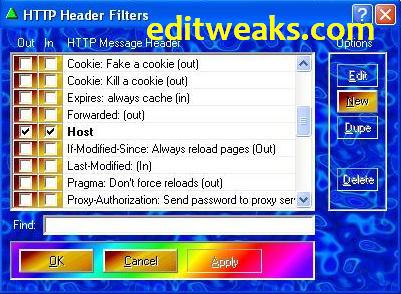
2. Launch the Proximitron, Tick use Remote Proxy but Untick any other thing you see there
3. Use the below configuration
  • Click Proxy > Put 195.189.142.132:8080 (NO SPACES) press OK to Save
  • Again Go to Headers >> Untick whatever you see there >> Click New
  • Fill it as follows
  • HTTP Header: Host
    URL Match: Leave Empty
    Header Value Match: *
    Replacement Text: mobiletv.mtnonline.com
    After putting these values, click on OK
  • Now Host is been Created and Listed in your HTTP Header Filters, Tick both boxes near the Host 
  • Click OK
 MTN Proximitron Settings
  • Open your Browser, (Firefox or Opera) > Go to Settings >> Advanced
  • Use the I.P : 127.0.0.1
  • Port 8080 Save and start Surfing the Web
This tweak works for a week, so use it for the moment, Don't forget to Share with friends, and if you're Gonna Be Copying this, please, Don't forget to honour the hardwork by putting a Link back to this site that you got it from!
Enjoy!

Wednesday

Glo and Etisalat Free Browsing Tweaks (Fresh and Working)

Yeah, unlike before, this days free browsing cheats are very Scarce, so I do this once a while, for my Friends in Nigeria who wants to browse with their mobile phones for free, this time I am sharing with Us what I discovered with a Senior guru, UNStoppable7, I give him 2 thumbs up for this.
He shared the tweak with me and his pals, so I am doing same, sharing with you.
I'm pretty sure You are quite lucky you're reading this.

etisalat and Glo fbt

The tweak is the called the Glo Night Package.
But Please note that it ONLY works for OLD Glo numbers like 0805, 0807, and 0705.

So if you don't have old Glo Sim, I recommend that you buy, go and borrow, or maybe steal one ;)
LOL

How to use the Glo Night Package Tweak

REQUIREMENTS
  • You must be on Glo Gbam.(dial *100*5*1# to migrate)
  • it costs only 10 naira as daily due
Okay, here is the Main part of it
Create a new access point on your symbian phone with:
  • APN :  glosecure
  • Open your Opera Mini
    Use PROXY SERVER: 082.145.211.001 or 82.145.210.84
    PORT:  80
    USERNAME and PASSWORD:   gprs
s40 users can Grab the Prov > Download Here

And if you aint having the Cast Opera mini,
Download any of the Ones below
* Cast Opera 4.2 HERE  OR
* Cast Opera 5.2 HERE

For  Opera Opera mini 5.2 handler (Download the Opera here)
In HTTP server put http://0.facebook.com
Socket server:   socket://0.facebook.com
Host: 0.facebook.com

FOR EXE 5 (Symbian)
Use HTTP server :   http://m.facebook.com
Socket sever:     socket://m.facebook.com

Download Exe5 Here

Launch the Opera and Start Browsing Free FROM 1 AM to 6 PM Every day

NOTE:

For your Health Reasons, please don't use it every night continuously, doing so can get you sick, because while others are Asleep, you are awake browsing, just an Advice.

The Etisalat Opera Tweak

This works fine on your Opera 7, 5.2 , 6, and Oupeng Browser
Download Here

IP: 82.145.210.1
PORT: 80
APN: etisalat
Frontquery: webpay.interswitchng.com# (make sure you put the # sign after the .com, especially s40 phone users)

HOST:  m.opera.com
Sorry I didn;t upload the Prov, but you can make the prov by yourself here
Launch and Browse on your Etisalat free, anytime any day.

That will be all for now, there're ways people use to browse on PC now, called VPN, it's not new, but I think I'll share it in my future posts, so keep checking.
For now Don't forget to Share this post with friends! Blessings and Peace pals.


Sunday

EdiTweaks Online HTML Parser

This should count as our second, after we released our very first Google PageRank Checker, few months back, which helped us  instantly check our PageRanks at one click.
Now, our second tool, a totally Free Online HTML Parser Tool is used to convert HTML, XHTML, or any JavaScript codes to ASCII codes.
Using this gadget won't change a thing in your codes, rather it would only help replace them with ASCII encoded characters so they can be compatible for your blogspot.

APPLICATIONS / USES OF THIS HTML Parser
  • You can use Converted codes to display Adsense Ads and other Ad Networks on your Blogspot blogs..
  • Use it for displaying Designs in blog post body
Simply Copy and Paste the Codes in the Box Below and Hit Convert.                                                                                                                              


HTML PARSER - ONLINE Tool by EdiTweaks
© EdiTweaks Inc. All rights Reserved.

Thursday

Airtel Bundle Tweak Updated For April - Get Free Airtel Data Bundle Now

Airtel Nigeria is at it again, two months ago I posted tweak which would fetch us  a bundle data of 25MB for free, I'm not sure that tweak lasted up to 48 hours, now I don't understand if it's some kind of secret promo for their users or something, just this morning, a generous friend of mine called me asking if I have this Tweak, I said No, so he shared it with me, I tested it and it worked immediately.


So i decided sharing the tweak with you,
Simply Dial  * 141 * 13 * 1 #

You instantly get 10 MB worth of Data bundle to browse with for 7 days, Free!.
Redialing it for a data bundle Top Up doesn't work if you are thinking of doing that. And it works just once on every Airtel SIM.
It's Still a good one since tweaks are pretty hard to get nowadays right?

Don't forget to Share this with friends that need it too if you found it helpful. Use our Share buttons below this post.  Enjoy!!

Wednesday

Reset/ Format/ Resurrect Your Nokia with Hard Reset, No Internet or External Devices Needed

Sometimes our Nokia fones, especially Symbian, can start becoming too slow than it supposed to, it cannot run properly as expected, these problems may be due to Internal Memory or/and MicroSD Card, which i will explain at the end of this post.

Months back, I had this cool application called Flip font which some of us, Symbian users know well about. Then, I had very little knowledge handling it so when I toyed around with some folders, using X-plore while I had this Flip font stored in my phone's internal memory, the C: drive got corrupted and my phone Crashed,  it went off and couldn't boot On again. I use a method called Hard Reset, though there are two ways you can Reset your mobile.

  • Soft Reset: clears pending errors and bring your mobile to its initial state by restoring factory settings. To do this, the shortcut is: *#7380# 

  • Hard Reset: you can use this if soft reset proves not working, and the errors still remain in the phone,  doing a hard reset takes 2 ways, just enter the code: *#7370# and press Yes to confirm.
Or you can press a combination of buttons (this is the last option to take in cases where the phone refuses to Boot),also known as RE-flashing or the "3-Finger Salute" and it works most various Symbian phones.


NOTE:  Ensure you back up your files into your Memory card since doing this would format/delete all data in your C: Drive (Phone's Memory)
 
Working on Nokia E51,  E63, Nokia E5, N95, N81, N73, E65, E51, E55 (Symbian V3 and V5 phones)
Remove and REinsert the battery.
Hold the following buttons *, 3 (number button) and Talk/Green key.
Now press the Power button on the phone, do not release those buttons until you see the Nokia boot up screen. once you feel the phone power up you can let go off the power button while still holding all three button.
working on Nokia 5800XM
Use the following buttons to do a hard reset on Nokia 5800XM, press and Hold GREEN/ RED/ CAMERA keys all at once, then Press power button. this will only work on 5800's that have firmware version 20... and up. )

Summary

The good thing about this that it turns restores your phone back to factory Setting, making it seem like it's New, but the ugly  part is that you will loose your Files, if not all.

What you Should know about what can make you Reset your Phone?

Internal Memory

When the phone's ROM (Read Only  memory) get almost full, there are no more spaces to store caches from your browsers, apps, receive Messages/files and so on,  it would definitely alter the speed at which it operates.
* Make your external memory (Micro SD) your primary Storage since it has more space for saving data
* Ensure you don't install malicious applications inside your phone's primary memory, it would easily harm the phone's system.
Keep the internal memory strictly for data which can only be pre-installed in the internal memory by Default, such as caches, firmwares, cookies etc.

Micro SD Card Memory

* Same matters of slow operating system will arise when your memory card gets full, in this case, deleting some files might be the solution.
* Do not always go for Micro SD Cards (MMC) with very high capacity, if your Manufacturer recommends a 3 Gigabyte Memory card for the phone, then use it that way, ignoring such recommendations to go for more might later end up crashing the phone.


Monday

Airtel Bundle Tweak- Get Free Airtel Data Bundle Now

airtel3.jpgHi fellas, I suppose this is the reigning topic discussed and shared in many web forums as at the period of my posting it.
Yes, it is very true and easy and fast,


I won't wanna keep you waiting to get it, that's why this post will be very clear and brief.
Just Text "weekytrial" using SMALL Letters without space to 141 and Gbaam! You are given 25MB of Data bundle to browse for one week as the text replies, but hey, you can always Text and receive it again after exursting the first one you used, in fact, this one is infinite.
If you are having problems with Configuring your phone for Airtel, then see this POST.
And go ahead and enjoy it while it lasts.
And don't forget to show some love this Valeentine Season by Sharing this Post with your friens using our Facebook and Google+ Buttons, Enjoy!!!

Friday

How to Download Files from RAPIDSHARE, MEGAUPLOAD, 4shared etc using Opera Mini

Hi Great Fans of editweaks, sorry if I had kept you waiting to get  my new posts.
Well, I'm back, and stronger I guess, #LOL
I noticed most people find it difficult when trying to download from sites like Rapishare, hotfile, megaupload etc with their mobile phone using Opera mini browser.
This is because these sites use some sort of JavaScript that animates the pages and/or times visitors downloading from them and our Opera mini browsers do not support such scripts, hence such sites, or any other sites visited using opera mini are Static.
But, this will change after you read this post ;)  Here is an extremely easy way to download through such sites in an opera without javascript.
Note that this tweak applies to Opera mini versions 4.x, 5.1, 5.2, 6., 6.5 etc that has download managers without scripts  from sites I mentioned above.

In this tutorial i will use opera 4.2 as example and screenshot also for the benefit of newbies.
STEPS:
1. Launch your Opera
2. In the Address Bar, Type: Javascript:alert(c=0)


cc


3.  Press Go to


ccc


4. Bookmark the page that popped up
5. Go to Hotfile, 4Shared, or any File Hosting site that use Javascript time-limit for download
Assuming you used Hotfile and had gotten to file you wanna download

6.
Click on the Regular Download.

xxx


7. After the Time Limit
Shows 58 sec,25 sec,13 sec etc.. Just count the time in your mind.

 
8. Wait for 1 Minute or the given time limit dispalyed.


vvv


9. Open the Javascript Bookmark we created earlier


bb
 

10.Javascript Alert will popup with OK.  just click it and proceed.


nn


11.
It will take you to a page with captcha, just enter the code shown in the image, scroll down and click download file.
from there they will show you the real page of downloading with "click here to download"


nnn


12. Just click  Save and proceed with your download


nn
 

The download begins and That's all. We are done.Just a reminder, this works specifically for Opera mini version 4.x,
once you succeed getting to step 11, you can still Copy the download URL in the address bar and Paste for direct download to any faster browser or downloader you have.
Post comments if you have something, or simply say Thank You by SHARING this Post with friends using the Share buttons below :)

Tuesday

Airtel UnLimited Browsing Package+

airtel-new-logo.jpg
Airtel Nigeria has always been giving us Real tough time in cases of FBT. This is because they have one of the Strongest Built Firewalls in my country. Making it uneasy for hackers to byPass via Proxies or whatever method they can use to get in and browse for free. So I came up with this, its been around for a while, few people are already using it and is also been advertised on radio for some time now (but NOT all of us especially most internet users listen to Radio right? :)
 DO THE BELOW AND START SURFING FAST with SATISFACTION
NOTICE=>
ITS STRICTLY MIDNIGHT THINGS

  1. Migrate to Airtel big family by dialing *447#, if you are already on the plan don't bother migrating
  2. After migration,just make sure you make atleast one minute call to any network between the hours of {8am to 11am} then you are qualified for the 4mb that will be given between the hours of midnight calls.
  3. Here is the main trick "you can exceed the 4mb given." meaning You can Download anything you want, yet your credit will still be intact (Between 12.30AM - 4.30AM)

~TIP~
laptop_computer_flipped_open_0515-0909-2 This is an Opportunity for you, P.C owners (laptop/desktop) to Flex. All you have to do is insert your Airtel SIM into your Modem, connect, and start Browsing Free and Fast!!!
Remember, anytime outside 4:30am, you will be charged for browsing hence your credit in your account balance will be deducted.