Showing posts with label Apps. Show all posts

Monday

Samsung Galaxy S8+ Tweaks, Themes, Apps and Mods

Looking for the best Samsung Galaxy S8 Mods and tweaks? Here you will also find the best Themes, Apps. Some of them are mods not needing root access on your precious Galaxy S8.
We went to XDA developers forum to fetch you the top best mods and tweaks you can use in your Galaxy S8 and S8+.
These RRO mods were made by a tytydraco of XDA forum. Some of them are more useful in everyday life than others, and some are primarily experimental for theming. They are all safe and have not caused a SystemUI crash.


XDA forum Samsung Galaxy S8+ Mods, Tweaks

NEW

Substratum will be the new main priority with mods, as it allows us to do more edits!
This apk contains all the individual tweaks, which can all be installed and updated via the app!

Substratum Download via PlayStore: https://play.google.com/store/apps/d...ekt.substratum
Substratum Samsung Required Addon via PlayStore: https://play.google.com/store/apps/d...kt.sungstratum
Here is the apk for the System Mods overlay pack: https://drive.google.com/open?id=0B8...l9HTWFhSmpOb1U

CENTER CLOCK INCLUDED ^^^ enjoy~!

Always On Display Tweaks

Hide Battery (icon and percent): https://drive.google.com/open?id=0B8...E1aNEhKdTVxU1k
Hide Notification Icons: https://drive.google.com/open?id=0B8...3BiODBjWWpmR00
Hide Date: https://drive.google.com/open?id=0B8...m9RUEVtS3RVMFE
Double Tap To Wake Anywhere: https://drive.google.com/open?id=0B8...FRlZE9XYTg3NGM
For DT2W, you must enable the home button in your AOD settings. Another thing is that this disables the home button icon. It is a side effect of the tweak, so it's manually hidden entirely.


UI Tweaks

Carrier Hider: https://drive.google.com/open?id=0B8...DF5a1E2OE5XVkU
Disable Nav Bar: https://drive.google.com/open?id=0B8...HBCTHpfY1FsNWs
Disable Status Bar: https://drive.google.com/open?id=0B8...kMtN2M5UjI2UjA
Remove Unlock Text: https://drive.google.com/open?id=0B8...lpRRHJISnN1VW8
Remove Status Bar Clock: https://drive.google.com/open?id=0B8...3BCYlg3ekJEUkE
Remove Status Bar Battery Icon (not percent): https://drive.google.com/open?id=0B8...XJZeWNnVlJqRGM
Better Default Nav Colors: https://drive.google.com/file/d/0B8D...w?usp=drivesdk
Half Nav: https://drive.google.com/file/d/0B8D...w?usp=drivesdk
Material Navigation (best with Half Nav): https://drive.google.com/open?id=0B8...lFWeFhfdzBOaG8
Bigger InCallUI Photo by RequeLine: https://forum.xda-developers.com/gal...9/post73527652


Misc

Precise Animation Scales: https://drive.google.com/open?id=0B8...lpxOVA3WU95c1E
Once installed, it modifies your window animation scales in Developer Settings. It only supports English and a few others. Still working on it. If you get a dev menu FC, just delete the apk, set your animation scales to off, and reinstall it. It won't have all the options but it'll still work (IE: 0x, 0.1x, 0.2x, etc..) even though the corresponding text is wrong.

Status Bar

https://drive.google.com/open?id=0B8...WlhNVJ2UUJmZkk
NOTE: Please see this post before using: https://forum.xda-developers.com/sho...&postcount=186

Culled from - https://forum.xda-developers.com/galaxy-s8+/themes/mods-small-collection-tweaks-t3657119

More are coming! Please leave suggestions for more mods you want so I can try and make them. I've been getting lots of positive feedback.
Also, Tigerhoods, Pimpmaneaton, Venom, and Crayonyes have been helping me a bit, so big thanks to them.

Top 5 Music Apps for Android and iPhone in 2017

Streaming music has become a lot easier, thanks to the innumerable apps available online. The apps let you create a library of millions of songs and listen to them whenever you want, without even consuming your phone space.
When you search for music apps in your Play Store or App Store, you get millions of options. Picking the best ones out of these might be difficult. To make your task easy, here is a list of the best five music apps for your smart phone.

 Top 5 Music Apps for Android and iPhone

1. Google Play Music

Google Play offers ad-free and uninterrupted access to cloud-based music consisting of around 35 million songs. It lets you look out for new and interesting podcasts. The app has a clean interface and is available for both Android and iOS users. It gives songs suggestions based on your music taste and listening habits. It also lets you download the songs for offline listening and create your own radio stations. Moreover, you may upload up to 50,000 songs from music library to a personal cloud locker for streaming on-the-go.


2. JioMusic

JioMusic offers anytime, anywhere music for both Android and iOS users. With Jio’s 4G network, the app offers excellent sound clarity and superior listening experience. The app enables streaming high-quality content, downloading songs, and sharing content on social platforms. It has features like custom playlists, non-stop radio, options of regional and international music, and light and dark themes, among others. Depending on your music taste, JioMusic offers music recommendations as well. Besides, it also enables you to set a caller tune of your favorite song using JioTunes. With millions of HD songs available in over 20 languages, JioMusic has become one of the best music appsin the industry.

3. Apple Music

Being the first music streaming service from Apple, it offers full access to any song in the Apple Music library. The app is built on the backbone of Beats Music and iTunes Radio. It is available on both Android and iOS platforms. The app has a large music catalog of over 30 million songs. It offers facilities like custom playlists and radio shows. It provides access to Beats 1 radio station that broadcasts 24 hours a day. You may listen to new tunes and music discussions from music artists, industry experts, and DJs on the radio station. Like Google Play, this app also gives suggestions based on your listening habits.

4. Spotify

Spotify offers ad-free access to stream single song or albums, create personal playlists, and download the songs for offline listening. The app has its own desktop and mobile versions and it runs on both iOS and Android platforms. It boasts of a well-known interface and a unique Facebook integration feature. It also has features like themed playlists, personal radio station, and weekly ‘Discovery’ page that offers new customized suggestions every week. You may stream over 30 million songs on the app. You may also enable push notifications on the app for updates on your favorite artist or album.
 

5. Pandora

Pandora is a free music streaming app that has been in the industry for long. The main highlights of Pandora app are its simple interface and cross-platform support. It lets you listen to music on any virtual platform and sync the music across all of them. You will be able to access the app from your mobile phone, desktop, TV, and car, too.

The app offers customized radio stations curated using advanced algorithms. The radio stations are created based on your favorite artists. Pandora lets you bookmark artists and give ratings to the songs. It also has an alarm feature that lets you start your day with an inspiring tune. The app is available on both iOS and Android platforms.
From this list, choose the app that you liked the most and get ready for a new music listening experience.

Saturday

4Ward.NG Review - Buy Scratch cards Online Easily | WAEC, GCE, NECO, NABTEB and others

The one thing that has never stopped growing in this country is small businesses and startups. Somehow, someone out there is crazy enough to come up with an idea, a solution, something creative enough to tackle an issue in the country.

Two young men created something very unique and useful recently. Something we probably overlooked all this while. It’s called 4Ward NG. 4ward.ng is a web application that sells scratch cards and result checkers online, instantly. You click on the card you want (i.e waec result checker), pay with your ATM card, receive the card details on your phone and email.


We all know you have to leave home to buy your GCE and WAEC result checkers at retail prices. 4 WARD NG sells at lower prices than Cafes and your scratch card details get sent to you immediately purchase is made. It is assured you will receive the card details as it’ll be sent via email and sms. So, if you don’t get it in one, you get it on the other or both channels (Email and SMS).
4Ward.NG
4WARD NG was founded by James John and Okeke Magnus. According to them, food and product delivery is not the only thing we can automate in this country, there are other platforms out there building CBT apps and Exams practice sofwares. 4 Ward NG is here to deliver cards instantly and help make result checking easier

The cards are cheaper than prices anywhere else. You can buy the cards from your couch at Home.

All the cards are delivered to both your phone through SMS and also to your email, instantly. Signing up and usage is free, and they don't charge any extra or hidden fees. and you don't have to subscribe for anything. If cards are out of stock, you can request to be notified via email when they are finally in stock. You can buy the cards anytime. The site is online 24/7

How Does It Work?

  1. Visit 4ward.NG on your phone or computer’s browser
  2. Click on the card you’d like to buy
  3. Pay with your ATM card and have it delivered to your email and phone number instantly.
  4. The delivery is sure, as you don’t just receive the card via email, there’s also SMS, for free. See? Easy.

Check out 4ward.NG today.

Twitter: @4wardNG
Facebook: @4wardNigeria
Instagram: @4wardNG
The Web app: www.4ward.Ng

Thursday

How to Leave WhatsApp Groups in 2 Simple Methods 2016 / 2017

WhatsApp is a mobile chat application that most users take very personal, WhatsApp Messenger is a FREE messaging app available for Android and other smartphones. WhatsApp uses your phone's Internet connection (4G/3G/2G/EDGE or Wi-Fi, as available) to let you message and call friends and family.
There are times your friends or unknown contacts will add you to WhatsApp groups that you don't want to be. You may find yourself scrolling and tapping around looking for how to leave the Group and that's what I'll be showing you how to do today. Leaving a WhatsApp group is actually very simple.

Leaving WhatsApp Groups - Method 1:

Open the group chat >> Tap the group name at the top to display the Group profile/picture and members >> where there are lists of phone numbers of members, Scroll down till you reach the bottom. >> There you'll see EXIT GROUP. In red color.


Leaving WhatsApp Groups - Method 2:

This is actually easier and faster.
From your Chats list, Tap and Hold the Groups Name like you're marking it. >> Tap the 3 dots at the top right and EXIT group.

It will take seconds to remove you.
That's how to Leave a WhatsApp group, it's very simple as that. Don't forget to hit the Share button below.  😏

Wednesday

Download 360 VR Player PRO 1.5.19 Cracked APK | Watch 360 Videos

This is one of the best VR player for Android. With this App you can play and watch 360 videos and Virtual Reality Videos if you have a VR (virtual reality) headset, it works for most Android smartphones running Android Kitkat or later versions.

360 VR Player PRO | Videos

This app plays 360 Videos and Virtual Reality Videos
Other Features of 360 VR Player PRO:

  • use 360 ° degree | panoramic | 3D mode | VR mode.
  • use Touch , use Motion
  • use device gyro sensor to navigate in the video
  • use Cardboard for Virtual Reality videos
  • play and stream videos online
  • use as Video player
  • play one saved 4K HD Video – Very High Resolution
  • share with friends

Note: Be patient VR takes time to load because of your internet connection.

How to install 360 VR Player PRO
  • Save the downloaded .apk on your android phone’s SD card
  • Run and install it
  • That’s it, Enjoy! :)

360 VR Player PRO Screenshots


Where to Download >>  GO TO DOWNLOAD 360 VR PLAYER

Sunday

Voicemail finally comes to Whatsapp for Android and iOS. Here is how to use it.

While the new that Whatsapp is ending support for Blackberry, Nokia and old Android/iOS devices come December, the Facebook-owned company is forging ahead with the development of the IM app for the devices still supported.

What I am trying to tell you essentially is that there has been an update for Whatsapp for Android and iOS, and while both have different version numbers (version 2.16.229 for Android and version 2.16.8 for iOS), the new update for both platforms comes with a new feature that is overdue; Voicemail.


When Whatsapp added the Voice Call feature for its app on all mobile platforms in 2015, there was a lot of excitement because the feature wasn't a common one in the mobile app world. Though the feature has been useful, there are times when you feel that it should be improved upon, particularly because the Voice Call feature is only useful when the second party is online.

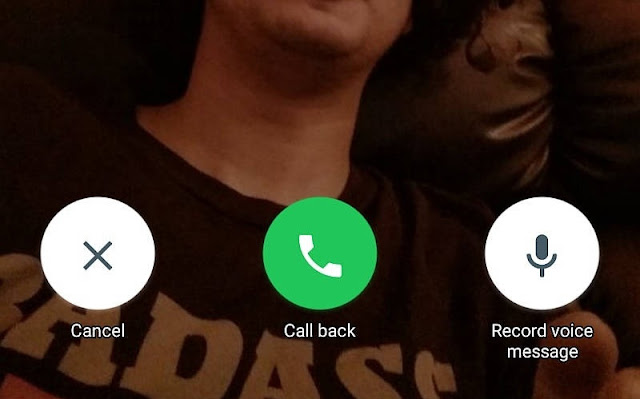
That is exactly what Voicemail is coming to fix in Whatsapp. Thanks to it, you can now leave a voice message when a Whatsapp call to a user is not picked or answered, as opposed to the norm of leaving a text message in the same situation.

How to use the Whatsapp Voicemail Feature


When your Whatsapp call to a user is not answered, you will be presented with three options: Voice Messages, Call Again and Cancel. You already know what the last two options are used for, it's the first one we're concerned about here.


To utilise the Voicemail feature after a Whatsapp call is not answered;
  • Select the Voice Messages option from the three options.
  • Tap and hold the Voice Message button to start recording your message (voicemail).
  • When you're done recording your message, release the Voice Button button to send it, or swipe to the left to trash it and record another.

The message you record would be sent to the user as a voice note (VN). Considering the series of new features that are being released to Whatsapp almost weekly, the Whatsapp Video Call feature that has been in the rumour mills for some time doesn't seem to be far from us anymore.

Wednesday

"Save Draft" function for Photo Editing might be coming to Instagram soon

A new phenomenon on Instagram has suggested that a "Save Draft" option for photo editing may soon come to Instagram. Towards the end of last month July, some Instagram users began to get the option to save their work as draft after pressing the back button while editing photos in Instagram.


Here are some joyful tweets by lucky users who have gotten the feature:


And many more got theirs this month:
However, when Tech Crunch reached out to the Instagram company, they confirmed that it was just "an experiment for the time being".

We’re always testing new ways to improve the Instagram experience was all an Instagram spokesperson had to say concerning the Save Draft feature.
Even though this might truly be a test and nothing serious, considering the level of joy users exhibited concerning the feature, Instagram might just rethink and decide to fully integrate it into the app. That is left to be seen, after all, all we can do is watch.

Google Maps for Android now allows you to save offline map data to external SD Card


The latest update to Google Maps for Android smartphones is bringing two new features that might interest two different categories of smartphone users: the rich and the poor.


The first new feature is the ability to switch to using only Wi-Fi connectivity for location navigation. This comes handy in situations where you come across a free Wi-Fi network while navigating with Google Maps, and you want to save your mobile data.

To use this feature, simply grab the latest update on the Google Play Store using the button at the end of this post, slide to your Settings Menu and check the place where you would normally find Offline Areas; it has been replaced by a Wi-Fi Only option, which you can enable to stop using your cellular data and load your navigation data through Wi-Fi. This feature may excite those who have the capacity to purchase Wi-Fi data bundles.


Product Manager for Google Maps, Amanda Bishop describes a scenario in which this feature is useful in a blog post:

We’ve all been through this -- whether in our own backyard or a different country. You need to get directions, but you don’t have service. Or you do have service – but it’s spotty – so you find yourself staring at the map in a perpetual state of loading while you sit in your car waiting to find out which way to go. Now, when you know you’ll have spotty service or just want to save on data, you can toggle to “Wi-fi only” to use Google Maps entirely offline on Android.

The second new feature in Google Maps for Android allows you to download location and navigation data for offline areas to your SD card instead of the internal storage. This is particularly useful for those using low-end and mid-range smartphones that possess meager amounts of internal storage.

With this feature, you can now kill two birds with a stone; save for the rainy day when you have abundant megabytes for browsing by downloading map data for your frequent locations to your phone for offline use, and salvage the internal storage on your phone if you have an external SD card. Users of high-end smartphones with ROM capacities of 64GB and upwards won't be too concerned with this.


Amanda Bishop also described a scenario in which this is useful:

Entry-level smartphones come with internal storage capacities as low as 4GB, while higher-end models range between 8GB and 32GB. For many of us, that’s not enough for all the videos, music, apps, and photos we cram onto our beloved smartphones. To ensure that Google Maps users with any storage capacity can download and use offline areas when they need them most, we’ve added the ability to download your offline areas to an external SD card (if your device supports them) on Google Maps for Android. Now you’ll never have to choose between snapping more food photos or the ability to navigate offline.

To enjoy these two new features, you have to update your Google Maps to the latest version. Grab it in the Play Store using the button below.

Sunday

Download Prisma for iOS and Android and Turn your Photos to Artworks

There is a new app on the Play Store, and no it's not Pokemon Go. It is a photo filtering app called Prisma that has been available on the App Store for iPhones for a few months back, and has finally been brought over to Android users.

The difference between Prisma and the other numerous photo filtering apps that abound on the Play Store, is that it completely rebuilds a picture based on the filter applied to it.

The app works not by just overlaying the filter on top of the image, but it reconstructs the image from the ground up to create a new photo that essentially embodies the applied filter.

With the type of technology utilized by Prisma, photos of any kind and size can now be transformed to look like pieces of artwork by famous artists, with the use of some filters specially designed and included in that regard.

Here are some photos after being worked on by Prisma on Android and iOS.

Wale Adekile - Geek.ng


Ifediri Dominic - Editweaks.com


If you are still not convinced about how good this app is, and how popular it has become since its release(s), here are some statistics. Since the app was released on the App Store for iPhones in the early days of the summer, it has raked in over 10million downloads and over 400 million pictures have been filtered and edited by the app, according to a report by The. Verge.

Also since its release on the Google Play Store some days ago, the application has garnered about 5 million installs on the Google Play Store.

Even though Prisma is a free app requiring no purchases before installation like many other smart filter apps, it doesn't diminish user experience by showing ads everywhere possible in the app. This shows that the developer of Prisma cares about its users, also evident in the cool and easy-to-use User Interface of the app.

After filtering photos to your satisfaction, you can easily share them to popular social media platforms Facebook, Twitter and Instagram. Prisma possesses full integration into these sites.


To view the app in action, watch the below video review of Prisma by Youtube Channel iUpdateOS.


. Have you used the app? What do you think about it? Please share.

Tuesday

New Google Play Store Algorithm Bsdiff makes app updates faster


The Google Play Store is the one-stop location for all users of Android, especially those who love and use a lot of apps. While downloading the apps and using them may be exciting, the process of updating the apps at regular intervals is often a pain in the neck.

Some apps, in fact, almost all of the major and most-downloaded apps in the Google Play Store are updated at least once monthly, which further compounds the update problem. Those to be pitied most in this situation are those who play heavy games like Grand Theft Auto, The Walking Dead and EA Real Racing. The apps possess extension files and APKs that are always larger than 2GB, and updating them could last forever.

Google has now rolled out a new algorithm for updates in the Google Play Store to fix this problem. In the event of an app update via the Play Store, the algorithm called Bsdiff will compare the installed components of the app being updated, to the new components available in the update installation file (APK), and will only deliver these new components to the app in the update, as opposed to the former algorithm which downloads the whole new APK and re-installs it.

According to Google, the new algorithm reduces the size of app updates by up to 50%, since it only delivers a patch to the existing app components.

To this end, Android App Developers have been advised by Google to decompress native libraries in their apps, in order not to hinder the smooth performance of the Bsdiff Algorithm.

Now, when you view installed apps in the Play Store, you will see a new Update Size listing along with the other application listings, which shows the size of the app update, if available. If it's a new app being viewed, the actual Download Size will be seen in place of Update Size.

Friday

WhatsApp is Ending support for Blackberry, Nokia, Android and iOS devices

As at now, there are one billion people using WhatsApp, performing about 100 million calls a day, some will be among users of the devices about to be removed out of their service as it's been announced on their blog, "We will soon be ending support for certain devices. At the end of 2016", Whatsapp will no longer support the following platforms:


  • BlackBerry, including BlackBerry 10
  • Nokia S40
  • Nokia Symbian S60
  • Android 2.1 and Android 2.2
  • Windows Phone 7.1
  • iPhone 3GS/iOS 6


According to the WhatsApp team, it was a tough decision they had to take cause things are changing really fast and they said "we're putting an even greater emphasis on security features and more ways to stay in touch with the people that you care about.


These platforms listed above don't offer the kind of capabilities we need to expand our app's features in the future. If you use one of these affected mobile devices, we recommend upgrading to a newer Android running OS 2.3+, a Windows Phone 8+, or an iPhone running iOS 7+ before the end of 2016 to continue using WhatsApp.
Once you have one of these devices, simply install WhatsApp and verify your phone number on the new device to continue using WhatsApp. Keep in mind that WhatsApp can only be activated with one phone number on one device at a time."

There is currently no option to transfer your chat history between platforms. However, we provide the option to send your chat history attached to an email.
People using those devices about to be cancelled had started getting the notification about this already.

Top 10 of the Best Legal & Law Apps for Android

When you visit the Google PlayStore for Law and legal Apps, you will surely find a wide variety of of them. There are also the very good apps for lawyers and students out there, the best ones you can use for your legal research, case management, trial preparation and billing, whether you're a professional or student in the faculty of law.
Best Legal & Law Apps for Android
Although PlayStore has a very good number of these Legal and Law Apps, we had to take some time to dig out some of the best you can try out.

Note however, some are free and others are paid or offer in-app purchases.

Sometimes, Google PlayStore just repackages freely available content such as codes and statutes and we tried to put them in the list probably because they somehow provide some sort of added value, like the ability to annotate.

Below are top 10 of the Best Android Applications for Lawyers, Law Faculty and Law Students you can try out:

AgileLaw
Free, but requires an AgileLaw account. Install this app on your iPad, hand the iPad to the deponent, and navigate through the deposition without ever using a printed exhibit again.

Bloomberg Law
Free, but requires current paid Bloomberg subscription Follow news, litigation, and market information related to clients and prospects. Receive alerts for legal and news searches. Ability to share documents via email.

CaseSync
Free, but requires a subscription to CaseSync Pro desktop. Mobile version of case management software. Features calendar management, matter creation, and ability to search matters

Dike Trial 
Costs about $1.99. Much like a Calendar app designed for lawyers. Links case files to calendar pages. Search by case number, client name, or date. Ability export and import data.

DroidLaw
Free, but offers in-app purchases.
Free version contains Federal Rules of Civil Procedure, Evidence, Appellate Procedure, Criminal Procedure, Bankruptcy Procedure, U.S. Constitution. Option to purchase state codes, U.S. Code, U.S. Supreme Court opinions, CFR, Manual of Patent Examining Procedure, 2010 & 2011 Federal Register. Ability to search by keyword, bookmark, and share content. DroidLaw also has several add-on programs available in the app store.

Lawyer ON GO
$19.99. A kind of a Case management app. Allows addition and updating of clients and events. Ability to add attachments to client records. Supports dictation and speech to text. Export and import via CSV files.

Time Master + Billing
$9.99, Time tracking software allows for multiple running timers. Time entries by client with subcategories of projects and tasks. Set billing rates, use time rounding, track expenses, and create reports. Optional modules for invoicing, Quickbooks exports, and wireless sync.

ALSO READ: 6+1 Productivity Apps You really need to try out

TrialWorks
Free, but requires paid TrialWorks Case Management Software     Provides access to notes, docket, contacts, and documents that are stored in TrialWorks Case Management Software. Ability to review matter chronology and court dates and add new matters.

Legal Newsance
Free, Covers current legal news, CLE program information, legal resources, forms, and employment opportunities.

Fed Courts
Costing about $2.99
Full text of federal rules of procedure and local rules for each federal court. Access to PACER and addresses of all federal courts.

That's that about Legal and Law apps for Lawyers or every other person interested in them. Good news here is some of these Legal Apps are also available on iOS, all you've to do is go to iTunes Store, search using their names and install.

Thursday

WhatsApp is Truly Preparing Video Calling feature for users

Okay, a day before Christmas last December 2015, I published a post saying few Reasons WhatsApp Video Call Feature might be a Bad idea, but right now WhatsApp had gone ahead with preparation on new video call feature for the Chat or Instant Messenger App.


The innovation started 6 months back after screenshots of the feature leaked on iOS, this was the same period I published my opinion about it.
Around last week, users reported that a new BETA version 2.16.80 was released and they found the Option to tap a button to make Video Call although it was inactive.
Initially, Call button takes you directly place your call, but on this new update, you will find option to make either a Voice or Video Call.

The WhatsApp team is still testing things out, and from what we learnt, this update will be rolled out to Beta Testers and some Countries before eventually and gradually sending it out Globally since the team will have more amount of data to handle for billions of users after releasing the Video call feature.

Sunday

Get Apple Music Student Membership as Apple slashes Price half for Students

There are heaps of streaming music services out now and it usually isn’t simply the amount and quality of the rear catalogue that dictates that we have a tendency to subscribe to them.

Apple Music is rolling out membership that will slash prices for students in the EU. This refers to Students enrolled in qualifying universities or colleges can join Apple Music at a discounted monthly rate. To get started go here.

ALSO READ: YouTube Brings Virtual Reality To Viewers with This Amazing Video

Apple Music Student Membership


I recently discovered that in the EU (European Union) university graduates can pay a £12 Associate in a Nursingnual subscription to urge an NUS further card, which then entitles you to traditional student discounts in a form of places. One company that has utilised such a theme is Spotify, where the premium service will be signed to for £4.99 per month. Now Apple has declared a similar deal for college students, offering 0.5 value subscription.

That takes the prices right down to £4.99 a month and provides a similar service to Spotify, but there’s a difference: Apple uses a completely different system, not based on the NUS card, and instead checks that you’re an existing student. That means that the NUS further card isn’t applicable thus graduates cannot profit of the supply. Apple Music hasn’t had the best of starts, with criticisms about its style prompting rumours of a recent re-launch next month. Nonetheless, it already has a sizeable market share with 13 million subscribers, up from 11 million simply 3 months gone. Issues of the NUS card aside, would the students now be tempted to sign up for the Apple service over its rivals?

Wednesday

How to Add Card and Use Apple Pay in Canada (For iPhones, iPad and Apple Watch)

Today, Apple Pay had finally announced that its services had expanded, hence can be used by Canadians with credit cards from CIBC, RBC, ATB Financial, and Canadian Tire Financial Services.

Apple Pay is Apple’s mobile payment solution. It works with the iPhone 6s, iPhone 6s Plus, iPhone 6, iPhone 6 Plus, iPhone SE and Apple Watch. Apple Pay will not work on the iPhone 5 or iPhone 5s because it lacks the necessary NFC chip but the small good news here is it will work if you connect your Apple Watch to it.
In addition, iOS users can make in-app Apple Pay purchases with Touch ID-equipped iPad Air 2, iPad mini 3, iPad mini 4 and iPad Pro.

In November 2015, their support for American Express credit cards was launched for Apple Pay debits and had already began issueing the service across Canadians. The good news seems to have come to fulfill that criteria.


How to Add Card to Apple Pay on the iPhone and Apple Watch:

Launch the Wallet App, known is Passbook from iOS 8. This launches the Apple Pay.
You will be asked to add a valid credit/debit cardd and also asked for your Apple ID password.

However, the method for adding a card to Apple pay through your Watch is different from that on the iPhone.
So, when you pick up your phone, open the Apple Watch app, scroll down to Wallet and Apply Pay, now tap "Add" where it displays the card.

Making Payments in-Store using Apple Pay

To do this especially at a point of sale, once you reach the where the merchant presents you with total amount due, Now  enter your Finger on Touch ID, then Hold your iPhone close to the terminal. The terminal may ask you to choose Credit or Debit card. To make it faster and easier, you can simply choose a card to use as default for all your transactions in case you added more than One card in your Apple Pay.

Making Payments with your Apple Watch

Open your Apple Pay in the  watch, unlock it with your passcode, then double-tap the bottom, this will bring up list of cards/ Now place your Apple Watch close to the terminal as you'd do with the iPhone. The Watch should vibrate once payment is completed.

Tuesday

Quick Fix: VLC Audio Issues - Video Not Playing Sound For Android

VLC media player for Android and PC is a free and open source cross-platform multimedia player that plays most multimedia files as well as discs, devices, and network streaming protocols.
Although with a complete database, an equalizer and filters, VLC plays all weird audio formats but sometimes when we have some Videos or sometimes Audio files on our Android smartphones and gadgets, VLC cannot play Audio sound for it.
I use Android 6 Marshmallow, it should work on Lollipop 5.1 or lower Android OS. Here is a quick fix:

1. Update the App - Go to PlayStore and get the latest VLC for your Android

2. Change VLC app Settings - this works whether you have updated your VLC App or Not. Follow the simple steps.
i.) Launch VLC
ii.) Tap Menu >> click Settings
iii.) Scroll down and tap Advanced
iv.) Here you'll find Audio Output , Tap it and select "OpenSL ES"


Now go back and play the files (Video or song) again, it should play with Audio sound for you to hear and enjoy.

Sunday

How to Create a Video Guide from Scratch with Movavi Screen Capture Studio

One of the most effective ways to create video guides regarding anything on a computer is with screen capture, which is also possible on Android devices as seen in our previous post. By capturing what’s happening on your screen, you can literally show viewers the steps that they need to take to perform a certain task – while narrating instructions to them using a voiceover.


At first it may seem as though creating such a video would require technical know-how, the truth is that with Movavi Screen Capture Studio, it is actually rather easy due to its intuitively designed interface and features. In fact aside from the software itself, the only other thing you need is a script of sorts that details what steps you want to show, and how you want to show them.
Recording the Video Footage.

ALSO READ: How to Get Started Driving Traffic with Videos

Once you have both the software and script, you can start to record the video footage you need. With Movavi Screen Capture Studio you needn’t limit yourself to screen capture, and can actually also choose to record footage via a webcam. In some cases you may even want to use a combination of different types of footage, including some recorded with other devices.

If you do choose to record the footage via screen capture then all you need to do is set the capture frame, select the audio source, and click ‘REC’ to start recording. For video guides in particular you might want to take advantage of some of the other features that will let you display keys that are pressed on screen, highlight the mouse cursor, and set up a custom ‘click’ sound.

Editing and Polishing the Video Guide

In any case, once you have actually recorded the footage that you need with Movavi Screen Capture Studio, the only other part of learning how to make a training video is to edit and improve it. For that you can use some of the features of the software to:
  • Trim out unnecessary footage and merge clips together in the sequence required.
  • Add audio tracks to include a voiceover or background music.
  • Insert text that can be customized to create unique-looking captions, subtitles or watermarks.
  • Apply special effects and filters to stylize the appearance of the video.
  • Improve the video quality manually or automatically and correct common issues with the recording.
  • Place animated transitions between scenes of your video guide.
Between all these features you should definitely be able to polish your video guide so that it looks professional and attractive. As you experiment more with the features in Movavi Screen Capture Studio and develop a feel for them you’ll find that you’re able to apply them more effectively and really tap into their potential.

Friday

Top 11 Traveling Apps You Need Before You Head off

The days of searching for your desired locations by looking at impossible-sized maps or struggling to get info from non-English speakers are a thing of the past. Thanks to the ginormous number of traveling apps we have today, traveling has become much easier. From city maps, currency conversion, translation tools, and even weather apps, there’s plenty of ways you can make your traveling experience go with ease.
Here is a list of 11 leading traveling apps you can download today:


1. Citymapper

Cittymapper is competing with Google and Apple maps in city navigating. Citymapper uses data from public transport authorities and provides information about public transport and cycling routes. It also offers info on the cheapest and fastest ways to get to places. To date, the Citymapper app offers information for 29 cities worldwide.

2. AlpineQuest GPS Hiking

For those nature-loving travelers, Google offers a large number of topographic maps perfect for those planning to go hiking, sailing or hunting. No need to worry about cell coverage; all the information from AlpineQuest GPS Hiking can be stored on your SD card for later use. Exploring the wild has never been made easier.

3. TripCase

Available for iOS and Android devices, TripCase lets you organize your travel plans in one streamlined itinerary. You can also get essential travel information with just one glance at your device thanks to this handy app. Organize your trip and keep up with the latest travel info regarding local events, restaurants and hotels with this app. Thanks to TripCase your traveling experience will seem effortless.

4. FlightTrack

You can follow the path of a huge number of international flights on the zoomable maps offered by this fantastic app.
FlightTack also provides info on departure gates, cancellations, and delays which comes in handy to the busy traveler. The app is available on iOS and Android devices.

5. TripAdvisor

Don’t trust online travel agencies anymore? TripAdvisor offers honest reviews from fellow travelers of hotels, vacation rentals and restaurants. It also offers price comparison which is a great way to manage your expenses. The app is available on iOS and Android.

6. SkyScanner

Plan and book your flights with this leading global travel search site’s app. Its apps are free and have already won over more than 40 million users. The app is clean looking and even offers detailed info on price fluctuations.

7. Destinations on Google

Google has recently launched a digital travel agent app called Destinations on Google. According to latest tech news, this new app lets users “search destinations, view suggested itineraries and price their flight and hotel.” Seems like a good addition to the classic Google maps app.

8. WeatherPro

Of course, when you’re getting ready for your big trip you want to know the weather conditions of the area you’re heading to. WeatherPro is pretty accurate in offering detailed weather reports. This is definitely a perfect tool for the outdoorsy type. Don’t know what to pack in your suitcase? Check out the weather in this app and you’ll be sure to not carry unnecessary attire.

9. XE Currency

With more than 5million downloads, this accurate, up-to-date currency conversion app will help you keep a track of your spending. The app is clean-looking and easy to use, but most of all, reliable. It is available for Android and iOS users.

10. Time Out

The Time Out app is a great planner and travel guide that offers advice on the best places to wine and dine. You’ll get the latest info on local events and make sure to not miss out on anything on your travel weekends. Time Out is a growing app, offering in-depth info on a large number of cities each day.

11. Google Translate

Oldie but Goldie, this app helps you have easier communication with locals overseas. It can also translate road signs using the scanning mode. With this handy app, you’ll be sure nothing is lost in translation. It can also come in handy at local restaurants that don’t have English menus, just scan the menu and you’ll be able to pick and choose local meals.

ALSO READ - Bloggers, Journalists, Artists... How To Add Watermarks to your photos with PicsArt for Android

Conclusion:

Travel apps are handy tools that will probably take up the space of your phone on your holidays. The digital travel market is ever growing with a worldwide worth of $450 million in 2014. Almost half of all travelers are planning and organizing their trips on their phones and for good reasons also. Apps are a handy and convenient way that makes traveling easier with each new invention.

References:
https://www.glozine.com/technology/gadgets-technology

http://www.wearabletechdigest.com/latest-stuff

This is A Guest Post contributed by Katleen Brown,
Katleen is a content writer. She loves to publish her articles on various technical related websites. In her spare time, she likes to do research and writing articles to bring awareness. She is working as Communication Practitioner and Technocrat Expert Writer. Advocating all types of technical professionals. Connect with her on Google+, Pinterest, and Twitter.

Sunday

Android N: Newly Added Feature Will Make Sharing Easier & Faster

It's really nice how Android made sharing seamless across its operating system over the years. We know on previous Android OS versions, (around 4.2 Jellybean to the recent Marshmallow 6.0), we always had been seeing the same ways of sharing Files or data, the standard "share" command and its collection of APIs allows for easily getting content sent from one app to another.

A practical example is using my Android Kitkat device when I want to Share a file, you Tap the "Share" icon and see a list of Apps you can use to share it.

Looking at my screenshot below, my device (running Android Kitkat), there are quite too many Apps on the list using that Share function, I am sure only few are relevant to me when sharing stuff.


Android N has a little feature that makes that interaction much more user-friendly now: Share apps can now be pinned to the top of the cross-app menu.
With this, even if you have installed plenty apps that have Share function, you don't have to scroll too much to find the App you want to Share to.


Pinning Share Apps: To pin share apps is also easy, simply open the Share Menu from any App (like when you're sending a file), the list of apps will come up, just press and Hold any of the apps and select "Pin".
After you Pick and Pin any app, it will stick at the Top for you to quickly use it when sharing content. To Unpin any app, long-press the app to have it removed.

Tuesday

6+1 Best Productivity Android Apps in 2020 You Really Need To Try Out

When you launch the Google PlayStore and check for "the best Productivity Apps" you will find a wide selection, in fact hundreds of them this 2020: Adobe, Google Drive, Dropbox, PDF viewers, etc, these apps are everywhere but there are still some unique ones you'll see and feel "If only I knew this app a long time before now".

We'll recommend such Apps for you today, the aim of the Apps remain to help everyone increase their productivity or carry out daily tasks in very easy unique ways.
I have personally tried most of them, they work great.
In descending order, here are 6 +1 Productivity Apps You may Not know but You Really Need To Try Out.

6. ColorNote


This app's layout should remind you of StickyNote or NotePad on your PC. ColorNote is a simple yet powerful app for drafting your daily write-ups and texts instantly.
Unlike Google Keep (which uses internet/cloud backup to Sync Notes), ColorNote is straight to the point.
With it, I quickly write random stuffs that pops out of my head so I don't forget later. You even can create a Checklist or Texts of unlimited words any time.
DOWNLOAD HERE

5. Sunrise Calendar

Honestly, I find most Pre-installed Calendar Apps boring, it takes me so much time to understand and figure out how to arrange my activities with them, till I found Sunrise calendar, see, I like things "simple" even if they can be sophisticated, and I bet you should too.
MicroSoft innovated the App, it's one of their most useful mobile Apps after Outlook. Sunrise calendar is far easiest and help you Schedule your activities and reminders in one place without tapping your phone's screen too much.
DOWNLOAD HERE

P.S: Microsoft might be killing this app soon. They're integrating it all into Outlook, so if you have the APK (current version) which is better, keep it.


4. Snowball - Smart Notifications

As long as Android is concerned, notifications are always hanging around, Snowball turns your notifications into much more than just an alert. With this app you'll be able to respond to many different types of notifications without having to launch the actual app they're coming from.  It's configured according to your own priorities with the most important notifications at the top. You should get this one if you receive too many notifications.
DOWNLOAD HERE


3. Chromer

Most popular Apps such as that of Facebook, Twitter amongst others usually come with in-built browsers also known as System Webview. Take for example when you click a link from Facebook app, it opens the link and views the page using the Facebook app's system webview right? Many other apps also do this, the big problem with system webviews is that they don't keep any records of your Logins or anything, this means frustration when you have to Log in to such websites over and over again, Chromer has come to change that. I use it to force open external links on Google Chrome from any App, at least I am sure viewing external links with Chrome Browser is way better, instead of System Webview.
DOWNLOAD HERE


2. Milanote

This Milanote review is definitely a needed one, I was impressed with the product and how it improved my work. Initially, for my note taking on PC, I had been using EverNote all these years until I recently discovered Milanote.

Milanote is an advanced coolest version of Notes App, it's a whiteboard app that helps me to gather notes and organise my work better, you can even invite and collaborate with other people or your team to work on a project remotely.
The User experience is so simple yet very useful and has lots of rich tools.

Milanote's easy-to-use drag-and-drop interface lets you collect and organize every part of your creative project in one place—images, notes, links, files, videos and tasks, side-by-side on an infinite virtual canvas.

It's just like working on a wall in a creative studio. You can arrange your inspiration into a beautiful moodboard, add notes explaining your ideas, get feedback from a client or map out tasks on a project—all in one place.
The app is available for use on Mobile and Web or PC

DOWNLOAD MILANOTE APP

Check out Milanote on Web or PC

Milanote review

1. Tiny Windows (MultiWindows)

Another simpler way to handle multi-tasking had been provided by this App, this app tiles your running apps in a way stickyNotes do on your Windows PC, with Tiny Windows you can resize, move your small apps, to use and work on them at the same time. It's most effective on devices that have large resolution screens.
DOWNLOAD HERE


 +1 - Your Turn...

Over to you, we are making your app our +1 to add on the list.
You can tell us the Productivity Apps you use or share with us which Apps from our list you'll try out, Comments are open.