Showing posts with label Google. Show all posts

Tuesday

Google Assistant Screen Search not working? Here's a fix

Here's A Quick Fix to Google Assistant Screen Search not working - Google Assistant has many uses related to searching for and finding out information, one of which is to find things on the internet related to what is currently displayed on your phone screen. This feature, called Google Assistant Screen Search, was first introduced as Now on Tap in the days of Google Now. The feature hasn't been working properly of recent, with many users (including me) getting a Nothing found on screen result. In this article, I'll show you how to use the Google Assistant Screen Search despite this bug using a workaround.

To use the Google Assistant Screen Search feature, you have to start Google Assistant (by long-pressing your phone's home button or manually launching the application) and tapping the What's on my screen? button. However, when I tap the button immediately after launching Google Assistant, I get the following result:


This is not a one-time glitch. It happens over and over again and is probably a bug in the latest update to the Assistant app. There's currently no fix for it, but there's a workaround, and it's not by clearing the cache and data for your Google app, uninstalling and reinstalling the Assistant application, or installing the beta version of the app. It takes a simple thing: patience.

When you launch Assistant, wait for around 3 seconds before tapping the What's on my screen button. If this doesn't work for you, wait until the four dots at the bottom of the screen turn into a microphone before tapping the phone, and the feature should work properly.


We hope Google will fix this soon in an update to the Assistant application. Till then, you're welcome.

Saturday

How to get the new Gmail Redesign and Features

Of all Google apps, Gmail is updated less frequently, and even when it's updated, the changes are not that much. That has changed now as Google launched the biggest updates to Gmail some days ago. This includes some changes in the UI and a lot of changes in functionalities.


This article covers how you can start using the new Gmail right now, and the new features that come with it.

How to Enable the new Gmail

It's easy. Just click on the Settings icon in the top right corner of Gmail and select Try the new Gmail, follow the prompts and you're good to go.


Looking for a "Settings icon" in the top right corner of your Gmail mobile app? Oops, you won't find it. Most of these new features are only available on Gmail for the web, and only about two are ported over to the mobile app (the features available on mobile will be indicated below).

But should you try out the new Gmail? Is it worth it? Read through its new features below and decide ;)

PS: If you don't find the try option, relax. It's being rolled out gradually and not all Gmail users have received the option yet.

Features of the new Gmail

Floating Action Buttons

You no longer have to open your email to perform actions like Archive, Delete, Mark as Unread and Snooze. When you hover your mouse over an email, the buttons for these actions will appear and you can perform them right from your Inbox folder.


Of course, you can still perform these actions on an email while reading it. All except Snooze.

Wait, what the hell is Snooze?

Snooze Emails

Google has added the ability to snooze emails right from the inbox with the new snooze action button. You can choose the duration for which your emails are snoozed from a preset list ranging from Later in the Day to Some Day, or specify a date and time yourself.

Nudges and Smart Replies - Google AI


Google has incorporated some of its Artificial Intelligence into Gmail. The service now uses AI to determine if an email is important to you, and brings it back to the top of your inbox if you've not read or replied it after some time. This most times means all emails you haven't replied to.


Google has also brought over Smart Replies from the mobile app to the web. Smart Replies uses AI to present you with some reply phrases you might want to use to quickly answer a mail.

Confidential Mode


This mode prevents your recipient from forwarding, downloading, printing or copying/pasting the content of your mail. You can also set an expiry date for your emails.


If the email is that much of a security risk, you can add two-factor authentication and have your recipient provide a Google-generated passcode (sent via SMS) in order to read your message.

Unsubscribe from Newsletters

Once Google notices you haven't read a newsletter for a long time, it automatically suggests that you unsubscribe it. From there, you're just one tap away from unsubscribing. Not huge but useful for those of us who are subscribed to many newsletters and find it hell organizing our inbox as a result.

This is also available in an update to the Gmail mobile app, along with high-priority notifications (for the most important emails).

Integration with Google Apps


If you're neck-deep into the Google Apps ecosystem, the new Gmail takes you an inch deeper. It comes with a right sidebar that allows you to use other Google apps. It comes with Calendar, Keep and Tasks by default, but you can add other Google Apps as well as any Gmail add-on.


You can switch back to the old Gmail by following the same procedure that brought you to the new, though I'll have to ask what planet you are from if you choose to do that.

So, how do you feel about this Gmail revamp? Share your thoughts in the comments section. 

Monday

Why You are seeing Traffic Referrals from Blackhatworld and Motherboard.Vice.com on Google Analytics

So recently, I started getting and seeing strange referral traffic from Blackhatworld and Vice.Motherborad.com and it's been going on for the past 5 days. When I looked into my Google Analytics. Going further to investigate, I wanted to know the particular page's URL that was referring that traffic on my Analytics, I clicked - Real Time >> Content and found this URL -
motherboard.vice.com and now, blackhatworld
Still I went further and picked up the second URL -
www.blackhatworld.com/seo/this-guy-not-one-f-ck-given.897424/

Someone Spammed Google Analytics, a Russian man precisely...

Upon visiting that URL, I realised from thread that I am not alone, millions of other web masters viewing their Google Analytics are seeing the same thing, someone had spammed Google Analytics, a Russian to be precise and funny he was doing it to show his support for Donald Trump.

The alleged Motherboard spam. It's not us. Image: Paul Anthony / Twitter


Although last month, As Analytics Edge reported in November, websites have noticed referrals from lifehacĸer.com and ɢoogle.com. Check those URLs again; they are not the real Lifehacker or Google domains.

To be clear, this is not anything that VICE or Motherboard is doing. Instead, someone is including a link to the article in their own Google Analytics spam, and seems they had even added Black hat's article to the spam sites.
The likely explanation is Google's “Measurement Protocol,” which allows developers to send data directly to Google Analytics servers. It looks like the traffic is coming from Motherboard, but, in reality, it's not.

Why did He do this?

As you have read in the headline above, it was to support Donald Trump, the Google analytics Spammer wanted the loads of traffic and wanted all the fame and glory on his own Name, his name is VITALY POPOV, we also found out he wanted revenge on Google for blocking his AdSense account some years back.

We had learnt that this is a temporary issue as Google Spam team is looking into it already.

Although there are controversies surrounding his name due to the fact that someone had bought a domain bearing the spammer's name - vitalypopov.com
The man promised to direct the domain where ever the Spammer wants if Only he agrees to stop Spamming Google Analytics.
At the moment of publishing this post, the domain is only redirecting to UrbanDictionary's page that is carrying description of A**Hole.

Friday

Meet Google Phones: Pixel & Pixel XL | Price, Videos, Release Date and More

Month of October is near and Google is set to launch its own manufactured replacements of Nexus mobile smartphone into the market known as the new PIXEL phones. It will arrive in 2 variants, Google Pixel and Pixel XL. The release date for both of the devices had been scheduled for October 4th, 2016.
Although, phone case makers had already produced and started selling out cases for the new Pixel phones that replaces the Nexus phones starting this year onwards - on several e-commerce websites including Amazon, and in the process ended up revealing the designs of both the devices.


Pixel and Pixel XL Design

There are confirmed talks that both variants resembles the iPhone 6 and the HTC One A9 as it housed in aluminium bodies and sporting unduly rounded edges although the edges look very premium and different from many other devices.
 Users are sure to have mixed views about the body design, with its iPhone 6 look, but other people would still not fee anything exciting about it. The pure-Android Google phone "Pixel" is said to come with thick bezels that no phones released in 2016 had featured before. More exclusive stuff on the Google's phone like the Nexus 5X and the Nexus 6P, the impending smartphones will come with rear-mounted fingerprint scanner.
Overall, the Pixel and Pixel XL seem to sport same design, their body sizes are only thing that varies.


Google Pixel And Pixel XL Release Date

The much anticipated Google's Android phones, the Pixel and Pixel XL will be announced on October 4th, 2016 at an event in San Francisco.


Google Pixel And Pixel XL Price

We are yet to confirm the cost of Pixel branded smartphone but is likely to hit the store shelves with a slightly higher pricing.
Google announced its flagship Nexus 6P last year at a starting price of $499, and if rumors proved to be true, the price could be quite higher this time for Pixel and Pixel XL.

Google Pixel And Pixel XL Specifications Appear on Geekbench; Benchmark unveiled

The Pixel and Pixel XL (previously dubbed as Nexus Sailfish and Marlin) had appeared couple of times on several blogs that unleashed its benchmark.
According to Rolan Quandt on Twitter (@rquandt). He discovered the benchmark listing revealing that the Pixel XL variant will run on Android 7.1 Nougat and will be powered by an octa-core processor from Qualcomm clocked at 1.59GHz.
The Pixel XL scored 4176 points in the multi-core test and 1561 points in the single-core test.


Google Pixel And Pixel XL Video review

Pixel (sometimes called Nexus) had shown up on YouTube by TechRadar:
Watch below.


Nexus/Pixel/Pixel XL: Everything we know right now.

Tuesday

How to Enable or disable Google Chrome Material Design on Windows PC

Some people might feel a need to want to change back to former design on their Chrome by disabling the recent Chrome's Material design, this post is here to show us how to go about it.
If you use Google Chrome as your major browser, you must have received an update and become aware that there's now a NEW design on the browser known as Google's MATERIAL DESIGN.

The latest version of Chrome is CHROME 53, and it's basically appearing uniquely different based on Material design from and by Google.


But, What is Material Design, on Google Chrome?

For Chrome browser, Material design means Chrome 53’s user interface is flat, and some icons have changed. For some time now, several companies, Microsoft most notably, had brought a complete visual refresh to normal classic Chrome layout via their MicroSoft Edge browser if you look very very well.
Material design on CHROME includes changes like introduction of a Dark Incognito theme, sharp edges of tabs, hamburger menu changes to 3 dots, redesigned pages for Downloads & Extensions, etc. It offers a mouse optimized layout – and the Hybrid layout offers a more spaced-out experience suitable for touch devices. The changes may not be obvious to the eye, but rest assured, they are there.

But fact remains that not everybody may like this, you and some other people may already be used to the previous look of your Chrome, use the steps below:

How to Enable or disable Google Chrome Material Design on Windows PC

To change or revert back to your original design on Chrome 53, in your address Bar type chrome://flags into the address bar.

2. After that, Press Ctrl+F, type “Material Design”, the press Enter.
3. Now, you will see a setting Material Design in the browser’s top chrome. Change it from Default to Non-Material, restart the web browser and everything should be back to normal. There’s also an option that says Material Hybrid – it is meant for touch-enabled layout.

For those who love the Material design already, perhaps you'd prefer to see it throughout the entire web browser, not just some aspects of the user interface. You can achieve that.

Still on same settings:


Below the option in YELLOW, “Material Design in the browser’s top chrome”, there’s another option known as “Material Design in the rest of the browser’s native UI”. Click Enable and it should extend the –top-chrome-md setting to secondary user interface.

More flexible features can also be likely unlocked when you go to the  chrome://flags Settings. Note however, that tampering with that it may cause issues with your Chrome browser.

Thursday

How to Unlock a Chromebook with a simple PIN code

"Google now allows users to unlock Chrome OS with a PIN code and this will definitely come handy for touch devices", Google developer François Beaufort wrote.
The initial usual way of authenticating and safeguarding your Chromebook was to pair it with your smartphone to unlock your Chromebook device, but now a new fresh feature is on the test by Google on Chrome OS, this will enable users to be able to unlock their Chromebook with a single PIN.

Google developer, François Beaufort says the "Quick unlock" settings will soon be introduced in the regular Chrome settings page.


Here is an Easy Guide to set up the new function to unlock your Chromebook using just a PIN on Chrome OS:


1. Enable the flag - chrome://flags/#quick-unlock-pin

2. Restart Chrome

3. Head over to the Chrome Material Design settings page to set up your unique PIN for the Lock Screen feature

4. Under the new "Screen Lock" section, set up your unique numeric Lock Screen PIN

5. Finally, lock your screen with [magnifying glass key] + L

6. Now try out your new "Quick unlock" feature and unlock the Chrome OS using your new PIN code.
"This is a good move in the right direction," one user commented on the post. "However, I think that this PIN lock feature should be expanded to also include passwords. So the password is not linked to the Google account but a separate password just for the device."

Friday

Introducing Google Play Family Library: Share purchased content with friends and family conveniently

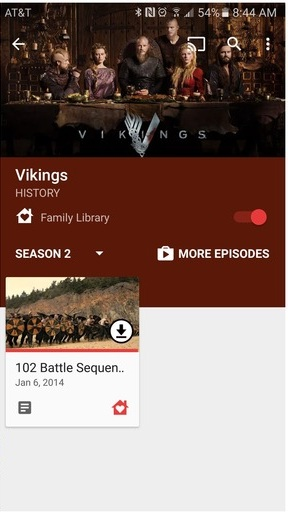
A new feature has been added to the Google Play Store, and it's called Google Play Family Library. It is a feature that allows you to share paid content (apps, books, video, audio, games, etc) purchased on the Google Play Store with family members without having to re-purchase it, and easily at that. The feature was supposed to be launched in July, and considering that the App Store for iOS already had a similar function since about two years ago, it's about time it got to Android users.

So how do I create my own Family Library?
Don't worry, in this article, I will guide you thoroughly on the steps you need to take to create your own Google Play Store Family Library and start sharing your purchased content to loved ones to use for free. Read on.


STEPS

1. Sign Up


As you should have guessed already, you need to have a Gmail account to even have access to this feature at all. Once you are signed in to your Gmail account, you can sign up for the Family Library in two ways:
  • Through the Google Play Store app on your Android device. Open the app, go to Account >> Family, and tap on Sign Up.
  • You can also register using a web-based browser. Head over here to get started.

2. Add Payment Method


You have to add a credit card with which payment for all paid Google Play content purchased by any beneficiary in your Family Library would be made. For every purchase made, you will get an e-mail with details about who is buying what. Don't worry, you can set limits so that indiscriminate purchases are not made with your card. More on that later in this article.

3. Add content to the Family Library


If you've been making purchases on the Google Play Store prior to this time, you can choose to add those paid content to the Family Library so that other family members can download and use them for free. You may not want to share everything you've bought with the family (you know, teenagers-only stuff, or things that kid must not see!), so select I'll add them later, one by one.


However, you could be the type gunning for a non-existent Top Google Play Spender of the Year award, and have purchased a lot of stuff that you can't start adding them one by one. Simply choose Add all eligible purchased items and click on Proceed.

4. Add your desired Family Members


After sorting out what you want to share and what you want to keep private, it's now time to add the loved ones to share your purchased content with. You can only add individuals who have a Gmail account, are members of your family, live in the same country with you and are of age 13 years or older. You can add up to five beneficiaries.

To do this, type the name of the contact in the Add Recipients text field. A list of your frequent contacts is shown, and when you type names in the text field, suggestions will be shown so you can add contacts faster.
The contacts won't be added straight away; invitations would be sent to their e-mail addresses, and when they accept you will be notified via e-mail.


Each family member that accepts the invites will now have a new FAMILY LIBRARY section under My Apps and Games where they can see all the content you have added, and from there they can download them.


After that, every paid content that can be added to the Family Library will have its icon somewhere near their title, so you know whether you want to share it with the family or keep it to yourself.


4. Tweak your Settings

Now that you've added your family members to your Family Library, the next thing to worry about is your credit card and your privacy. Your credit card because everyone in the Family Library can make purchases on the Google Play Store with your credit card, even if they don't have access to its pass key. Your privacy because everything you buy will be made available to them all for free.

Thankfully, Family Library has a Settings menu where you can apply restrictions and control the content that the other members get, and the purchases they can make with your credit card. One thing to note is that each family member can still make purchases with their own credit card, so if you have someone who can conveniently purchase stuff on their own, kindly ask them to refrain from making purchases with your card.

To change all these, locate the Family Manager Settings menu. One of the settings you can customise is:
  • Require your approval before purchases are made. You will have to manually confirm approval when a family member wishes to make a purchase with your credit card. This setting can be customised for every individual in the Library, or applied generally. Useful if you have a shopaholic in the house.

  • Another useful one is

  •  Delete a family member. Has that family member been behaving naughtily? Simply delete him/her; it only takes seconds and some screen taps. Or do you have a grouse with that other adult in the family? You can take revenge without physical damages.
Though you can share a lot of things and virtually all paid content, there are still some intricate things you can't share in the Family Library.

Things you can share

All paid
  • Apps.
  • Games.
  • Books.
  • TV Shows. and
  • Individual Movies/ Movie Bundles.

Things you can't share

  • In-app purchases.
  • In-app achievements and progress.
  • Individual movies in Movie bundles. If you purchase a movie bundle, you can only share the entire bundle; you cannot pick individual movies from the bundle to share.
If you're using Google Play Music and Play Books applications on iOS, you can also partake in the family library.

What do you think about the new Family Library feature in Google Play? Air your views.

Wednesday

Google Maps for Android now allows you to save offline map data to external SD Card


The latest update to Google Maps for Android smartphones is bringing two new features that might interest two different categories of smartphone users: the rich and the poor.


The first new feature is the ability to switch to using only Wi-Fi connectivity for location navigation. This comes handy in situations where you come across a free Wi-Fi network while navigating with Google Maps, and you want to save your mobile data.

To use this feature, simply grab the latest update on the Google Play Store using the button at the end of this post, slide to your Settings Menu and check the place where you would normally find Offline Areas; it has been replaced by a Wi-Fi Only option, which you can enable to stop using your cellular data and load your navigation data through Wi-Fi. This feature may excite those who have the capacity to purchase Wi-Fi data bundles.


Product Manager for Google Maps, Amanda Bishop describes a scenario in which this feature is useful in a blog post:

We’ve all been through this -- whether in our own backyard or a different country. You need to get directions, but you don’t have service. Or you do have service – but it’s spotty – so you find yourself staring at the map in a perpetual state of loading while you sit in your car waiting to find out which way to go. Now, when you know you’ll have spotty service or just want to save on data, you can toggle to “Wi-fi only” to use Google Maps entirely offline on Android.

The second new feature in Google Maps for Android allows you to download location and navigation data for offline areas to your SD card instead of the internal storage. This is particularly useful for those using low-end and mid-range smartphones that possess meager amounts of internal storage.

With this feature, you can now kill two birds with a stone; save for the rainy day when you have abundant megabytes for browsing by downloading map data for your frequent locations to your phone for offline use, and salvage the internal storage on your phone if you have an external SD card. Users of high-end smartphones with ROM capacities of 64GB and upwards won't be too concerned with this.


Amanda Bishop also described a scenario in which this is useful:

Entry-level smartphones come with internal storage capacities as low as 4GB, while higher-end models range between 8GB and 32GB. For many of us, that’s not enough for all the videos, music, apps, and photos we cram onto our beloved smartphones. To ensure that Google Maps users with any storage capacity can download and use offline areas when they need them most, we’ve added the ability to download your offline areas to an external SD card (if your device supports them) on Google Maps for Android. Now you’ll never have to choose between snapping more food photos or the ability to navigate offline.

To enjoy these two new features, you have to update your Google Maps to the latest version. Grab it in the Play Store using the button below.

Google adds support for Rio 2016 Olympic Games with Google Search, Youtube & Google Maps

The 2016 Olympic Games scheduled to hold in Rio De Janeiro, Brazil is fast approaching. The Games will start officially on August 5, and for those who would be unable to journey to Brazil to witness the event live, Google has come to the rescue. The consumer-friendly tech giant is introducing new features across all of its internet platforms to make it easier for sports lovers to keep up with all the action at the Rio 2016 Olympics. And for those in major countries in Africa, you can check out some brain teasing Quiz that can even help you shop in the spirit of the game.


Starting with Google Search, when you search for the word "Olympics" or any similar variation of it, either in the web-based search engine or in your iOS/Android Google App, an in-depth search result that allows you to get information about the happenings in the Olympics will be shown at the top of the Search Page or the Google App, and this info can even be sorted into categories of country, sport type, event and specific athlete competing in the event.


Furthermore, the web-based Search results will let you view TV schedules for events and results of past events in more than 60 countries. And in the Google App for iOS and Android devices, you will be able to sign up for push alerts for situations when an event has been completed or a medal has been won.


Also in Search Trends, a variation of Google Search that showcases only the latest and trending events and happenings all over the world, this year's Olympics will be getting a special seat. Google will be showing unique Olympics-based Search Trends results and insights combined with data visualizations, to make sure you understand exactly what's going on Rio even without you being there.

Moving on to Youtube, the company's second most successful online product, 15 of the video portal's top video creators will be specially sponsored to the Olympics Games in Rio to give Youtubers a taste of what it would be like to be physically present there. Youtube will offer live streaming of the Games on mobile from these top video content creators, and highlights of the event will be shown from official broadcasters in more than 60 countries of the world.

Finally, some features of Google Maps like Street View will be beefed up to allow users to explore Rio and all venues in the city where Olympic events would be taking place.

OF COURSE, all these can't compare to being present live at the event, but will serve to bring the happenings of the events closer to us than ever, through technology.

The Rio 2016 Olympics Games is starting officially on August 5, so stay tuned here, because we will be bringing all the tech-related happenings in Rio to you, live in 3D ;) .

Tuesday

New Google Play Store Algorithm Bsdiff makes app updates faster


The Google Play Store is the one-stop location for all users of Android, especially those who love and use a lot of apps. While downloading the apps and using them may be exciting, the process of updating the apps at regular intervals is often a pain in the neck.

Some apps, in fact, almost all of the major and most-downloaded apps in the Google Play Store are updated at least once monthly, which further compounds the update problem. Those to be pitied most in this situation are those who play heavy games like Grand Theft Auto, The Walking Dead and EA Real Racing. The apps possess extension files and APKs that are always larger than 2GB, and updating them could last forever.

Google has now rolled out a new algorithm for updates in the Google Play Store to fix this problem. In the event of an app update via the Play Store, the algorithm called Bsdiff will compare the installed components of the app being updated, to the new components available in the update installation file (APK), and will only deliver these new components to the app in the update, as opposed to the former algorithm which downloads the whole new APK and re-installs it.

According to Google, the new algorithm reduces the size of app updates by up to 50%, since it only delivers a patch to the existing app components.

To this end, Android App Developers have been advised by Google to decompress native libraries in their apps, in order not to hinder the smooth performance of the Bsdiff Algorithm.

Now, when you view installed apps in the Play Store, you will see a new Update Size listing along with the other application listings, which shows the size of the app update, if available. If it's a new app being viewed, the actual Download Size will be seen in place of Update Size.

Google has introduced Android Skilling Program in India

Google has introduced a skilling program for Android developers in India, which is aimed at training close to two million developers in various Android skills such as End-to-end Android training and Associate Android Developer Certification.
The launch of the Android Skilling Program in India was announced just recently on the Google India blog, where it was stated that the program is in support of the recently established Skill India initiative of the Indian government, where private and public authority companies and establishments are encouraged to train India's citizens in their respective niches.


Google believes India will have four million software developers by 2018, which prompted them to quickly launch the Android Skilling program in India to capture the country's developers before other software-developing companies do. Furthermore, since just 25% of India's current developers develop for the mobile platform, the Android Skilling program aims to encourage developers to start building and developing for mobile platforms, even as majority of Indians access the internet from these mobile platforms. The Android Skilling program will focus on the following key elements:
  • End-to-end Android Training
  • Training Channels
  • Associate Android Developer Certification


Speaking about the three key elements of the Android Skilling program;

"Last year, together with Udacity, we introduced the Android Nanodegree program in India. Today we are seeing over 11,500 students across India enrolling every month. And only two weeks ago, we launched the Android Basics Nanodegree with Udacity so that we have an end to end path—from zero to hero—for Android Development without having to send all of our students to many different places to learn the prerequisites. Today we are announcing The Android Developer Fundamentals course, a specially-designed instructor-led training program that will be made available across public and private universities and training institutes of the National Skill Development Corporation of India. This in-person training will be integrated with Computer Science curricula of universities within this calendar year. The Android Developer Fundamentals course material will also be covered on NPTEL (an IIT Madras project in collaboration with the IITs and IISc) as part of its online Mobile Computing course starting July 18, 2016. The Android Developer Fundamentals reference course and all practicals and courseware will be available as Open Source to everyone for free. All details of the program and courses can be found here."

"In addition to partnering with the National Skill Development Corporation of India, we have teamed up with training partners like Edureka, Koenig, Manipal Global, Simplilearn, Udacity and UpGrad who will operate as Authorized Android Training Partners in India. We are working closely with them to train their trainers and to update their Android courseware to prepare their students for the Android Certification and a career in Android development."

"To support potential Android developer employers, we are also launching a globally-recognised, job-oriented, Associate Android Developer Certification—a performance-based exam, that will help candidates obtain entry-level Android Developer jobs in the Industry."


If you're a developer in India and you are interested in the Android Skilling program, log on to the Google Training Certification website and take the certification exam. However, you'll have to part with 6,500 INR (Indian Rupees) before you can take the exam. We are looking forward to when Google would launch a similar initiative to the Android Skilling program in African countries.

Finally, Google's Visible PageRanks Totally Gets Eliminated

Around the first day in month of May 2016, Google decided to do a final termination of PageRanks, one of its most used tool used to determine the strength of websites across its Search Engine, and since then, all toolbars that display ranks have been showing a PageRank of Zero for all websites.

Going down memory lane, we know how important this tool had been but it never got anymore update since December 2013, then in November 2014, it was confirmed that there will be no more PageRank update for the Google Toolbar, meaning no externally visible update.


What does this Mean For Website Administrators and SEOs?

From what we've known so far, Pageranks were rarely updated and had not been updated over the past 3 years, Google no longer finds it relevant, hence this action was simply to correct and avoid confusion about the meaning of this key figure for the very complex evaluation of a website. Pageranks are not the only metrics you can use to measure how valuable or good a website is.

And as a follow up from experiments and observation after termination of ranks back to Zero, the ranks of websites were not totally eliminated, at least, NOT INTERNALLY, only the visible page ranks or numbers are now gone hence most sites seem to maintain their value and position on the Search Engine after the page rank termination was carried out.

Monday

YouTube Brings Virtual Reality To Viewers with This Amazing Video

May be you are hearing of virtual reality for the first time. Let's quickly describe, in less than 5 seconds...
Virtual Reality is the computer-generated simulation of a three-dimensional image or environment that can be interacted with in a seemingly real or physical way by a person using special electronic equipment, such as a helmet with a screen inside or gloves fitted with sensors.
For a simpler understanding let's just say Virtual reality is bringing "Virtual" into Reality.


With all the rumors we had been getting and even the virtual reality products that is already available in the markets, products like Facebook's Oculus and the Samsung VR Gear, if you were at TECH PLUS 2015 that took place in Lagos mid of this year, you may have seen Samsung VR in action during one of the conferences, these are interesting and helpful gadgets we hope to share with you in our future posts someday but today, I'd like to tell us that YouTube in partnership with Apple Music and GoPro Camera (more about the camera after the video) had already implemented this and released a totally awesome virtual reality video having an artiste, to whom I am a fan of, speaking of XO's Abel, popularly known as The Weeknd, this was a video of his hit track's Remix "The Hills".


In this video, you find this guy coming out of a building, acting dizzy, but that's not the point, the interesting part is You, the viewer, can tap into the reality of that video, with the navigation button found on the top left, you can have a move and look around the whole scene. This puts you into "virtual reality" , we don't wanna say much, just watch the video below.


The virtual reality video shoot was made possible through the use of an extra-ordinary video camera GOPRO 6-camera virtual reality rig, officially called "ODYSSEY". This camera is quite very expensive, around $15,000 and it's not for everybody, only "professional content creators and producers" are allowed to get and use it, this is probably the reason why you see mighty Apple Music doing this video using the camera.

Cool stuff isn't it? Please Share or tell us what you think. :)

Tuesday

Google about to Rebrand into a New Company called ALPHABET

This news wasn't all that catchy till I came to understand that Google may be undergoing a ReBranding soonest.

Ever since it was invented by Sergey Brin and Larry Page over 11 years ago, it had grown tremendously with so many products that have attracted Billions of users now, like the Google Maps, Chrome, Youtube, and Android.

But according to Sergey Brin, the co-founder he stated "and I wrote in the original founders letter 11 years ago, "Google is not a conventional company."
And Larry Page stated - "We do not intend to become one”.

These statements are what seem to be coming to reality with Google now.
From what we had learnt and what the future holds which they talked about at the new Site's Address: abc.xyz
G - is just, for Google, other alphabets would stand for other Powerful products that they'd want to bring forward.


The new company, Alphabet, will preside over a collection of companies, the largest of which will be Google.

What is Alphabet?

Alphabet is mostly a collection of companies. The largest of which, of course, is Google. This newer Google is a bit slimmed down, with the companies that are pretty far afield of our main internet products contained in Alphabet instead. What do we mean by far afield? Good examples are our health efforts: Life Sciences (that works on the glucose-sensing contact lens), and Calico (focused on longevity). Fundamentally, we believe this allows us more management scale, as we can run things independently that aren’t very related

Larry Page had already handed-over his CEO power to Sundar Pichai, the new man who will replace Larry Page to handle control of the core search engine business as new CEO of Google

Now, Heading the new Alphabet company will be Larry Page as CEO and Sergey Brin as President.

An analyst feels the move would allow investors to assess Google’s core business more clearly while allowing Google to highlight its other assets. “It’ll give people a truer picture of the nature and specifics of Google’s core operation,” he said.

Monday

Google to Launch "Buy buttons" On its Search-result pages In Coming Weeks

The Wall Street Journal recently reported that the Search Engine Giant and company, Google Inc. will launch buy buttons on its search-result pages in coming weeks, a controversial step by the company toward becoming an online marketplace rivaling those run by Amazon.com Inc and eBay Inc. 

Image Credit: webmasterformat.com
Wall Street Journal pointed that Google will start displaying new Buy buttons when people search for products on mobile devices, according to people familiar with the launch (there were people who are very familiar with this launch from Google and they speak about it)
The buttons will accompany sponsored—or paid—search results, often displayed under a “Shop on Google” heading at the top of the page. Buttons won't appear with the nonsponsored results that are driven by Google’s basic search algorithm.

 ALSO READ - Google Domains Gives Best Fully Customised Domains at Best Prices


According to , Here's what (we think) we know:

  • If shoppers click on the buy buttons, they will be taken to another Google product page to complete the purchase. On that page, they will be able to pick sizes and colors and shipping options, as well as complete the purchase.
  • The products will still be provided and sold by retailers, rather than by Google.
  • Retailers including Macy’s Inc. are in talks with Google about taking part in the launch, the people added. (but there's been no comment from Macy's yet)
  • Google won't show buy buttons when shoppers search on desktop computers.
  • The program will start with a small percentage of the search traffic it handles.
  • The product pages where Google handles the purchases will be heavily branded for the retailers selling the items.
  • Google will let shoppers input payment credentials such as credit-card numbers one time, and the company will store those and automatically load them for future purchases on its shopping pages.
  • Google will still be paid by retailers through its existing advertising model, rather than taking a cut of the sales price of items

I had been wondering what would be the first impression after big Online Retailers (both here in our continent, and Outside) and Shoppers saw this Headline, Google is at it again with a Business product, 
is it something to worry about? OR will there be some kind of adaptation that needs to be applied by these retailers if Google eventually introduces their "BUY NOW" buttons, whatever the decision may be (I think) will depend totally on the information gathered at this period.
What do you think?

Friday

You Can Now Run Your Android Apps On Your Google Chrome for Windows, Mac, Linux, Chrome OS

Google back in September introduced the first set of Android apps for Chrome OS via its App Runtime for Chrome (popularly known as ARC) in Beta.
The First Android Apps which supported their Chrome OS included: Duolingo, Evernote, Sight Words,
and Vine
Now, the company is taking the ARC that is still in beta to the next level as it can allow Android apps to run (to some extent) on desktops.
The Chrome extension named ARC Welder is now available via Chrome Web store, and it can run (or test) any Android app within the Chrome browser.


Android Apps on Desktop

The search engine giant stresses that the new Chrome extension release is primarily focused on developers to test their apps on Chrome OS. It's worth mentioning that the while move might be targeted for developers to test the apps for Chrome OS; though it allows most Android apps to run on desktops such as Windows, Mac, Linux as well as Chromebooks.

Android Police also points out, "It runs Android software at a speed that's close to native inside of a sandboxed Dalvik virtual window."

Considering that ARC is still in beta, Google is referring to this release as a Developer Preview.

Google details how to get started steps for developers to test or run Android apps on Chrome OS via the ARC Welder Chrome extension, which unfortunately requires the apk (Android application package) file of an app. Users can find the signed-apks for most of their favourite apps on third-party hosting sites like Apkmirror. To test or run an Android app, one will have to attach the apk file to ARC Welder and launch the app.

The company also details how developers can upload their apps to Chrome's Web Store.

"In ARC Welder, click Download ZIP. Upload your ZIP file to the Chrome Web Store. And See the Publishing Your App for more details.
If you'd Like to know how to Run Your Android Apps on your Desktop, you can check out this post on Lifehacker as they have published a Step by Step tutorial on it.

There are few limitations as Google Play Services are not completely supported, which means that the apps relying on it might not run well.
"Since ARC is in beta, it doesn't support all of Google Play Services yet," Google said.
The company however has given some available APIs to fix.

At the moment, some are kind of pondering whether there's any need to have their Android Apps on their Deskop, many others feel this is yet another great Innovation for more Possibilities.

Saturday

Mobilegeddon 2015 - How Google Told Me To Be Responsive or Die On April 21st

Couple of days ago, you'd notice a change in the design of this website, picking a quality template wasn't easy but thank heavens, I made it after lots of tweaking here and there.
Most fulfilling part was Feedback I got from friends like you reading this, my new design came out successful... right?.
I had intentions of changing my blog's design this Year, honestly it's "Pretty Hard Work to make Your Blog or website Design Stand out", so I was Lazy about it Until I got A very Shocking Mail From Google Webmaster Tools on the 18th of March.

Google Webmaster Sent me the Below...


1.The straight Big Reason Why I got this mail was Because my Template wasn't Responsive as at that time 18th March, 2015.

2. Google had Already Announced a warning in their Official Webmaster Central Blog, they said and I quote
"Starting April 21, we will be expanding our use of mobile-friendliness as a ranking signal. This change will affect mobile searches in all languages worldwide and will have a significant impact in our search results."

Internet Experts came up with a name for 21st April, they now call this day - "MOBILEGEDDON", the day so many Websites will be washed-off from SERP (Google's search Engine Result Page).

So that email means if I do not Comply by April 21st, I'll be De-ranked from their Search Engine, my major Source of Traffic.

I can't imagine such Tragedy happening to me, I haven't had issues with Google before, Not with their PENGUIN or PANDA Algorithm Updates and changes, I wasn't going to let this "MOBILEGEDDON" be my first big problem with Google.
It took few weeks but I fixed it by Making this Blog Mobile and PC Responsive.
After doing the design Improvements, I quickly Ran to do the MOBILE FRIENDLY TEST
and Shazam! I passed! Issue Resolved!

Mobile friendly Test

What Can You Learn & Do from the Above Experience?

If you own a Website, or blog, please check your Mail if you have a Similar one as mine from Google Webmaster Tools, and Better Still, go to MOBILE FRIENDLY TEST and run a Test on your Blog or Website.
I had checked and helped a few friends & clients fixed theirs, We are still fixing....
Google is going to Take this very Serious, by April 21st, many Websites that are not Responsive will GO DOWN, and the Responsive One who Passed the Test will MOVE UP to First Positions on SERP.
For Example: MR. A Website and MR. B's Website talks about the same thing, it won't be a matter of whether MR. A's Content is better than MR. B, if MR. B's website is Mobile responsive, Google will place Him higher than MR. A.
Since I made design changes on my Blog's User Interface to be responsive, truth is Traffic some how Improved, so it's a Good thing, and I'll conclude by asking
Did You Use the Mobile Friendly Test? Did You Pass it? Are You already Doing something About Avoiding Mobilegeddon.

Hit the SHARE BUTTONS below, this might Save Someone's Life :)

Google Domains Gives Best Fully Customised Domains at Best Prices

As they say, Your Domain Name DESCRIBES YOU & WHAT YOU DO.
Whether you're getting a website domain for Personal or Business reasons, the Name you give your Domain is One of the First Big Steps you take for creating your Online Presence.


Google Domains has rolled something very Uniquely different from what you've been seeing on the Web, when you take a Look at some Domain Registrars like GODADDY, HOSTGATOR, AVIXE etc to mention but few, they give you Domains ending with .COM , .NET , ORG, etc.
You and I are so used to such domains, but Google Domains is giving us more than that now, with Google Domains, you can name your Top Level domains(TLD) as follows:- 
.recipes,
.clothing, 
 .business etc, there are now more options to choose from than ever before.

Their Domains (.COM) starts at the PRICE of $12USD.

Google Domains have partnered with some of the most reliable and easy-to-use website building providers on the web: Shopify, Squarespace, Weebly, Wix, and of course, Blogger. They're already helping business to create some useful Websites for their customers through those platforms, it's been very Easy.

Before now, Google Domains we strictly for Use by INVITATION, but now this had been Lifted, it's now Open for everyone in the U.S at the moment of this post.
If you're not in the U.S, simply go here to GET EMAIL ALERT immediately Google Domains becomes available in your Country.
Their Researchers have tested the beta version and opened its features for use, Google Domains includes enhanced features like:
  • Improved search and suggestion experience to help you find the perfect domain name
  • Over 60 new domain endings like .company, .florist and .coffee (view the full list with Pricing here)
  • A simple dashboard to manage your domain, website and email settings
  • The integration of Blogger so you can create a blog and easily connect it to your domain
  • The ability to quickly browse website template themes and compare the plans and features of our website building providers
  • Dynamic DNS so you can setup your domain and keep it pointing to the same computer even when the IP address changes.
 Get started today at www.google.com/domains.

This really is an Exciting News for many of us, and the cool price they started with ($12) isn't so Bad either.