Showing posts with label iOS. Show all posts

Saturday

EaseUS Review for Mac - Best Free Data Recovery software

Did you mistakenly delete something from your Mac OS X? Or maybe due to crash or some error you lost some valuable file(s) in your MacBook?
EaseUS Data Recovery Software for Mac OS X is arguably one of the best solutions to perform a successful Mac data recovery and it's Free to use.

We will do a further more explanation of how EaseUS data recovery software works for Mac OS X in this review.

EaseUS Mac Data Recovery freeware enables you to recover deleted, lost, or formatted files at the press only a few buttons.

With just three simple steps, it's enough to restore all of your deleted data on MacBook, iMac, and storage devices. The earlier you use, the greater the chance is to recover.

Recovering Mac Files with EaseUS

EaseUS free data recovery software recovers deleted and formatted files for Mac. It can be applied to repair and restore photos, videos, music files, emails, documents, archived files, and more: 200+ file types are supported.

How to Recover Lost Data and Ensure Hard Drive Recovery on Mac OS X

Here is the simple guide on how to perform a Mac data recovery which will Recover lost/deleted files, photos, videos etc on Mac OS x with EaseUS data recovery software.

STEP 1: INSTALL
Download and install the program, then launch it on your Mac computer. It's completely safe and will never cause any damage to your drives.


STEP 2: LOCATE AND SCAN
Select the disk/partition where you lost data, click 'Scan' to start file scanning.


STEP 3: PREVIEW AND RECOVER MAC DATA

Filter scan results, preview and recover data


There you have it. We just recovered lost Mac Data using EaseUS, with just few clicks, it works very fast, it’s efficient and has proved to be a lifesaver to so many Mac OS X users all over the world.

Wednesday

Pros and Cons of Mobile GPS Tracking

Pros and Cons of Mobile GPS Tracking

Innovation in mobile phone tracking technology allows business owners and parents to track the whereabouts of their employees and family members, at any time of the day. However, this tech presents a double-edged sword that features benefits and drawbacks. Let’s analyze the pros and cons of implementing tracking technology in your life, and that of your employees and family.

Find a Lost Device

The most significant advantage of mobile tracking technology is the fact that you can find a lost, stolen, or misplaced device. All you need to do to find out the location of the phone or tablets is log onto an app like GPS–Handy Orten and execute a search command. The app pinpoints your device with outstanding accuracy providing you with the location history


Keep an Eye on Family Members

Concerned parents can use a third-party tracking app to keep an eye on their children. If your child exhibits irrational behavior and you’re worried about what they’re getting up to a tracking app can provide you with peace of mind.

The app tracks their movements and gives you a complete history of where they’ve been during the day. There’s no more getting away with skipping school or telling you they’re going to the movies when they’re going somewhere else. A tracking app works as long as their phone is online, and if there’s a gap in their location history, you’ll know somethings not right.


Monitor Driver Behavior

Third party apps let you monitor driver behavior. This feature serves business owners and parents. If you think your driver is wasting business resources and running errands on your time, a third-party tracking app lets you know their movements.
The app alerts you of any driver misconduct, such as talking on the phone or texting while driving. You’ll receive alerts of and hard braking or speeding as well. This system works well for monitoring the behavior of delivery drivers, and learner drivers.


Protect Company Data and Assets

A third party tracking app can take things to the next level for protection of your business data and assets. Can you imagine if your employee's phone goes missing? They may have sensitive business documents or data on their phone that your competitors are dying to get their hands on at any cost. A tracking app prevents this data from falling into the wrong hands. If you can’t recover the phone, you have the option to wipe it clean.

Certain tracking apps allow you to monitor communications behavior, as well as location data. Track your employees or family member’s texts, search history, and call logs without them being any the wiser. If your child is lying to you about their whereabouts or what they did during the day, you can check up on their communications and discover if they're telling the truth.


Invasion of Privacy – The Ethical Debate

This level of tracking causes a moral crisis with some people. Your children and employees may not like the fact that you’re monitoring their every move. It may seem kind of creepy.
However, In the case of your business, you have the right to know what our employees are doing with your time and money. If they feel you are invading their privacy, then they must have something to hide.
The ethical problem is a bit more challenging when it comes to covertly monitoring your children’s or spouse’s behavior. You could consider it the same as reading their private diary. The decision to use covert tracking software is up to the individual and its line that you’ll have to cross by yourself.

Loss of Trust

If you’re discovered using covert tracking software on your employees or children without their knowledge, it may cause a crisis of trust between you.
People don’t like to know that someone is spying on them, even when he or she is doing nothing wrong. The choice is up to you, take it or leave it, face the consequences if you get caught.

Wrapping Up – The Pro’s Outweigh the Cons
Overall we can say that the pros of implementing tracking software in your business or at home outweigh the cons. In the case of data loss, or one of your children going missing, a tracking app is invaluable to the recovery of the device or learning your child’s whereabouts.

Monday

How to scan documents with OCR on iOS

One of the updates brought by iOS 11 to Apple devices is a new feature in the Notes app which allows you to scan photos and physical documents so you can save them up just like your notes. This was a nice addition as it eliminates the need to install third-party applications just to perform that function, but it's still insufficient for those that want to go a step further and scan their documents with OCR as neither iOS or the Notes app support it natively. In this post, I'll show you how to scan documents with OCR in iOS.

Scan documents with OCR on iOS


Speaking in the context of smartphones, OCR (Optical Character Recognition) is a technology used to recognize text characters present on media files like documents and photos. The media files are first scanned and converted to a digital form suitable for character recognition, before the final process of OCR is carried out.

Special systems are designed to scan and recognize text on these files, but since many smartphones these days (definitely iOS devices) have cameras that are capable of taking clear and large pictures, applications can make use of both the cameras and software libraries available to carry out the process. In this guide, we'll be using Scanbot which is one of the best scanning applications available on the App Store.

Requirements

  • A device running on iOS.
  • Scanbot Pro. Even though Scanbot can be downloaded for free on the App Store, you have to upgrade to the pro version to get advanced tools like OCR. It's available via in-app purchases for $6.99.

Scanning documents with OCR on iOS - The Process

Launch the Scanbot app.

If it's your first time, you'll be taken straight to a camera interface where you'll be able to start scanning documents. To get there on subsequent launches, tap the + button on the main screen.

Scanbot Capture Screen

Scanning Multiple Documents

If you have more than one page of document you wish to scan, you can do it without having to keep exiting and returning to the capture screen. To do this, tap the Multi-Page option at the top left of the capture screen.

Scanning in dark environments

If you're in low-lit conditions, or you just want more clarity on the documents you're scanning, tap the Flash option at the top centre of the capture screen.

Automatic and Manual Scanning

The app's capture screen is just like your phone's camera application; you can tap the shutter button to scan a document. If you want this to happen automatically, however, tap the Automatic option at the top right of the capture screen.

You'll then have to position your device so that the page you wish to scan is completely in the camera's field of view and let the app do its thing.

When you're done with all the document pages you have, you can review your collection of images to see if you want to add more, delete some, or edit existing ones. When you've decided, tap the Save button to collate all the images into a PDF. 

As long as you've upgraded to Scanbot Pro, OCR will be performed automatically on the document after it has been collated into PDF format.

Scan existing document with OCR


The steps above are for scanning a new document with OCR. If you want to scan an existing document with OCR on your iOS device, simply import the document into Scanbot through the Share Sheets action, switch to the Text tab at the top of the screen and tap Run OCR.

Friday

Top iPhone for Every Budget

The best iPhones for Every Budget 2018 - Apple is known for its tempting iPhone models that it launches with specific periods of time. As the phones have become the symbol of excellence, almost every smart phone user love to have one of it. But as the innovation and creativity increases the rates and prices rise as well and for a number of people it becomes nearly impossible to grab the latest one in the market. So, whether they should not consider buying an iPhone? No, because we will introduce iPhone models for each budget and you can choose one that suits you the best.

iPhone SE:

iPhone SE - Top iPhone for Every Budget

iPhone SE is the smart phone that is budget smart as well. We know that buying a top-rated iPhone can be expensive but Apple has introduced this model for its users that cannot afford the latest model in the market. It is the first 4-inch phone that apple have ever introduced. Although it has the modest price tag but it is still a very premium phone. The phone has the same bossy and premium design as iPhone 5s and the same A9 processor. So, it is worth considering if you are looking for an iPhone on a budget.

Product Highlights
⦁    GSM / 4G LTE Compatible
⦁    12 MP f/2.2, OIS, 29mm, phase AF, dual tone LED flash
⦁    Apple A9 Dual core 1.84 GHz Twister
⦁    16GB Storage Capacity + 2GB of RAM
⦁    5.7" 640 x 1136 IPS LCD Display
⦁    1624 mAh battery
⦁    iOS 9.3.2, up to iOS 11

Key Features
⦁    Color: Space Gray, Silver, Gold, Rose Gold
⦁    Capacity: 16GB
⦁    Screen Size: 4.0"
⦁    OS: iOS 11
⦁    RAM: 2GB
⦁    Rear Camera: 12 Megapixels
⦁    Front Camera: 1.2 Megapixels


iPhone 5s:


It is an affordable alternative to iPhone SE. If you have a budget slightly better than the SE model then you can go for iPhone 5s. It’s a little more powerful with a new processor but it is still not in the new territory. It has an improved camera and the best thing is that it is equipped with the finger print sensor. Which mean that you can make your security even smart. You might not find a cheaper Apple product with such features in this budget.

Product Highlights
⦁    GSM / 4G LTE Compatible
⦁    8 MP f/2.2, OIS, 29mm, AF, dual tone LED flash
⦁    Apple A7 Dual core 1.3 GHz Cyclone
⦁    16GB Storage Capacity + 1GB of RAM
⦁    4.0" 640 x 1136 IPS LCD Display
⦁    1560 mAh battery
⦁    iOS 7, up to iOS 11

Key Features
⦁    Color: Space Gray, Silver, Gold
⦁    Capacity: 16GB
⦁    Screen Size: 4.0"
⦁    OS: iOS 7
⦁    RAM: 1GB
⦁    Rear Camera: 8 Megapixels
⦁    Front Camera: 1.2 Megapixels

iPhone 6 and 6s:

iPhone 6 and 6s

iPhone 6 was the big change in 2014. With a bigger 4.7 inches screen and a curvy look, iPhone 6 is the best mid-range smart phone from apple when it comes to budget. It is far more powerful as compared to iPhone 5 and 5s and is one of the slickest performers for most of the apps. But it is a two-year-old mobile and don’t lies in the territory of new models.
There is a slight difference in the price of 6 and 6s but it also gets improved as it includes the 3d touch a better camera but the same design. Its pressure sensitivity is the feature that offers new tricks for enhanced emailing and shortcuts around the home screen. Specs listed below are for the iPhone 6s:

Product Highlights
  • GSM / 4G LTE Compatible
  • 12 MP f/2.2, 29mm, phase AF, dual tone LED flash
  • 1.84 GHz Apple A9 Dual-core CPU
  • 32GB Storage Capacity + 2GB of RAM
  • 4.7" 750 x 1334 IPS LCD Display
  • 1715 mAh battery
  • iOS 9, up to iOS 11

Key Features
  • Color: Space Gray, Silver, Rose Gold, Gold
  • Capacity: 32GB
  • Screen Size: 5.5"
  • OS: iOS 9
  • RAM: 2GB
  • Rear Camera: 12 Megapixels
  • Front Camera: 5 Megapixels


iPhone 7:


iPhone 7 is considerably the new model of apple but it is also high on price. If you fancy large screen phones then why not to opt for iPhone 7?  There are wireless head phone jacks with iPhone 7 and the home button of the phone is a sensor button. It is also a water proof smart phone introduced by the apple. iPhone 7 is the steal right now as the new models are ready to hit the market; the 7 model is getting less expensive and still the newest model in the market.

Product Highlights
  • GSM / 4G LTE Compatible
  • 12 MP f/1.8, OIS, 28mm, phase AF, quad LED flash
  • Apple A10 Quad-core 2.34 GHz
  • 32GB Storage Capacity + 2GB of RAM
  • 5.7" 640 x 1136 IPS LCD Display
  • 1960 mAh battery
  • iOS 10.0.1, up to iOS 11

Key Features
  • Color: Space Gray, Silver, Gold, Rose Gold, Jet Black
  • Capacity: 32GB
  • Screen Size: 4.7"
  • OS: iOS 11
  • RAM: 2GB
  • Rear Camera: 12 Megapixels
  • Front Camera: 7 Megapixels


iPhone X and 8:

iphone X and 8

If you really want to spend hug on your smart phone than iPhone 8 and iPhone X are the latest models in the market. Both have wireless charging capabilities and both are rich with many new features. iPhone X doesn’t have a home button at the front, which means that you can enjoy more screen to body ratio. The details below are for the iPhone X:

Product Highlights
  • GSM / CDMA / HSPA / EVDO/ LTE
  • Dual 12 MP (f/1.8, 28mm, OIS & 56mm, f/2.4) 2x optical zoom, quad LED flash
  • Apple A11 Bionic Hexa-core 64-bit architecture
  • 64GB Storage Capacity + 3GB of RAM
  • 5.8" 1125 x 2436 Super AMOLED Display
  • 2716 mAh
  • iOS 11

Key Features
  • Color: Space Gray, Silver
  • Capacity: 64GB
  • Screen Size: 5.8"
  • OS: iOS 11
  • RAM: 3GB
  • Rear Camera: Dual 12 megapixels
  • Front Camera: 7 megapixels

Top Smartphone Trends Coming in 2018

The latest trends and forecast in Smartphones like Android, Apple's iOS and others coming 2018 - What to expect and all you need to know.
Technology has taken over the world and every day we encounter different products and devices that are made for our ease and comfort in our daily routines.
Moreso, smartphones are something that are trending from the day they got launched and till date the trend is growing and growing.

Every year a new range of trends and features are launched in the field of technology. Many new smartphones try to come up with a range of innovations and the new features also determine the price of the smartphones. The innovations and new trends have managed to make smartphones an inseparable part of our lives. Just with the help of a single click we can manage to complete our daily activities

However, New Year means new trends, therefore let’s just highlight the top trends that might be launched in 2018. Some of the most important ones are:

Google Pixel 2

PAYMENT INNOVATIONS SHOPPING ONLINE

  • The first trend is of m-commerce. It is going to become a new standard of shopping and buying products online with the help of mobile applications. Mobile payments would be cheap and safe, and they can act as a best alternative to the existing traditional methods of payment. Technologies like mobile e-wallets etc. might be launched to help achieve this new standard of shopping.


EXPANSION IN CLOUD DRIVEN APPS

  • Moreover, one can expect a further expansion in the cloud driven mobile apps. Cloud applications means that the mobile applications will be able to access and retrieve the data from the cloud. Cloud driven mobile applications mean that the data will take less space in the internal memory of the smartphone. Most of the data will be stored in the cloud applications. Hence one should expect a launch of server less computing or application that will have a significant impact on the mobile application development


GESTURE CONTROL

  • Another feature that one can find in different cell phone is that if gesture control. Gesture control trend will ensure the smartphones to track facial or body movements for different inputs. The smartphones might be controlled with the help of gestures. Also, the gesture control involves the finger print lock of the phones. People are currently preferring those smartphones that open up with their fingers only and that seriously is one impressive feature.


BETTER CAMERA PIXELS

  • The pixels of the camera that smartphones offer to its users can increase up to 20 megapixels. Moreover, the performance of the cameras will also improve. Everyone loves to have a smartphone which has great camera quality because it is the age of selfies so why not! Also, people might witness a better image stabilization, optical zooming, accurate autofocus etc.

INTEGRATION OF PAYMENTS

  • Moreover, the integration of payments with our device is likely to take place. The financial processing can be done by phone companies rather than with the help of banks. This is a true depiction of the growth in our technology, the innovation with which it comes with is also outstanding.


HEALTH CARE

  • People who have Apple devices can expect their Siri to answer health related problems. Apple is planning to develop a health care operator in their devices like the Apple Smart Watch, which can help people treat their health problems.


WATERPROOF

  • Earlier, the only thing that mattered in a phone was that it was strong enough to survive a fall or other damage but 2018 brings a lot of different and impressive things with it, waterproof smartphones will become an entry requirement, which means that whoever is planning to launch a new device in 2018 need to ensure that the device is waterproof.

BETTER BATTERY INNOVATIONS

  • One of the worst fears of a smartphone user is the low battery sign and our usage of cellphones has increased to such a level that we all now need a smartphone that can last for hours. Well, don’t worry because the battery power of the upcoming smartphones will be better than before and with time people will witness a significant improvement in the battery life of devices.


All the above trends are expected to be launched in 2018. Let’s see how many of them are actually launched in 2018. Grab the smartphone that offers maximum number of new features as they will be worth the money that you are planning to spend on getting a new smartphone. Let’s wait for 2018 to begin.
Stay connected and keep reading because we've got a lot more to talk on the new trends and features in the world of smartphones. Till then, keep sharing and keep loving our blogs.

Thursday

15 Secret iPhone Codes Revealed - The best iPhone tricks

Apple iPhones as we know come with very secured technicalities that make it seem very hard to explore. But there is a list of Apple iPhone codes which you can use to unveil or unlock unique features hidden inside the iPhone. This will enable users to do more and enhance their call quality among other features.


If you would like to know the IMEI number of your iPhone, improve the normal settings in your device or tweak your iPhone iOS the way Android users do to their operating system. Then these codes below are secret USSD codes will work great for your  Apple iPhone.


*3001#12345#* : Field Test mode

*#5005*7672#: SMS centre number*3370#: Turn on or off EFR (Enhanced Full Rate), a mode that improves your iPhone’s call quality

*#06#: Find out your iPhone’s IMEI number

*#31#: Hide your number on calls option

*#43#: Check if call waiting is on or off

*43#: Turn on call waiting

#43#: Turn off call waiting

*646#: Check minutes left on contract

*225#: Find out your current mobile account balance

*777#: Find out prepaid account balance

*#61#: Number of missed calls

*#21#: Call forwarding status

*#67#: Call forwarding number

*#33#: Find out what mobile services are disabled on your phone

FIELD TEST mode is an interesting feature which allows users to see their phone-signal strength measured in numbers, with the number going up and down depending on signal.
A value above -80 is a full-bar strength, but anything below -110 is very weak. This is a more accurate way of seeing whether you have enough signal to make a call, rather than holding on to hope with one-bar.
We advice you to be careful and don't tamper or do what you don't understand with the codes as using the secret codes on your iPhone is totally at your own risk.

Wednesday

Easy Steps to Hide or Unhide Photos/Videos on iPhone 7, 7 Plus iOS 10

Upon using our various smartphones like the iPhone 7 and 7 plus, there are things you want to keep private or would like to hide, for example some of your personal photos and videos on your iPhone/ iPad and iPod touch using built-in hide/ Unhide feature.

After reading this post you will discover how you can Hide or Unhide Photos/Videos on iPhone 7, 7 Plus iOS 10. This method also applies to Apple iPhone 8, 8 Plus, iPhone X, the iPhone 11 flagship and iPhone 12 and 13, you will learn how you can hide or unhide photos and videos on them.

If we may ask, “Why is camera fun on iPhone 7 and its successors?” 
According to recent reports, after iPhone 7 went on sale, the New iPhone 7 and iPhone 7 plus users tend to take more photos on their new device than on the earlier iPhone models, this is as a result of the iPhone 7’s capability to capture great quality photos/ Video in every camera shot you take with it.


On Apple devices, this feature to hide or unhide photos is not very common, we are aware most of the users know and need this because they need password protection for the hidden photos on their iPhones. If you want to instantly hide and set your privacy on captured photo on iPhone we have a tendency to use this feature. So, we will now find out how to hide Photos and Videos on iPhone 7, iPhone 7 plus.


Below are the steps that will guide you on how to hide/unhide single or multiple photos and videos on iPhone 7 and 7 plus, quickly by using a photo app.


Steps to Hiding and Unhide photos or Videos on iPhone 7, iPhone 7 Plus for iOS 10


Hide photos and Videos on iPhone 7 from Photo app in iOS 10

Hide photos and videos on iOS 10 from Photo app

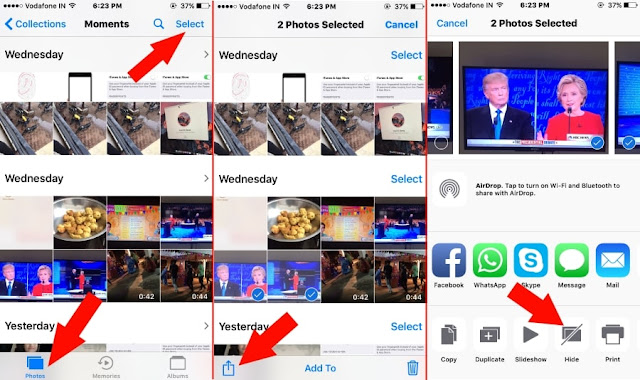
1: Open photo app on iPhone 7/ iPhone 7 plus.

2: tap on photos from below tab in Photo app. From top right corner of the screen tap on “Select” option. opt for images that you wish to hide. Yes, we can choose multiple pictures right away by sliding finger on image shifting it lift up. Else individual pictures we can select by tap on it individually.


Photo credits: HowToiSolve


3. From Bottom tab, tap on share icon. Next, from Sharing popup choose “Hide” option (See image below).

Confirm it.


And we're done!

How to Unhide hidden photos from photo app in iPhone 7 and IPhone 7 Plus: iOS 10


Steps For unhiding hidden photos and videos in photo app is also easy, using the steps below:

1: Head to the photo app on iPhone/ iPad. tap on “Album” from below tab.

2: Separate folder for recently hidden photos and video saved into Hidden album is there. Tap on it.

3: From the top right corner, tap on select > choose photos or Videos that unhide or See in photo app at glance.


4: tap on share icon, now click on Unhide.


You can tell us the comment section if this worked for you, perhaps you have any alternatives of Hiding Photos and Videos on iPhone 7 plus or iPhone 7 with iOS 10? Pls tell us and don’t forget to hit our share buttons.

Sunday

Voicemail finally comes to Whatsapp for Android and iOS. Here is how to use it.

While the new that Whatsapp is ending support for Blackberry, Nokia and old Android/iOS devices come December, the Facebook-owned company is forging ahead with the development of the IM app for the devices still supported.

What I am trying to tell you essentially is that there has been an update for Whatsapp for Android and iOS, and while both have different version numbers (version 2.16.229 for Android and version 2.16.8 for iOS), the new update for both platforms comes with a new feature that is overdue; Voicemail.


When Whatsapp added the Voice Call feature for its app on all mobile platforms in 2015, there was a lot of excitement because the feature wasn't a common one in the mobile app world. Though the feature has been useful, there are times when you feel that it should be improved upon, particularly because the Voice Call feature is only useful when the second party is online.

That is exactly what Voicemail is coming to fix in Whatsapp. Thanks to it, you can now leave a voice message when a Whatsapp call to a user is not picked or answered, as opposed to the norm of leaving a text message in the same situation.

How to use the Whatsapp Voicemail Feature


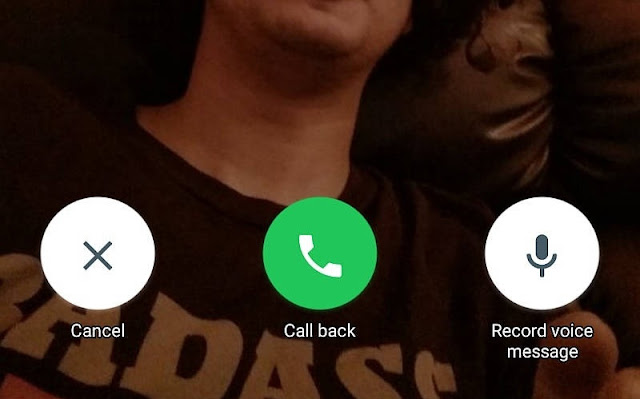
When your Whatsapp call to a user is not answered, you will be presented with three options: Voice Messages, Call Again and Cancel. You already know what the last two options are used for, it's the first one we're concerned about here.


To utilise the Voicemail feature after a Whatsapp call is not answered;
  • Select the Voice Messages option from the three options.
  • Tap and hold the Voice Message button to start recording your message (voicemail).
  • When you're done recording your message, release the Voice Button button to send it, or swipe to the left to trash it and record another.

The message you record would be sent to the user as a voice note (VN). Considering the series of new features that are being released to Whatsapp almost weekly, the Whatsapp Video Call feature that has been in the rumour mills for some time doesn't seem to be far from us anymore.

Wednesday

Apple has started releasing iOS 10 Beta 5 for developers

Just a few days after rolling out beta 4 for developers, Apple has started releasing iOS 10 Beta 5 build for developers. The roll-out started a few hours ago, and it is now known that iOS 10 is coming in September, hence the frequent beta releases.


The latest beta build comes with a lot of improvements and fixtures in areas including:
  • In-App purchases in the App Store.
  • Bluetooth iMessage.
  • iOS' interaction with Apple TV.
  • Phone and Wallet apps.
  • Accessories.
  • iPhone 6S panicking when using its Smart Battery Case.
iOS 10 Beta 4 also comes with some tweaks in some of the functions in iOS, including:
  • Photo app doing a new scan on launch due to its AI and facial recognition data being reset.
  • Music Control center tweaked (how? Wait and see for yourself).
  • Today now includes two new view tabs: Data and Day.
  • Widgets now have darker backgrounds.
  • Lock sound changed.
  • Voicemail transcription now available on iPhone 6S, 6S Plus and iPhone SE, all with an English-speaking Siri.
Beta 5 also arrives with a new app, and it's for kids. Swift Playgrounds is an apps with which kids can learn to code in a fun way.


However, some problems have not been fixed with the latest beta release, including:
  • FaceTime calls between iPhones running iOS 10 Beta 5 and Macs running the latest macOS beta.
  • Recently Played in For You not refreshing instantly in Apple Music.
  • Notes quitting instantly upon launch.
  • And other minor hiccups.
.If you are an Apple Developer and you are interested in iOS 10 Beta 5, you should already know where to get it by now.


Tuesday

$2500 Limited Pokemon Go Edition of iPhone 6S announced by Russian Company Caviar

The Pokemon Go craze is still on, and Russian company Caviar has joined in. The company has announced that it will be launching a limited bunch of iPhone 6S Pokemon Go Edition smartphones targeted at die-hard Pokemon Go fans who care less about spending their money on a mobile game.


The launch of these special editions of the iPhone 6S is expected to coincide with the official release of the Pokemon Go game in Russia. This seems imminent, as the game is already hitting key Asian markets.


The iPhone 6S Pokemon Go Edition is special for its exclusive back design which features a gold-plated Pokeball logo, while the rest of the back is engraved with Titanium.
The phone is going to cost a whopping $2700 (more than thrice the price of the standard iPhone 6S), and guess what? Only 77 units of the device will be made! The deal is further sweetened by an offer by Caviar: people who buy the phone will get a dedicated Pokemon Go account with all the Pokecoins an account could have, which means 14,500 Pokecoins worth $99.99.


If you are willing to shell out that amount for the phone or you are curious, more information about the iPhone 6S Pokemon Go Edition by Caviar can be found here.

What's your take on this?.


Sunday

Hack iOS and win $200,000 - It's the Apple Bug Bounty Program

A bug bounty program is one in which hackers from around the world converge to try to hack the systems of the company or organization holding the event. The hacking is not done with a bad intention, but is done to discover whatever vulnerabilities might exist in such systems, and the hacker(s) who discovers any such vulnerabilities goes home with a prize, usually cash proportional to the security and risk level of the bug discovered. Bug bounty programs are done to encourage more hackers to stop black-hat hacking and expose vulnerabilities in operating systems to the company manufacturing it.


Most big tech companies already have their own bug bounty programs, but over the years, Apple has managed to stand out in this regard as it does in its operating systems; it doesn't have a bug bounty program. Well, that was until last week, when Apple's head of security engineering and architecture, Ivan Krstic, announced at the Black Hat event that Apple would start rewarding hackers and security researchers who discover any security risk or vulnerability in its products.


The announcement came as a great surprise to the people present at the Black Hat event and tech watchers, because most of Apple's security announcements are made at its WWDC event, and the last time an Apple representative spoke at the Black Hat event was four years ago.


Apple's reason for refusing to launch its bug bounty program until now is the high level of patronage hackers get from government agencies and black markets for security flaws. I'm sure what was in the mind of the Apple representative that announced that was the FBI-Apple battle that played out months ago, in which FBI eventually bought the tool with which it hacked into the Sans Bernardino shooter's iPhone for nearly $1 million from a private security firm.

There are five categories of uncovered-bug-to-reward ratio in the Apple Bug Bounty Program:

CategoryReward
Vulnerabilities in secure boot firmware componentsUp to $200,000
Vulnerabilities that allow extraction of confidential material from Secure EnclaveUp to $100,000
Executions of arbitrary or malicious code with kernel privilegesUp to $50,000
Access to iCloud account data on Apple serversUp to $50,000
Access from a sandboxed process to user data outside the sandboxUp to $25,000

The Apple bug bounty program will be launched in September, and at first, participation would be on an invitation-only basis, and the program will be open only to researchers who have previously disclosed tangible vulnerabilities to Apple. New researchers won't be turned away, however, as long as they make and provide useful security disclosures. Apple plans to expand the program slowly, in order to avoid an influx of reports that could overshadow important security discoveries should the program be opened to all and sundry at launch.

For researches to be able to claim the prize for a disclosure, they will have to follow the usual procedure; provide a proof-of-concept based on the latest software in question (which is iOS in this case) and the latest hardware compatible with the software. The exact amount won would be determined by some security factors like clarity of report, risk to users of the software, and others. The final decision will be taken by Apple. The tech giant also plans to encourage winners of its bug bounty to decorate their rewards to charity; if a winner decides to do so and his/her chosen charity institution is approved, Apple will double the reward that person gets and it would all be donated to charity.


It has been announced, and there is no going back. Apple Bug Bounty Program is here, and is launching in September. iOS developers can now dust their hacking tools and get to work, because the competition's gonna be stiff from now on.

Saturday

Facebook plans to add MSQRD Selfie Filters functionality in News Feed

If you are familiar with the MSQRD video filter app for smartphones, then what I'm about to say won't be too strange to you. If you aren't, let me tell you a bit about the MSQRD app.

MSQRD, whose actual nae is Masquerade but was styled to that probably due to its scary nature, is a filter app for selfies and videos, which allows (or allowed) users to add filters and lenses to selfies and videos they took. The app was still in its start-up stages when it was acquired by Facebook for about $117 Million in March.

Until recently, nothing was heard of the app, and none of its features were seen integrated into Facebook platforms. Now, Facebook is testing a new feature that puts a camera at the top of News Feed and allows Facebook users to add filters to their selfies. The feature is similar to the selfie filter in Snapchat, and from reports of testers, the feature will have to be enabled by tapping on the camera button, after which it will be enabled automatically each time the Facebook app is started.


Though the feature is available for the Facebook app for iOS and Android, it is currently open for testing by iOS users in Brazil and users of both platforms in Canada only. The feature offers filters and face-altering lenses that can be applied as overlay on top of pictures and selfies, just like that in Snapchat. Users in Brazil and Canada already have the ability to apply Olympics-themed filters to their pictures and post them directly to their Facebook profiles.

When the feature rolls out officially, it would only be available for the Facebook application for Android and iOS, though, and is likely not to be accessible on the web-based platform.

Wednesday

Apple has started rolling out iOS 10 Beta 4 for developers

Moving closer to the release of the latest version of its iOS software, Apple has released the fourth in a series of beta softwares for its developers. Developers for iOS have started getting iOS 10 Beta 4, one month after iOS 10 Beta 3 was released. The iOS 10 Beta softwares are an equivalent to Developer Preview on Android, the last of which was released about two weeks ago for the latest Android OS version, Nougat.


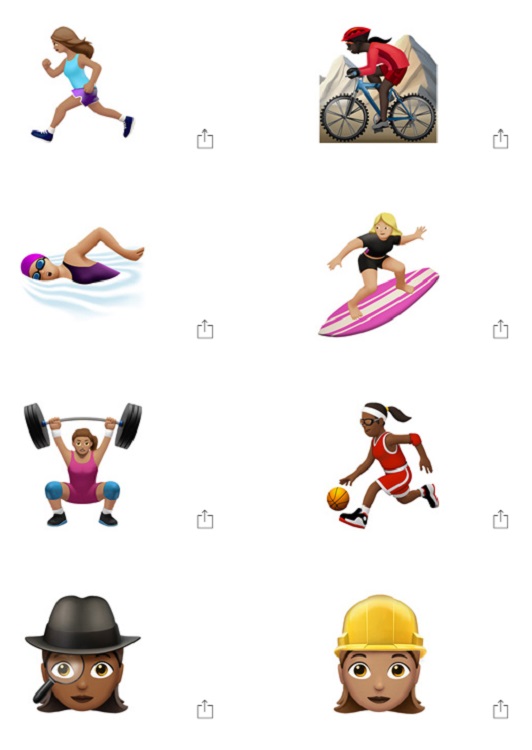
The latest iOS 10 beta introduces new features for iPhones, the most prominent one among them being new emojis aimed at promoting gender equality, with the inclusion of new emojis of female athletes and professionals. Popular existing emojis have also been redesigned, and a new rainbow flag emoji and more family-type emojis added.


Other non-emoji features introduced with iOS 10 Beta 4 include:
  • An intro screen that tells users to swipe left to access the different Control Center cards when opening Control Center for the first time.
  • Haptic feedback when locking the iPhone has been scrapped.
  • Plus several other little fixtures, additions and subtractions to improve user experience.
Recall that a new feature was noticed by several beta testers sometime ago which warns users when water gets in contact with the lightning port of their iPhones.

Those who installed the first three beta softwares of iOS 10 prior to this one can install the latest iOS 10 Beta 4 update over-the-air, and it is available for direct download by developers via the Apple Developer Centre. Apple is also currently running a public beta program which allows non-developers to test beta softwares of the upcoming OS version to some extent. The public beta program is usually updated some days after that for developers has been updated, so if you are not an iOS developer, you gotta wait ;-) .

Sunday

Download Prisma for iOS and Android and Turn your Photos to Artworks

There is a new app on the Play Store, and no it's not Pokemon Go. It is a photo filtering app called Prisma that has been available on the App Store for iPhones for a few months back, and has finally been brought over to Android users.

The difference between Prisma and the other numerous photo filtering apps that abound on the Play Store, is that it completely rebuilds a picture based on the filter applied to it.

The app works not by just overlaying the filter on top of the image, but it reconstructs the image from the ground up to create a new photo that essentially embodies the applied filter.

With the type of technology utilized by Prisma, photos of any kind and size can now be transformed to look like pieces of artwork by famous artists, with the use of some filters specially designed and included in that regard.

Here are some photos after being worked on by Prisma on Android and iOS.

Wale Adekile - Geek.ng


Ifediri Dominic - Editweaks.com


If you are still not convinced about how good this app is, and how popular it has become since its release(s), here are some statistics. Since the app was released on the App Store for iPhones in the early days of the summer, it has raked in over 10million downloads and over 400 million pictures have been filtered and edited by the app, according to a report by The. Verge.

Also since its release on the Google Play Store some days ago, the application has garnered about 5 million installs on the Google Play Store.

Even though Prisma is a free app requiring no purchases before installation like many other smart filter apps, it doesn't diminish user experience by showing ads everywhere possible in the app. This shows that the developer of Prisma cares about its users, also evident in the cool and easy-to-use User Interface of the app.

After filtering photos to your satisfaction, you can easily share them to popular social media platforms Facebook, Twitter and Instagram. Prisma possesses full integration into these sites.


To view the app in action, watch the below video review of Prisma by Youtube Channel iUpdateOS.


. Have you used the app? What do you think about it? Please share.

Monday

Upcoming iOS 10 feature warns you when your iPhone is wet

iOS 10 release date is coming nearer, and beta versions of the new iPhone software have already been released to selected testers. Among the numerous

Sunday

This is Why Siri May Get Better than Google Now (Voice search actions)

At the WWDC 2016 event, big announcements were made about some sweet updates coming to iOS 10. After watching the Apple announcement of Sirikit, how it's been made open for developers to tweak it as they please, if you go through the video as an Android user, you may ask yourself same questions as I did, why we don't have this feature on Android?


Of course we have it, but it's not open. Google introduced Google Now voice actions API two years ago but this is limited to system voice actions like set alarm, remind me etc (check out the full list here => https://developers.google.com/voice-actions/system/

According to a Reddit user for Android threads, in this same time they announced custom voice actions where devs can implement custom action ( https://developers.google.com/voice-actions/custom-actions ).

API wasn't open and devs weren't able to make a request to participate in the program. Today, two years later, API is still not open and if Google doesn't open it quickly, they may be in a situation where Siri will be more useful than Google now .
People, not just developers want to be able to tell it a specific action to take, without necessarily say "OK Google"

Tuesday

4 Magical Uses of Your Phone's Camera You Probably Never Knew About

Every time we open our smartphone's camera, our intention is to take a photo, to capture moments or shoot videos with the phone. But your device's camera is now created to do more than just taking beautiful selfies, group photos or video calls.
Regardless of whether your phone runs Android or iOS, here are some other cool tricks and things you can do with your smartphone's camera combined with various apps you will need; to perform them.


1. TRANSLATE PICTURED TEXTS

Assuming you're walking down somewhere and see a road sign or a text written on a bus, or you're in a restaurant presented with a food menu having texts you don't understand, simply pick up your phone and open Google Translate (For Android, For iOS). You can get an instant translation through your camera directly from the front page of the app, tap on the camera icon and away you go.
Although the camera feature doesn't have as many language translations as the text side of it, but it can be pretty handy in many cases.
TextGrabber + Translator - Get it for Android, for iOS
and WayGo (Android, iOS) all work in a similar way.

2. FOR PICKING STARS IN THE SKY

Speaking of augmented reality or mixed reality, you can blend the use of your phone's camera and unique apps to find and pick out stars in the beautiful clouds once its evening or night, without telescope.
To do this, install SkyView (Android, iOS), point your phone camera up at the sky
You may also use apps like Wikitude (Android, iOS) or Blippar (Android, iOS).
These are amazing AR apps, you may even make a person smile if you show it off to your boy or girlfriend as you both are taking a night walk.


3. SCANNING DOCUMENTS

You don't always need the bulky scanning machine when you have a smartphone with you. Whether you would like to convert a pictured document to editable texts, or you would like to snap them as photo to keep them safely in the cloud. Your phone's camera with special Apps can perfectly handle that.
Scannable by Evernote's app ( For iOS ) and ScanBot (For iOS) are great choices, so is Google Drive apps (For Android) is able to do that same function.
You can also do this with CameraScanner ( For Android, For iOS )


4. WHEN YOU FORGET YOUR EYE-GLASSES

If texts are too small for you to see when reading, you can use this Android app to magnify the text, making it to act like your eye glasses so you can see the texts clearly through the screen.

Doing these cool stuffs may almost feel like magic, hope you'll pick one and try soon.

How to Disable/Turn Off Live Photos on iPhone Camera App on iOS 9

This should work for those using iPhone 6S/6S Plus, or iPhone SE Apple smartphones. The new Live feature on the camera app is quite exciting, in fact numerous iPhone users now use the upgrade on the photo camera app to create and share short videos on Social Media such as Facebook Live and so on, but there will be certain times when you don’t want to utilize it.
There’s also a negative side to it because it uses up your device’s memory as you create Live photos/videos, so to avoid or manage all that trouble, the best thing to do is Switch off this feature.

Apple iOS offers an option to manage this feature, this will enable you turn your Live photos Off or On right from the camera application on iPhones as long as you’re on iOS 9.


Guide to Turn off or Disable live photos on iPhone 6S or iPhone 6S Plus/ iPhone SE running iOS 9

Step 1: Open the Camera app on your iPhone/ iPad.

Step 2: Live photo is an online application on simple photo view type. Hence Live Photo option is not available for other Time-Lapse, Slo-Mo, Square, PANO type.


Step 3: From top camera view screen, Tap on the concentric shaped in circle. Next, enable it by selecting “ON” option. This normally enables Live Photo on iPhone.


Note: the yellow colored concentric shape circle indicates that Live photo is enabled and the White shows it's turned off Live photos on the iPhone, select the White.


Step 4: After selecting the white, you can now capture or take photos like you normally do (without Live feature).

Also note that once you enable/Turn on OR Disable/Turn off this feature, this setting is automatically saved for all time incase you re-open your camera app after closing it on iPhone 6S/ 6S Plus or iPhone SE, this doesn’t have effect on your previous setting on Live photos.

If you use other iPhone models (different from iPhone 6/ 6 Plus, iPhone 5S/ iPhone 5) with latest iOS 9 or 10 version, with such devices you won't be eligible to take live photos using Live photos apps and Sharing Live Photos on Social Media.

Sunday

iOS 10: Rumored Features to be Included | Apple Pay, Siri, HomeKit and more

Since it's confirmed that the Apple's developer conference will be held in June the 13-17th which is very close at hand.
More features are been rumored to arrive on the next Apple's operating system, iOS 10.
Some parts of the iOS update will ordinarily come to fix bugs and few others will roll in with entirely new features on iOS 10 for Apple devices.
To begin with, we will have a new look on Apple Music, a bunch of App Store improvements, Apple Pay updates and exciting new features for Siri, Apple News and HomeKit.


Below are few features or things to look out for in iOS 10 once it arrives on your various iPhones and iPads.

Hiding Apps on iOS 10

Most users were confirmed to be anticipating for a way to hide stock Apps from Home Screen. This will likely be possible on iOS 10. Although, not everyone may use this though, more beautiful apps are coming, which are not really worth hiding.
For HomeKit, Apple is reportedly planning on launching a standalone app for it, removing the need to access it from within Siri and other third-party applications that manage accessories using it.

App store

The App store is going through some improvements on its search visibility and discovery features. It's also rumored that there will be a revamp on browsing the App store and paid search may likely be rolled in too.

Apple Music

Revamp is also coming to Apple Music on iOS 10 despite it had only existed for only a year. The UI of the App had been said it will likely get a redesign, and stick to only mostly black and white, although many users seem to be complaining about the coming redesign, among these users are the 13-million paid subscribers. This was due to the fact that iTunes seems to be struggling with the market for a while now.

Siri

Apple is taking Siri to Mac. This feature will be one of the flagship features to the line of Mac laptops that are running OS X 10. 12.
More rumors say Apple will have a Siri SDK ready at next month’s WWDC. And it sounds like, very much needed improvements for Siri on iOS 10 and for the Mac could be the focus of the event.

Apple iCloud and Security

Sometime last month, it was quite embarrassing for Apple as FBI went ahead to use a third-party to break into an iPhone not so long ago, now it's been reported that Apple is working tirelessly to improve its security systems for its users and their Apple prodcucts and gadgets. The new security features for iOS 10 will be announced at the WWDC event 2016.

Apple Pay

This new innovation from Apple had proved successful after its release for a while, we even shared about their arriving Canada weeks ago. Apple is reportedly looking for ways to expand Apple Pay's potentials by bringing in new  features that could include ability to use the App for ATM withdrawals, and also further expansion into more countries.
More details about these new features and plans for iOS 10 will be announced by Appl at the WWDC 2016 event.

Get Apple Music Student Membership as Apple slashes Price half for Students

There are heaps of streaming music services out now and it usually isn’t simply the amount and quality of the rear catalogue that dictates that we have a tendency to subscribe to them.

Apple Music is rolling out membership that will slash prices for students in the EU. This refers to Students enrolled in qualifying universities or colleges can join Apple Music at a discounted monthly rate. To get started go here.

ALSO READ: YouTube Brings Virtual Reality To Viewers with This Amazing Video

Apple Music Student Membership


I recently discovered that in the EU (European Union) university graduates can pay a £12 Associate in a Nursingnual subscription to urge an NUS further card, which then entitles you to traditional student discounts in a form of places. One company that has utilised such a theme is Spotify, where the premium service will be signed to for £4.99 per month. Now Apple has declared a similar deal for college students, offering 0.5 value subscription.

That takes the prices right down to £4.99 a month and provides a similar service to Spotify, but there’s a difference: Apple uses a completely different system, not based on the NUS card, and instead checks that you’re an existing student. That means that the NUS further card isn’t applicable thus graduates cannot profit of the supply. Apple Music hasn’t had the best of starts, with criticisms about its style prompting rumours of a recent re-launch next month. Nonetheless, it already has a sizeable market share with 13 million subscribers, up from 11 million simply 3 months gone. Issues of the NUS card aside, would the students now be tempted to sign up for the Apple service over its rivals?