Showing posts with label FBT. Show all posts

Thursday

Updated Settings for MTN Musicplus + SimpleServer (If your BIS Refuses to Work On your PC, Android or iPhones)

We don't see any of these Telecoms doing their subscribers any good by blocking out the Simple server with BBLite tweaks people had been using... or managing rather, for a long while.

Truth remains that Data bundles in NG are still not as cheap as it's meant to be, instead of 1MB for less than 1 Naira, they prefer to reap people off which not everyone can afford or won't happily keep paying for, any ways, I didn't come here to vent.
If your Simple server had stopped working with your BBLited or BIS subscriptions which we shared in latest browsing tweaks 2016 sometime time ago, then we have an update that you can use to keep moving on, the updated Settings for MTN Musicplus with SimpleServer for both PC and Android.


TO ACTIVATE THE LATEST METHOD FOR YOUR SIMPLE SERVER + MTN MUSICPLUS FOR PC and ANDROID

With this, you'll get 150mb for 15Naira, and you can always do it as many times as you want.

Use the set up below:
1. Text C to 5900
2. Reply YES when you see a msg

3. Open your Simpleserver config file replace this "web.blackberry.com"
Replace that with >>>  musicplus. mtnonline.com /touch/index. html#index-page (WITHOUT SPACE)

Now save it and launch the simple server program, connect to internet and browse with your Mozilla or Chrome using Local Host (127.0.0.1) Port :8080 As usual.

If you exhaust it, text  CANCEL7C TO 5900 And reactivate using Step 1.


How to Use the MTN Musicplus tweak on iPhone/iPad


How to Use the MTN Musicplus tweak on your Android

You can simply Install and Use this With Simple Android Server Or Psiphon you can get here
Use your normal music plus settings on Netify or ProNet, Sypon Shield, OR follow the below settings -
  • Tick Remove Port
  • Proxy type: Real Host
  • Proxy Server: musicplus.mtnonline.com/touch/index.html#index-page
  • Real Proxy Type: Inject
> Select save and click on “tunnel whole device”.
> Click on the options tab

Region: All servers are working with it, but we advice you pick United states to avoid strange languages when browsing.

Select more option, And check “Connect through an HTTP” then select “Use the following settings:” then configure as.
Host address: 10.199.212.2
Port: 8080
Hit Back and hit Connect. (Thumbs up to Shelaf for sharing this)

As we earlier said, If you exhaust the allocated data, just text  CANCEL7C TO 5900 And reactivate using Step 1.

We understand that the process is a bit of stress but we have to keep it going till we find a stable tweak or till the former BBlited plans start working again.

Friday

All-In-One | Latest Browsing Tweaks 2016: MTN, Etisalat, Glo and Airtel

We are back at this and glad to announce working tweaks in 2016 despite it took some later time due to few other projects. Let's share some Free browsing and unlimited downloads with the most affordable browsing rates for all Telecom networks: MTN, Airtel, Etisalat and Glo.
If you've been looking for browsing cheats this period, this post is for you, just as we did with some awesome browsing tweaks last year.

All tweaks below works but note that some of these tweaks may get speed issues, new working ones will be updated here in this post thread from time to time.

We will break this down from MTN, Etisalat, Glo and Airtel Tweaks into categories depending on the device you use, namely:
For PC and Mobile - Android and iOS. Let's begin!

all nigerian networks


MTN Browsing Tweaks 2016

Many MTN tweaks are working at the time we published this post, we picked them out for you to use:

MTN Browsing Tweak For Android (Mobile):

First, Activate BB LITE Plan.
Send BBMIDID to 21600 - for Daily plan
Or Text BBLITED to 21600 - Daily Plan > costs 70Naira - Dial *216*7#
Text BBLITEW to 21600 for Weekly Plan costs 350Naira only

i.) ANDROID USERS DOWNLOAD SIMPLE SERVER FOR ANDROID HERE and check this post for full settings.

ii.) Use Psiphon Or Syphon settings for MTN BIS:
Download Psiphon  Or  Download Syphon here  and Use the Below Settings to Configure It.

Create New APN settings on your phone as follows:
» Open your phone settings >> Go to more >> Go to mobile network >> Go to access point names > Select MTN, Then create new APN and configure as shown below:
» APN: web.gprs.mtnnigeria.net
» Proxy: 127.0.0.1
» Port: 8080
» Save And Activate it as your default settings

Then Launch Syphon Shield or Psiphon Handler, in the handler menu:
» Remove Port: make sure you tick/mark it
» Proxy type: Real Host

» Proxy server: http://musicplus.mtnonline.com/data-reset or http://172.16.5.226@mtnonline.com/data-reset (THAT PROXY SERVER WORKS FOR FREE AT 0.0kobo in your acct but FOR BIS REPLACE THE PROXY SERVER WITH - web.blackberry.com)

» Real Proxy Type:Default
» Real Proxy Server: 172.16.5.226
» Real Proxy Port: 8080

» Select save and click on “tunnel whole device”.
Click on the option tab
» Region: select, USA or any other server

» Check “Connect through an HTTP Pro” then select “Use the following settings:” then configure as.
» Host address: 10.199.212.2
» Port:8080

MTN Browsing Tweaks For PC this 2016 

You can make use of MTN Simple server tweak for your PC. It's same settings and still blazing in 2016. For reminders use the settings below:
PC USERS DOWNLOAD SIMPLER SERVER FOR PC
and see the full settings to configure the Simple server for PC here

MTN MAGIC SIM 2016


We can't ignore sharing words about this tweak that returned after disappearing since 2013, it's back and works till date.
To activate it, ensure to Migrate your MTN Sim to MTN Pulse, dial *406# to do that.
  • Dial *123# and select as folows >> 3. Data services >> 1. my data plans >> 4. Simple surf >> choose 2 hours 1 day @250NGN
Once you get debited, Connect and Browse with it for only 3 or 4 mins. Disconnect and Switch off the SIM. Remove the SIM, Do not turn it On till 24hrs (next day), switch it on and Enjoy unlimited surfing. Works on all devices (PC and Mobile, hotspot: Android & iOS).


Airtel Browsing Tweaks For PC and Android 2016

Get 2gb with 100 naira on airtel without wasting time, dial *440*18#
N.B: it work for all the device both java android and pc, and it expires one day so this is for those of you who like downloading with your pc and android.

Subscribe Airtel 800mb with Just #100,
Simple Steps On How To Subscribe For Airtel 800MB
With Just N100 Valid For 1 Month.
Here is the Simplest code to
use,
Send "BYC3 to 440"

Airtel 1500 for 3gb
This isn't really a tweak but a cheaper data plan that works on all device.
Recharge 1500 and activate with this, simply dial >> *440*16#

Glo Browsing Tweaks For PC and Android 2016

Glo Tweaks for PC and Android:
The below Glo subscriptions work on both Mobile (Android) and PC
1. GLO 3GB FOR 500
This is a cheap plan, the Weekend plan costs N500 and gives you 3GB for 7days (weekend Sat 12am-Sun 11:59pm & Nights 12am-5am),
TO ACTIVATE: Send via sms, 61 to 127 or dial *127*61# (Plan not shareable) Data Booster will not work with this plan, no auto renewal).

2. You can use the Glo BIS Subscription for MTK Android phones after tweaking/changing your IMEI (supports Tecno, Infinix, Innjoo and other MTK devices). Follow the steps to activate it in this post.

Etisalat Browsing Tweaks For PC and Android 2016

Last but not least is Etisalat browsing (free) tweaks:

Activate Etisalat Social ME Plan. Dial *200*3*3*1#
choose monthly plan, #500 per month
Download PSIPHON Handler and use the settings below:

Tick Reverse Proxy box
Proxy type: Reverse Proxy
Proxy Server: mobile.facebook.com
Real Proxy Type: Inject
Real Proxy Server: ns393958.ovh.net
Real Proxy Port: 3128
Hit Save
Tick Tunnel Whole device and accept
Scroll to options and select United States as region
Now, Go to “more options”
When you see connect through an HTTP Proxy... TICK IT
Also Tick Use following settings…
Host Address: 94.23.200.49
Port: 3128
Now turn on your Data connection and Hit Connect on the Psiphon app.

Browsing Tweaks are quite valuable that people especially geeks can't do without, we will update more as the year goes, Enjoy these one while it lasts, any Questions or Contributions? Leave us your comments below.

Tuesday

ALL-IN-ONE! Latest Browsing Tweaks For MTN, GLO, ETISALAT and AIRTEL Users This 2016 / 2015

Have you been looking for Free/Cheap Browsing Tweaks to use this 2016? That's great, you have come to the right place, there are browsing tweaks for you now, for a while now many geeks had been using these browsing tweaks to do heavy downloads and Browsing at a very affordable rate, after many demands from friends and fans here, I finally took my time to make this post for all of us. It's an ALL-IN-ONE PACKAGE, tweaks for almost All Nigerian Networks, MTN, GLO, ETISALAT and AIRTEL.

UPDATE: Check out Latest Browsing Tweaks and Cheats in 2016 - For MTN, Airtel, Etisalat and Glo

Note: These Tweaks below still work in 2016 for MTN and Glo, we will update you on Etisalat and Airtel 2016 tweaks later on.

Here's a Break Down of all the Tweaks I am about to Share with you:
1. MTN BIS with Simple Server
2. GLO BIS FOR ANDROID, 3GB for 1k
3. ETISALAT, PayG - Unlimited browsing and Downloads
4. AIRTEL - A Fresh Tweak that Gives you 2GB after Tweaking your IMEI

So if you have the Sim listed above, smile as you Grab a Cup of Tea as you'll surely benefit from any or All these Browsing Tweaks below.

1. MTN BIS with Simple Server

  • WORKS ON PC AND ANDROID

SETTINGS FOR SIMPLE SERVER FOR PC

After downloading, Subscribe to any MTN BIS Plan of your choice by dialing *123*4*1#

The Daily BBC plan has been blocked for this tweak.


For using Blackberry plan with the Simple server:
BB10 Plan works great ( Send BBMIDID to 21600 - for Daily plan or the Daily plan for 70Naira - Dial *216*7# ).
Make sure you get the BIS Activation SMS and 100 or 70 Naira is deducted, once it's active.
Follow the Settings Below to Enjoy the sweet browsing on your Android or PC with MTN BIS plan :)

subscribe to any of your choice by dialing *123*4*1# to choose a plan, you're suggested ouse the Daily BBC plan ( Send BBCDAY to 21600 ), once it's active.
Follow the Settings Below to Join the Enjoyment on your Android with MTN BIS plan :) -

subscribe to any of your choice by dialing *123*4*1# to choose a plan, you're suggested ouse the Daily BBC plan ( Send BBCDAY to 21600 ), once it's active.
Follow the Settings Below to Join the Enjoyment on your Android with MTN BIS plan :) - See more at: http://www.editweaks.com/2014/06/mtn-bis-finally-working-again-with.html#sthash.tRrAmqIs.dpu
1.  Extract the SimpleServer.Zip >>> Open the extracted file folder,
You'll find Simpleserver.exe and
SimpleServer.ini
Edit the .INI file and input the following
In your Simple server INI input >> web.blackberry.com,
that is in your VALHDR0 = 'web.blackberry.com'
and
IQUERY = 'web.blackberry.com'
Save It (Ctrl + S )

Double Click on the ‘SimplerServer.exe to run the application.

2. Connect the modem, with normal APN settings.
To make sure your APN is correct, go to settings on your Modem and configure your
APN: web.gprs.mtnnigeria.­net ,
Password & username: web

Also configure your browser and IDM to 127.0.0.1 (LocalHost)
Port 8080.

3. On Firefox Menu, Click >> OPTIONS >> NETWORK >> SETTINGS >> TICK MANUAL CONFIGURATION, Input the Proxy I.P (127.0.0.1 and Port:8080) and Save.
See this Post on How to Configure your Browser to LocalHost.

RECOMMENDED: Best Ways To Change and Use Proxy Servers/Local Host on Google Chrome

After you're set, be sure the Simple Server is running, Connect your Modem.
Open your browser and start Browsing and downloading.

ANDROID USERS FOLLOW THE STEPS BELOW

==> Install SimpleServer.apk on your Android (Rooted Android Only) Root Your Android Here
==> Create New APN settings On Your Phone
As Follows...
Proxy: 127.0.0.1
Port: 8080
APN: web.gprs.mtnnigeria.­net
Save And Activate it SS your default settings.
 On your Android, go to simple server App and configure the settings:
==>Proxy host: 10.199.212.2
==>Proxy Port: 8080
==>Injection Method: get
==>Injection query/url: http: //­ web.blackberry.com/ [without any space]
==>Injection Host: web. blackberry.com [don't leave space]
==>Injection line: press your enter key 4 times
==>Log level: debug

Now the Last part;
Leave any other thing , Press Bck to Exit it, Pressing Back will automatically Save your Settings as you Exit.
Put on your Internet, Go back to Simple Server App and click START.

Simple Server Android

You can Browse and Download all you want. It powers all Apps.


N.B: This particular Tweak dies and resurrects, now look at this pretty Old Post I wrote about MTN BIS Working with DROIDVPN, that was early last year,  it had existed even before I updated that post in July 2014... We just invent new methods to keep it alive.
I use it when I published this post. It still works.

2. GLO BIS For Android Browsing Tweak

WORKS ON ANDROID ONLY:
All you need do is Tweak/Repair your Android's IMEI to that of Blackberry. After that, you can Share Connection from your Android to your PC via HOTSPOT.
GLO users are adviced to see this post On >> How to use Glo Blackberry Subscription on your Android.

3. ETISALAT Browsing Tweak:

WORKS ON PC AND ANDROID

Etisalat PayG

This one is Superfast browsing tweak for Etisalat users, but you'll need to be Super Smart to Enjoy it.
Follow the Steps Below:
 1.Get your sim on easycliq so that you receive free mb when you recharge. Subscribe to the payg plan.*229*5*7#
2.Recharge N100, they give you 5mb or 10mb depending.
3.Start your browsing, preferably downloading.
4.They usually reset the connection at 55mins, so your download will most likely stop at that time.
5.Just disconnect or switch of your data and then reconnect. No need for codes.
6.After another 55mins, do the same again.
This can be used for days with the initial N100 still intact. Your free 10mb will be reduced to 0.48mb and that will reduce by 10kb after each cycle. (CREDITS TO aiikae of GL for this working One)
N.B - Avoid Video Streaming Sites like Youtube etc when browsing as in Step 3.

4. AIRTEL Browsing Tweak

This is A Fresh Tweak that Gives you 2GB after Tweaking your IMEI
See the IMEI >> 869878000162957
It's 15 Digits, so you'll need to generate your Unique Numbers and use it to Get your own 2GB from Airtel.
You can copy the first 12 and generate others to make it unique.
Use IMEI.info to Check Valid IMEI or generate for yourself.
See this Post To Learn How to Tweak your IMEI
After tweaking this IMEI on your Android, Text  3G TO 141 and Enjoy.
See Screenshot Of 2GB received Below.

Airtel new 2Gb


CONCLUSION:
You will need to keep checking this post for updated working ones, just incase the one you use gets slow or blocked.
Young people love tweaks... never mind anyone telling you it's old stuff, I understand that you and other people who are reading this may be students trying to save some Cash and avoid Expenses, besides if you also check well, you're Enjoying More Data Freedom than people who pay for Data/Internet subscriptions,  that's one of the Major reasons I created this Tech blog. To Share Tweaks, unique and Useful Knowledge that works and make Life easy for all our Readers all over the World.
Network Agents can walk in here anytime to find this post and Decide to work on blocking it, but it really is none of our Business either.

We worked hard to dig out and Write this Long Post, If you Must Copy it, Pls be Kind enough to Give (Credit) Link Back to us where you Got it From.
We don't ask for money or Anything from you, Linking back and Sharing this post is the Best way to Support and Appreciate our effort, so everyone can progress.
SHARING IS CARING TOO, Don't Forget To Hit Our SHARE and LIKE Buttons Below. Have Fun!

*Updated* MTN BIS Now Working on Android Again with DroidVPN (for July 2014!)

Android users who know about DroidVPN should quickly check this one out, it's working real fast as at the moment of this Post,  

MUST SEE THIS  UPDATE! - ALL-IN-ONE! Latest Browsing Tweaks For MTN, GLO, ETISALAT and AIRTEL Users This 2015

ALL-IN-ONE! Latest Browsing Tweaks For MTN, GLO, ETISALAT and AIRTEL Users This 2015 - See more at: http://www.editweaks.com/2015/02/all-in-one-latest-browsing-tweaks-for.html#sthash.Nj5DyLk5.dpuf
Make sure you have an active MTN BIS, or subscribe to any of your choice by dialing *123*4*1# to choose a plan, you're suggested ouse the Daily BBC plan ( Send BBCDAY to 21600 ), once it's active.
Follow the Settings Below to Join the Enjoyment on your Android with MTN BIS plan :)

APN: Web.gprs.mtnnigeria.net
Proxy : leave it empty
port: leave it empty


Now go into ur droid vpn setting

choose tcp for d connection after that change
UDP: 53
TCP: 5222
bind local: 1100
Now go to HTTP header settings in Droidvpn
Host: web.blackberry.com
X-host: web.blackberry.com
That's all

To make browsing connection stable, Open Terminal emulator (You can download Terminal emulator from Play Store) and type "ping google.com"
In the Droidvpn, enable proxy address
PROXY :10.199.212.2
PORT: 8080
REMEMBER TO TICK ENABLE IP IN YOUR DROIDVPN
then CONNECT and enjoy. See my of DroidVPN Connected Screenshot below.
Credits to Mayoorcotyz of GL forum.


Also Read: Easy Guide on How To Use DroidVPN on All (Rooted & Unrooted) Android devices
 
Another great news is you can use it on your PC, after DroidVPN is connected, turn on your phone's Hotspot so you can also flex the fast browsing experience on your PC.
Enjoy and Don't forget to hit our SHARE button ;)

Friday

MTN MobileTV Tweak - Get 500MB to Browse and Download For Mobile & PC Free!

Seriously, MTN had really been very difficult to get by now, their Firewall had been very strong through out the whole year, not until we found a Leak, Yes, you heard me right "A Leak!"
It's been 4 days now, MTN free browsing is Back! and that's what I'm sharing on this post.
With this Tweak, you get 500 MB data bundle, for browsing and Surfing the web with your Mobile phone FREE!
First active your Mobile TV bundle,

Follow this Steps below:
1. With your phone web browser, visit : mobiletv.mtnonline.com

2. Once the page is on load, you'll immediately receive an SMS, stating you just got 500MB, for Free trial on their new mobile TV service for ONE WEEK (7 DAYS)
Dial *559# to see bundle Balance


MTN mobile TV tweak

The Main Part of the Tweak

Now here's the Sweetest part, you won't be spending all that huge amount of Bundle watching their "TV".

To use the 500MB on your Opera, UCweb etc, agai just follow the Settings below:

For Default Web Browser
Create a New Access point, with APN: web.gprs.mtnnigeria.net
In the Proxy server Address you can use any of the below Proxies:
  • morphium.info OR daveproxy.co.uk
  • Port: 80
  • HOMEPAGE: mobiletv.mtnonline.com
For OPERA 6, 7
Create a New Acess Point: web.gprs.mtnnigeria.net
Use Proxy Address: 195.189.142.132
PORT: 80
Open the Opera,
Leave every other thing Blank
Scroll down to Proxy Server use: mobiletv.mtnonline.com

DOWNLOAD >> the NEW OPERA 7 HERE

For Opera 4.2 HandlerLab use
IP: 82.145.211.1
Leave everything Blank
Launch the opera >> Proxy Server > mobiletv.mtnonline.com

For UCWEB (UC handler)
IP: 82.145.211.1
FRONTQUERY: mobiletv.mtnonline.com/cgi-bin/nph-proxy.cgi/010110A/http/
HOST :  mobiletv.mtnonline.com

HOW TO USE THE 500MB MOBILE TV TWEAK ON YOUR PC

A pal also said this tweak worked on his PC via Proximitron Tunneling App, though I haven't tried it yet, but Below are the Setting He used on His Proximitron:
1. Get Proximitron Here and Any other Web Browser (Opera recommended)
2. Launch the Proximitron, Tick use Remote Proxy but Untick any other thing you see there
3. Use the below configuration
  • Click Proxy > Put 195.189.142.132:8080 (NO SPACES) press OK to Save
  • Again Go to Headers >> Untick whatever you see there >> Click New
  • Fill it as follows
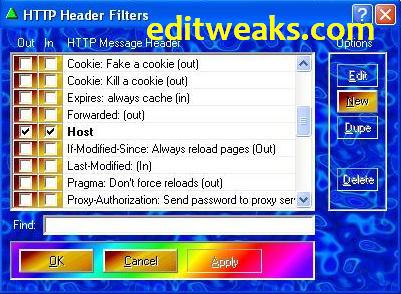
  • HTTP Header: Host
    URL Match: Leave Empty
    Header Value Match: *
    Replacement Text: mobiletv.mtnonline.com
    After putting these values, click on OK
  • Now Host is been Created and Listed in your HTTP Header Filters, Tick both boxes near the Host 
  • Click OK
 MTN Proximitron Settings
  • Open your Browser, (Firefox or Opera) > Go to Settings >> Advanced
  • Use the I.P : 127.0.0.1
  • Port 8080 Save and start Surfing the Web
This tweak works for a week, so use it for the moment, Don't forget to Share with friends, and if you're Gonna Be Copying this, please, Don't forget to honour the hardwork by putting a Link back to this site that you got it from!
Enjoy!

Wednesday

Glo and Etisalat Free Browsing Tweaks (Fresh and Working)

Yeah, unlike before, this days free browsing cheats are very Scarce, so I do this once a while, for my Friends in Nigeria who wants to browse with their mobile phones for free, this time I am sharing with Us what I discovered with a Senior guru, UNStoppable7, I give him 2 thumbs up for this.
He shared the tweak with me and his pals, so I am doing same, sharing with you.
I'm pretty sure You are quite lucky you're reading this.

etisalat and Glo fbt

The tweak is the called the Glo Night Package.
But Please note that it ONLY works for OLD Glo numbers like 0805, 0807, and 0705.

So if you don't have old Glo Sim, I recommend that you buy, go and borrow, or maybe steal one ;)
LOL

How to use the Glo Night Package Tweak

REQUIREMENTS
  • You must be on Glo Gbam.(dial *100*5*1# to migrate)
  • it costs only 10 naira as daily due
Okay, here is the Main part of it
Create a new access point on your symbian phone with:
  • APN :  glosecure
  • Open your Opera Mini
    Use PROXY SERVER: 082.145.211.001 or 82.145.210.84
    PORT:  80
    USERNAME and PASSWORD:   gprs
s40 users can Grab the Prov > Download Here

And if you aint having the Cast Opera mini,
Download any of the Ones below
* Cast Opera 4.2 HERE  OR
* Cast Opera 5.2 HERE

For  Opera Opera mini 5.2 handler (Download the Opera here)
In HTTP server put http://0.facebook.com
Socket server:   socket://0.facebook.com
Host: 0.facebook.com

FOR EXE 5 (Symbian)
Use HTTP server :   http://m.facebook.com
Socket sever:     socket://m.facebook.com

Download Exe5 Here

Launch the Opera and Start Browsing Free FROM 1 AM to 6 PM Every day

NOTE:

For your Health Reasons, please don't use it every night continuously, doing so can get you sick, because while others are Asleep, you are awake browsing, just an Advice.

The Etisalat Opera Tweak

This works fine on your Opera 7, 5.2 , 6, and Oupeng Browser
Download Here

IP: 82.145.210.1
PORT: 80
APN: etisalat
Frontquery: webpay.interswitchng.com# (make sure you put the # sign after the .com, especially s40 phone users)

HOST:  m.opera.com
Sorry I didn;t upload the Prov, but you can make the prov by yourself here
Launch and Browse on your Etisalat free, anytime any day.

That will be all for now, there're ways people use to browse on PC now, called VPN, it's not new, but I think I'll share it in my future posts, so keep checking.
For now Don't forget to Share this post with friends! Blessings and Peace pals.


Thursday

Airtel Bundle Tweak Updated For April - Get Free Airtel Data Bundle Now

Airtel Nigeria is at it again, two months ago I posted tweak which would fetch us  a bundle data of 25MB for free, I'm not sure that tweak lasted up to 48 hours, now I don't understand if it's some kind of secret promo for their users or something, just this morning, a generous friend of mine called me asking if I have this Tweak, I said No, so he shared it with me, I tested it and it worked immediately.


So i decided sharing the tweak with you,
Simply Dial  * 141 * 13 * 1 #

You instantly get 10 MB worth of Data bundle to browse with for 7 days, Free!.
Redialing it for a data bundle Top Up doesn't work if you are thinking of doing that. And it works just once on every Airtel SIM.
It's Still a good one since tweaks are pretty hard to get nowadays right?

Don't forget to Share this with friends that need it too if you found it helpful. Use our Share buttons below this post.  Enjoy!!

Monday

Airtel Bundle Tweak- Get Free Airtel Data Bundle Now

airtel3.jpgHi fellas, I suppose this is the reigning topic discussed and shared in many web forums as at the period of my posting it.
Yes, it is very true and easy and fast,


I won't wanna keep you waiting to get it, that's why this post will be very clear and brief.
Just Text "weekytrial" using SMALL Letters without space to 141 and Gbaam! You are given 25MB of Data bundle to browse for one week as the text replies, but hey, you can always Text and receive it again after exursting the first one you used, in fact, this one is infinite.
If you are having problems with Configuring your phone for Airtel, then see this POST.
And go ahead and enjoy it while it lasts.
And don't forget to show some love this Valeentine Season by Sharing this Post with your friens using our Facebook and Google+ Buttons, Enjoy!!!

Tuesday

Etisalat and Glo Stunting FBT for January 2012

Hmmm... First I would like to welcome us to the new year 2012.
Yes, This is what some of us have been running around looking for last year, well I guess I have brought it right in front of you all, strictly for my country people in Naija, except for MTN and Airtel that has been proving stubborn for over 2 months now. My package still remains all networks FBT for your Opera Mini HUI.
Download here> mtn-casts-operamini-4-2-b.jar
or Download here> opera5-2-rebirth-fast-by.jar


Etisalat-SriLanka.jpg

I kick off with ETISALAT:Though Etisalat tweaks do fluctuates at times but this particular one has been consistent for me. The HTTP server comes with a Slash trick
IP or Proxy Address -10.071.170.030Port - 8080
HTTP SERVER- 82.145.210.96/92.142.210.32

HOST - www.etisalat.com.ngfor s60 (Symbian) first Create a new Access Point and fill in the Below where Prompted,
For s40 users, you just have to download the .prov file of the above settings above
xmlprov-etisalat-by-ediso.ico
just that you have to go through the little stress of  Renaming the file format from .ico to .prov
I hope we know how it works? ;)


The next network to flex with is GLO
glo-logo.jpg

Proxy Address -
195.189.142.132
PORT: 80
Access Point Name - GloSecure
In the Opera Input -
wap.gloworld.com
Host: wap.gloworld.com
NOTE:
if you are using Opera
6.5 or 6.1 in the FILTER space, put *(wap.gloworld.com/wap.gloworld.com)   and  you are good to go.
This are the working tricks I have now, perhaps i will try cracking others or someday the other networks will come back to their senses that they are the ones loosing by making their firewalls. So flex with the above tricks, thank me later and don;t forget to Use the below
  SHARE BUTTONS or drop your comments or suggestions in the Comment Box. Happy New Year!!!

Airtel UnLimited Browsing Package+

airtel-new-logo.jpg
Airtel Nigeria has always been giving us Real tough time in cases of FBT. This is because they have one of the Strongest Built Firewalls in my country. Making it uneasy for hackers to byPass via Proxies or whatever method they can use to get in and browse for free. So I came up with this, its been around for a while, few people are already using it and is also been advertised on radio for some time now (but NOT all of us especially most internet users listen to Radio right? :)
 DO THE BELOW AND START SURFING FAST with SATISFACTION
NOTICE=>
ITS STRICTLY MIDNIGHT THINGS

  1. Migrate to Airtel big family by dialing *447#, if you are already on the plan don't bother migrating
  2. After migration,just make sure you make atleast one minute call to any network between the hours of {8am to 11am} then you are qualified for the 4mb that will be given between the hours of midnight calls.
  3. Here is the main trick "you can exceed the 4mb given." meaning You can Download anything you want, yet your credit will still be intact (Between 12.30AM - 4.30AM)

~TIP~
laptop_computer_flipped_open_0515-0909-2 This is an Opportunity for you, P.C owners (laptop/desktop) to Flex. All you have to do is insert your Airtel SIM into your Modem, connect, and start Browsing Free and Fast!!!
Remember, anytime outside 4:30am, you will be charged for browsing hence your credit in your account balance will be deducted.