Cryptocurrency market is significantly growing, and people are starting to store the value in this form. Just like the traditional currencies, cryptocurrency has challenges and the most notable limitation is instability of value. The granddaddy; Bitcoin is not spared either. Therefore, you have to play your cards right to gain optimally as an investor. An understanding of Bitcoin predictions is crucial in informing you of when to invest. This article elaborates some tips that will help you understand Bitcoin forecast and assure some sense of security.
Showing posts with label Online Payments. Show all posts
Monday
Xoom, PayPal service: How to Send & Receive Money in Nigeria and other Unsupported countries
Xoom, PayPal service: How to Send & Receive PayPal Money in Nigeria, and other Unsupported countries 2018 - Xoom is a newly acquired PayPal service that lets you easily send & receive money in and out of Nigeria, Namibia, South Africa, Ethiopia, Namibia, Tanzania and many other countries that cannot receive payments via PayPal, regardless whether you're in the country or outside Nigeria (in various currencies, Naira is supported now because it's the country's major currency). - Sign up here for Xoom account by PayPal
With PayPal's Xoom you can request money, mobile reloads/recharge your mobile from any where, and perform bill payments from friends and family in the U.S.
In time Xoom will be more used and welcomed by those living in and outside diaspora,
Here's more of all what you need to know about Xoom Nigeria
HOW XOOM WORKS
Xoom is here to bridge every gap, this means you'd be able to receive, send and withdraw money through this PayPal's service known as Xoom.
Easy and affordable, Instant Bank Deposit and Secure. Plus, Xoom offers a money-back guarantee for your peace of mind
HOW TO SEND & RECEIVE MONEY FROM USA WITH XOOM BY PAYPAL
It's quite simple to send money or receive money in Nigeria via Xoom.
Login or Sign up for Xoom account here >> You also can choose to Login with your PayPal account, this will merge your PayPal with your Xoom account. Follow the steps below after you're logged in.
1. Select the country you want to send money to e.g Nigeria, Namibia, South Africa, or any other countries that cannot receive payments via PayPal.
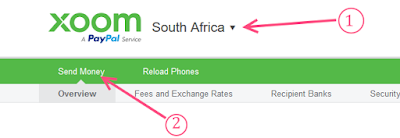
2.Click Send Money. This again will prompt you to choose the country where you want to send money to. This is also the country where the receiver's bank is located.
The amount the receiver will get will be displayed, it is calculated using exchange rates used by the platform.
3. Confirm you want to send the amount
4. Select How you want to Pay >> there are various options for you here and this is where you'll find XOOM PAYPAL TRANSFER FEES (at the time this post was published)
5. Recipient information
Enter the receiver's bank account details and go to next stage where you'll pay and send the money.
6. Review: Xoom will take a moment to review the details your prov and approve the transaction.
There you go! Money sent.
Xoom Transfer Exchange Rates - The rate varies for each country according to their local currencies, and it might be lower than you expect but overall the rate is almost very good, I guess this is also where the platform makes its money from)
With PayPal's Xoom you can request money, mobile reloads/recharge your mobile from any where, and perform bill payments from friends and family in the U.S.
In time Xoom will be more used and welcomed by those living in and outside diaspora,
Here's more of all what you need to know about Xoom Nigeria
HOW XOOM WORKS
Xoom is here to bridge every gap, this means you'd be able to receive, send and withdraw money through this PayPal's service known as Xoom.
Easy and affordable, Instant Bank Deposit and Secure. Plus, Xoom offers a money-back guarantee for your peace of mind
HOW TO SEND & RECEIVE MONEY FROM USA WITH XOOM BY PAYPAL
It's quite simple to send money or receive money in Nigeria via Xoom.
Login or Sign up for Xoom account here >> You also can choose to Login with your PayPal account, this will merge your PayPal with your Xoom account. Follow the steps below after you're logged in.
1. Select the country you want to send money to e.g Nigeria, Namibia, South Africa, or any other countries that cannot receive payments via PayPal.
2.Click Send Money. This again will prompt you to choose the country where you want to send money to. This is also the country where the receiver's bank is located.
The amount the receiver will get will be displayed, it is calculated using exchange rates used by the platform.
3. Confirm you want to send the amount
4. Select How you want to Pay >> there are various options for you here and this is where you'll find XOOM PAYPAL TRANSFER FEES (at the time this post was published)
- Bank Account (Transaction fee: 4.99 USD)
- Credit Card (Transaction fee: 9.99 USD)
- Debit Card (Transaction fee: 9.99 USD)
5. Recipient information
Enter the receiver's bank account details and go to next stage where you'll pay and send the money.
Here is a list of Banks Supported by PayPal Xoom
Access Bank plc
Diamond Bank
Ecobank Nigeria
Enterprise Bank
Fidelity Bank
FIRSTBANK
First City Monument Bank Ltd
Guaranty Trust Bank PLC
Heritage Bank
Keystone Bank
Skye Bank Plc
Stanbic Bank
Sterling Bank
Union Bank
United Bank for Africa Plc
Unity Bank PLC
WEMA
6. Review: Xoom will take a moment to review the details your prov and approve the transaction.
There you go! Money sent.
Xoom Transfer Exchange Rates - The rate varies for each country according to their local currencies, and it might be lower than you expect but overall the rate is almost very good, I guess this is also where the platform makes its money from)
Wednesday
How to be Eligible for Sending & Receving Payoneer funds
This article guide will show you all you need to know about how you can easily activate Payoneer payment services and become eligible to send funds or make local and international payments and also receive funds with your Payoneer accounts.
What is Payoneer?
For those who may not know it yet, we once discussed it here with how to earn $25 bonus with new Payoneer.
Payoneer is one of the best PayPal alternative today, it's used to Send and Receive mass payments with/from or for individuals, small and big companies.
They also provide debit cards to use anywhere in the world for online payments and for your ATM cash withdrawals (anywhere that supports MasterCard). The Payoneer Debit MasterCard service is awesome.
Now, back to activating and eligibility for Payoneer payment services for your account.
There are two possibilities – you either need to gain eligibility or there is a limitation for your particular account. Let’s look at both scenarios:
Eligibility
This means payments
What is Payoneer?
For those who may not know it yet, we once discussed it here with how to earn $25 bonus with new Payoneer.
Payoneer is one of the best PayPal alternative today, it's used to Send and Receive mass payments with/from or for individuals, small and big companies.
- Whether you are a blogger, business owner, professional or freelancer, Payoneer offers you multiple ways to get paid by your international clients and global marketplaces – quickly, securely and at low cost. Register for your own Payoneer account here
They also provide debit cards to use anywhere in the world for online payments and for your ATM cash withdrawals (anywhere that supports MasterCard). The Payoneer Debit MasterCard service is awesome.
How Do I Sign Up For Payoneer Account?
You can go here now and sign up for your Payoneer account!Now, back to activating and eligibility for Payoneer payment services for your account.
Activating your Payoneer to Send and Receive Funds
Everyone can Sign up to use Payoneer and recieve money but NOT all accounts are allowed to perform some core Payoneer payment services (especially sending money/funds) like sending payments.If Payoneer payment service is not open for me, What to do?
We'll explain below and how you can successfully activate your account to send and receive funds in any currency of your choice.There are two possibilities – you either need to gain eligibility or there is a limitation for your particular account. Let’s look at both scenarios:
Eligibility
- Many Payoneer users receive payments in several currencies (USD, EUR, GBP, JPY, etc.). Your account may only be open to make payments from one of these currencies. If you have at least one card or currency balance eligible to make a payment, you will see Pay in the top menu.
- To be eligible for Make a Payment, you must be receiving payments from Payoneer partners or directly from clients (other individual and companies using Payoneer) into your Payoneer account.
- Have you filled out the questionnaire and provided a copy of your photo ID? Sometimes we need just a bit more information about you before we can open the service, so if you haven’t already, be sure to provide this information.
- This service may be limited based on partner, country, or industry. For more information, please contact Payoneer Customer Care.
This means payments